web
You’re offline. This is a read only version of the page.
close
Skip to main content

Announcements

No record found.

News and Announcements icon
Community site session details

Community site session details

Session Id :
Microsoft Dynamics AX (Archived)

lookup value is updating in table

(0) ShareShare
ReportReport
Posted on by 219

Hi all , 

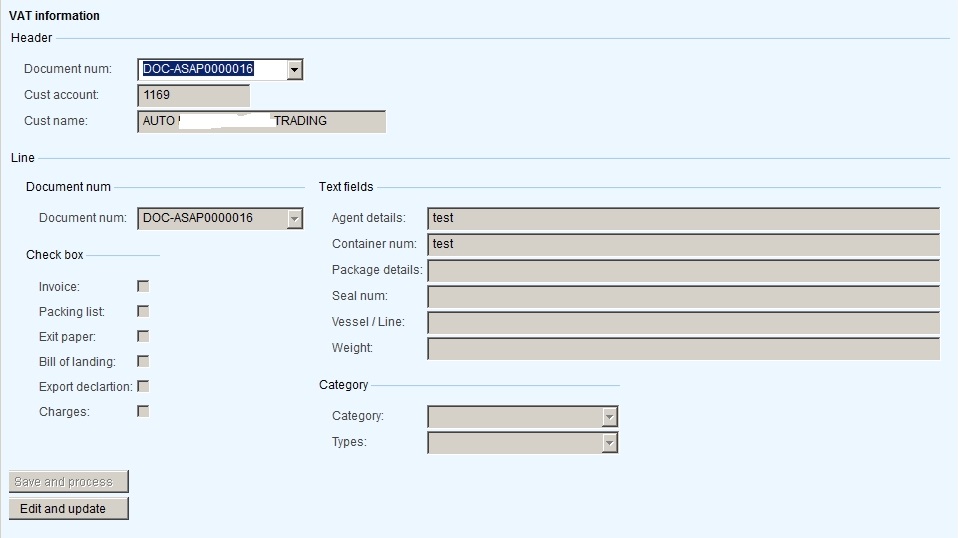
Using two tables in form datasource HeaderTable and LineTable  - *DOCUMENT NUM* is common in both table and in design i m using groups 

first group i added document num , cust account and custname 

second group added all the line table fields 

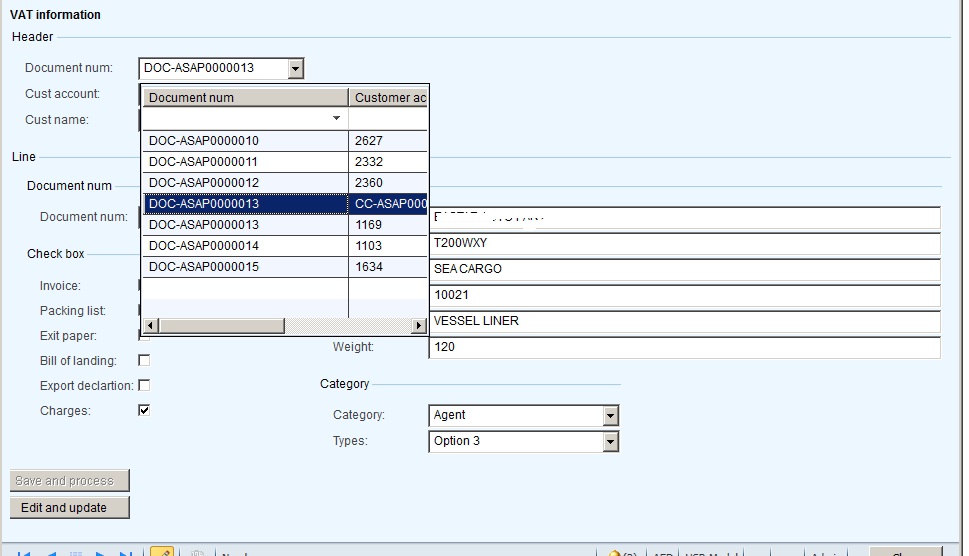
in lookup filtering the document number means related document number against line table values will show in line table fields . 

here i m facing the problem . once i enter the values in line table and moving to next document number it was updating previous document number to the current one which i selected .. 

7181.form.jpg          

desing which i created above

figure 2 is showing the lookup values total 6 entries .. currently i m in DOC-ASAP000016 then next image i  m moving to DOC-ASAP000013 

7774.form1.jpg  7750.16.jpg

After moving to next document number it was updating in the place of DOC-ASAP00016 to DOC-ASAP00013 .. 

  8726.13.jpg  15555.jpg

how to solve this issue .. any one suggest me the solution for this ....

*This post is locked for comments

I have the same question (0)
  • Suggested answer
    nmaenpaa Profile Picture
    101,172 Moderator on at

    First of all, it looks like you always have 1 line per header. At least your form doesn't support multiple lines per header. So why do you have separate tables for "header" and "lines"? Usually this kind of design is used only if you have 1:n relationship and therefore one table is not sufficient to handle the data.

    Maybe your problem will go away if you use a more suitable data model.

    Of course there is no technical limitation for not using 2 tables like you are using, but it just adds complexity.

    If you want to continue with your current data model, please share some details:

    1) What settings did you use for the relation between the tables?

    2) What settings did you use for the relation between the form data sources?

  • kavinDevarajan Profile Picture
    219 on at

    1) What settings did you use for the relation between the tables?

    in line table given relation with header table field name - document number ( normal relation )

    ds1.jpg    

    2) What settings did you use for the relation between the form data sources?

    form datasource mention delayed and joint source headertable

    ds1.jpg   ds2.jpg

    actually my process is i have one dialog class from there i generate the document number with custname , cust account and sales id . here i m inserting in both header and line table .. 

    then i m using 5 checkbox fields , 5 text box fields for user to enter the values in text box and select the check box then they wil click save button there i m controlling the document number is in clicked save then i frezzing it for non editable .. 

    in form bringing the lookup id for document number then select the document number to enter the values here i m facing issue 

  • Verified answer
    nmaenpaa Profile Picture
    101,172 Moderator on at

    Actually the relations are not the issue here, most likely it's the lookup field.

    Your lookup field should not be directly associated with any field in your data source. Otherwise anything you select in the field will update the current active data source record.

    Instead create a dummy field for the lookup, and create a lookup method in your table to populate it. If you look at the standard system, lookups are never implemented in the way that you did it.

    When user has selected something from the lookup, the modified method of the control is triggered. You need to add code there to search for the record that corresponds to the selected value.

    [View:https://docs.microsoft.com/en-us/dynamicsax-2012/developer/how-to-add-a-lookup-form-to-a-control]

  • Verified answer
    kavinDevarajan Profile Picture
    219 on at

    Thanks Nikolaos ,, As u said i created one dummy field for lookup and written modified method in the lookup field . now its working fine ..

    2626.form.jpg

    4857.form1.jpg

Under review

Thank you for your reply! To ensure a great experience for everyone, your content is awaiting approval by our Community Managers. Please check back later.

Helpful resources

Quick Links

Introducing the 2026 Season 1 community Super Users

Congratulations to our 2026 Super Stars!

Meet the Microsoft Dynamics 365 Contact Center Champions

We are thrilled to have these Champions in our Community!

Congratulations to the April Top 10 Community Leaders

These are the community rock stars!

Leaderboard > 🔒一 Microsoft Dynamics AX (Archived)

#1
CP04-islander Profile Picture

CP04-islander 39

#2
Michel ROY Profile Picture

Michel ROY 14

#3
imran ul haq Profile Picture

imran ul haq 8

Last 30 days Overall leaderboard

Featured topics

Product updates

Dynamics 365 release plans