web
You’re offline. This is a read only version of the page.
close
Skip to main content

Notifications

Announcements

No record found.

Community site session details

Community site session details

Session Id :
Microsoft Dynamics CRM (Archived)

Portal - Entity List workflow not executing if confirmation set to yes.

(0) ShareShare
ReportReport
Posted on by

If I have "Confirmation Required?" set to YES in the Entity List the workflow will not trigger when selected from the drop down menu.  It triggers the workflow fine if this is set to NO.  I have even re-created the entity list and page to be sure it wasn't something funny with the page.  Can anyone else confirm this behavior?
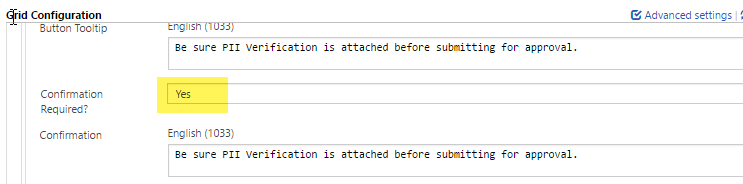
2084.ELWorkflowConfirm.png

*This post is locked for comments

I have the same question (0)
  • Suggested answer
    Abbas Khan Profile Picture
    255 on at

    You might be missing something else. Setting Confirmation required to Yes/No does not affect it.

    I have also tested same scenario to be sure and workflow triggers in both cases.

  • Inogic Profile Picture
    703 on at

    The Confirmation Required setting has nothing to do with the workflow to trigger. It just ask the confirmation regarding the workflow to be proceeded.

    We tested it at our end and workflow was triggered. You may check for the privileges and the scope of Workflow though.

    Thanks!

  • Community Member Profile Picture
    on at

    As I already stated the workflow runs fine if the confirmation is no.  So it can't be scope or permissions.  So it appears to be Gremlins.  :-)

  • Suggested answer
    Nadeeja Bomiriya Profile Picture
    6,804 on at

    Hi ilgy,

    You can get rid of some Gremlins with a restart :).  Give it a go if you haven't done already.

    dyn365apps.com/.../dynamics-365-portal-issues-try-restarting-the-portal

  • Community Member Profile Picture
    on at

    I have tried that.  It's hitting the JavaScript when I click the workflow link but with the minification I can't really tell what it's doing.  It's definitely an issue with the JavaScript. The worst part is it works fine in my on-premise version of the portal.(which of course is not the same version...THANKS Microsoft)  ;-)

  • Community Member Profile Picture
    on at

    i have the same problem, was this answered ?

Under review

Thank you for your reply! To ensure a great experience for everyone, your content is awaiting approval by our Community Managers. Please check back later.

Helpful resources

Quick Links

Responsible AI policies

As AI tools become more common, we’re introducing a Responsible AI Use…

Neeraj Kumar – Community Spotlight

We are honored to recognize Neeraj Kumar as our Community Spotlight honoree for…

Leaderboard > 🔒一 Microsoft Dynamics CRM (Archived)

#1
SA-08121319-0 Profile Picture

SA-08121319-0 4

#1
Calum MacFarlane Profile Picture

Calum MacFarlane 4

#3
Alex Fun Wei Jie Profile Picture

Alex Fun Wei Jie 2

Last 30 days Overall leaderboard

Featured topics

Product updates

Dynamics 365 release plans



