web
You’re offline. This is a read only version of the page.
close
Skip to main content

Notifications

Announcements

No record found.

Community site session details

Community site session details

Session Id :
Microsoft Dynamics AX (Archived)

AP invoice journal posting: you must select a value in the business unit field in combination with the following dimension units that are valid

(0) ShareShare
ReportReport
Posted on by

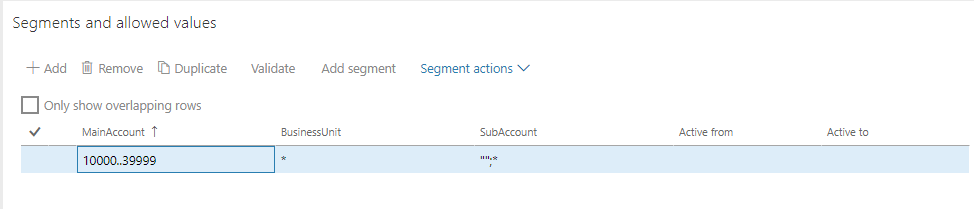
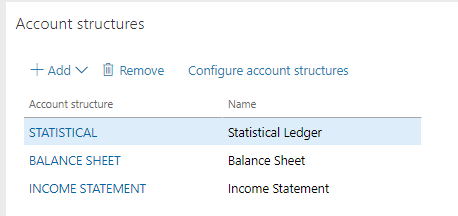
Yes, I keep reading about this being an account structures issue.  I've checked account structures 10 times and there is nothing wrong that I can see.

Here it is for reference:

  1. AP invoice journal - received the error below.
    1. Seems to indicate validation, but I don’t have any account / dimension validation
    2. Originally used Advanced rules, but have deleted all advanced rules and references to advanced rules
    3. Deleted and recreated / validated account structures just to be sure
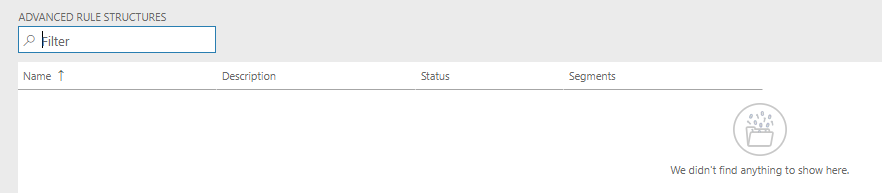
Advanced-Rules.PNGbalance-sheet.PNGIncome-Statement.PNG8686.Ledger.PNG

  1. Checked vendor group
  2. Checked AP vendor posting profile
  3. Checked PO / SO / Inventory posting profiles
  4. Created a Ledger journal to post to account 21010 with no errors
  5. Created a Ledger journal to post to Vendor and offset expense (mimicked AP) and received the same error (below)
  6. Was able to post a vendor invoice from a purchase order receipt with no posting error – same account and dimensions as invoice journal
  7. Was able to create a vendor invoice against a purchase order receipt with no posting error – same account and dimensions as invoice journal
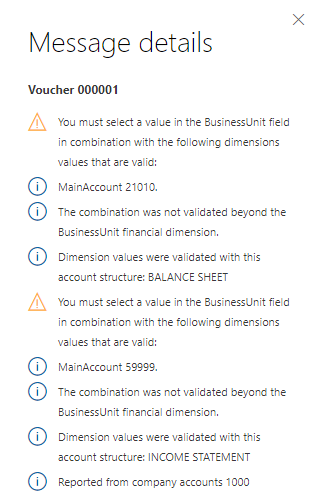
2845.Error.png

 I've searched all over and everything points to account structure.  How do I check the database to be sure all advanced rule structures are gone?

Katherine

*This post is locked for comments

I have the same question (0)
  • Suggested answer
    Ludwig Reinhard Profile Picture
    Microsoft Employee on at

    Hi,

    After making changes to your account structures I would recommend that you delete your journal and lines and create it again.

    Does this overcome the issue?

    Best regards

    Ludwig

  • Verified answer
    Community Member Profile Picture
    on at

    Well I found the issue, which is not directly related to account structures.  The issue is, that on the vendor record there was no default business unit dimension specified.  Therefore, on the accounts payable side (21010) of the transaction the business unit was missing, even though required by the account structure.

    The resolution was to update the vendor record to address the issue going forward, and for the existing invoice journal to click on the Financial dimensions drop down in the Lines and populate the business unit.  

    Now the journals are posting without error.

    My colleague, Gary, provided some additional troubleshooting in case this might help someone else with the same issue.  The first two items were set up correctly, and did not cause the error, it was the third one, below that helped me.

    1. Are you requiring a BU dimension on all GL accounts? If you are that is fine, but I generally segregate the AP and AR control accounts from having any dimensions since the offset captures the dimension on the expense or revenue account. So you might look at isolating those accounts from any dimension restrictions.

    2. Do your transactions involve any rounding? If so, make sure that your “Accounts for automatic transactions” accounts are populated, particularly for the error account. That will sometimes mess with the acct structures.

    3. Also, double check your dimensions by looking at the lines in the journal by clicking on the financial dimensions dropdown.

  • Ludwig Reinhard Profile Picture
    Microsoft Employee on at

    Hi Katherine,

    Many thanks for sharing this information and updating us.

    I just want to know why you need a business unit recorded with a balance sheet account? The vendor summary account?

    Best regards,

    Ludwig

Under review

Thank you for your reply! To ensure a great experience for everyone, your content is awaiting approval by our Community Managers. Please check back later.

Helpful resources

Quick Links

Responsible AI policies

As AI tools become more common, we’re introducing a Responsible AI Use…

Neeraj Kumar – Community Spotlight

We are honored to recognize Neeraj Kumar as our Community Spotlight honoree for…

Leaderboard > 🔒一 Microsoft Dynamics AX (Archived)

#1
Martin Dráb Profile Picture

Martin Dráb 4 Most Valuable Professional

#1
Priya_K Profile Picture

Priya_K 4

#3
MyDynamicsNAV Profile Picture

MyDynamicsNAV 2

Last 30 days Overall leaderboard

Featured topics

Product updates

Dynamics 365 release plans