web
You’re offline. This is a read only version of the page.
close
Skip to main content

Notifications

Announcements

No record found.

Community site session details

Community site session details

Session Id :
Supply chain | Supply Chain Management, Commerce
Suggested Answer

Production order Scheduling jobs in the past

(0) ShareShare
ReportReport
Posted on by 63

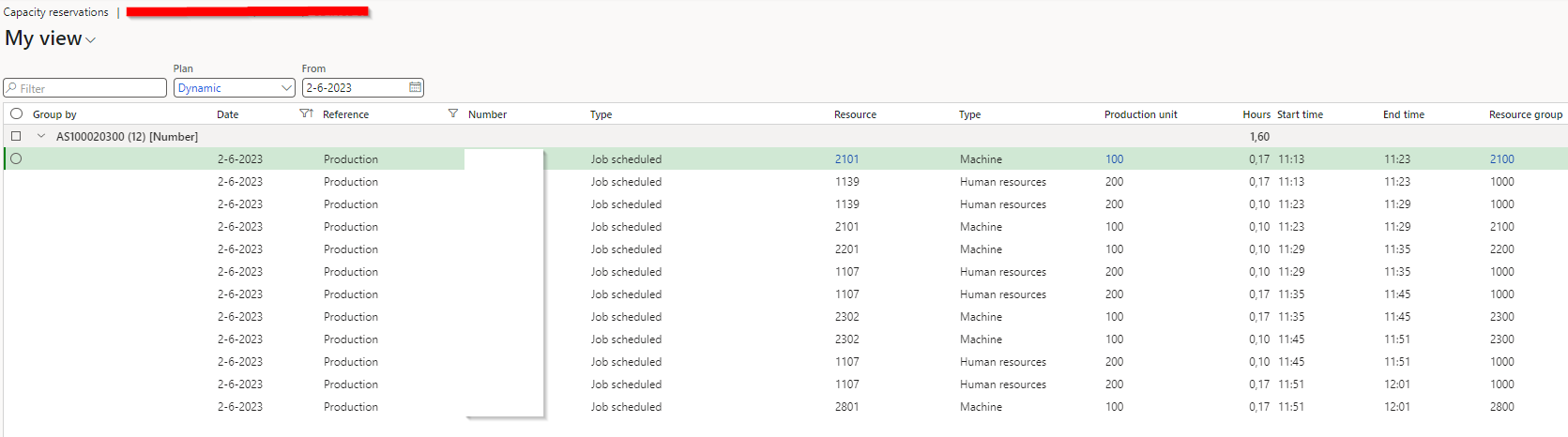
We are facing an issue with our job scheduling in D365FO. Our system is scheduling jobs (for production orders) backwards from delivery date.

Problem occurs when we schedule a production order during the day (02-06-2023 15.00 pm in this example) with delivery date on the same day. Looking at the reservations, jobs are scheduled the same day before 15.00 pm (see printscreen attached), which is of course not possible.

Could anybody point me how to solve this issue. We would like D365 to schedule jobs only after the current time (time of scheduling).

Thanks in advance!
I have the same question (0)
  • André Arnaud de Calavon Profile Picture
    301,158 Super User 2025 Season 2 on at

    Hi Nick,

    In this case, the delivery date probably can't be met, and I would replan using a forwards scheduling principle.

  • NickLaenen Profile Picture
    63 on at

    Thansk for the answer. I totally agree, if D365 is not able to schedule the order on time based on backward scheduling, it will automatically schedule order based on forward. Which means the order will be scheduled after the requested delivery date. But in my case the system does schedule (based on backward scheduling) the order in the past (see my original post). Jobs are scheduled on times which has already past.

    In our case both manual scheduling and batch job scheduling has this problem. We re-schedule all job in the evening (10 pm), but job are scheduled that day in the afternoon (15 pm), which is not possible of course.

  • Suggested answer
    Drew Lencsak Profile Picture
    411 on at

    Hi Nick, can you check this setting under Master planning parameters and if not set, change to "Current time" and then rerun your scheduling and test?:

  • NickLaenen Profile Picture
    63 on at

    Hi Andrew,

    Thank you for pointing me in this direction, unfortunately setting was already set on Current Time.... so it doesn't solve our issue.

Under review

Thank you for your reply! To ensure a great experience for everyone, your content is awaiting approval by our Community Managers. Please check back later.

Helpful resources

Quick Links

Responsible AI policies

As AI tools become more common, we’re introducing a Responsible AI Use…

Neeraj Kumar – Community Spotlight

We are honored to recognize Neeraj Kumar as our Community Spotlight honoree for…

Leaderboard > Supply chain | Supply Chain Management, Commerce

#1
Laurens vd Tang Profile Picture

Laurens vd Tang 303 Super User 2025 Season 2

#2
André Arnaud de Calavon Profile Picture

André Arnaud de Cal... 122 Super User 2025 Season 2

#3
Siv Sagar Profile Picture

Siv Sagar 105 Super User 2025 Season 2

Last 30 days Overall leaderboard

Product updates

Dynamics 365 release plans
