web
You’re offline. This is a read only version of the page.
close
Skip to main content

Notifications

Announcements

No record found.

Community site session details

Community site session details

Session Id :
Microsoft Dynamics CRM (Archived)

Update default country field based on Option Set value

(0) ShareShare
ReportReport
Posted on by

Hi, 

With data consistency in mind, I would like to automatically update the value of the country field (in Account Addresses) update automatically once the value of another field (which is a custom option-set) changes.

A simple figure below about what I am trying to achieve. 
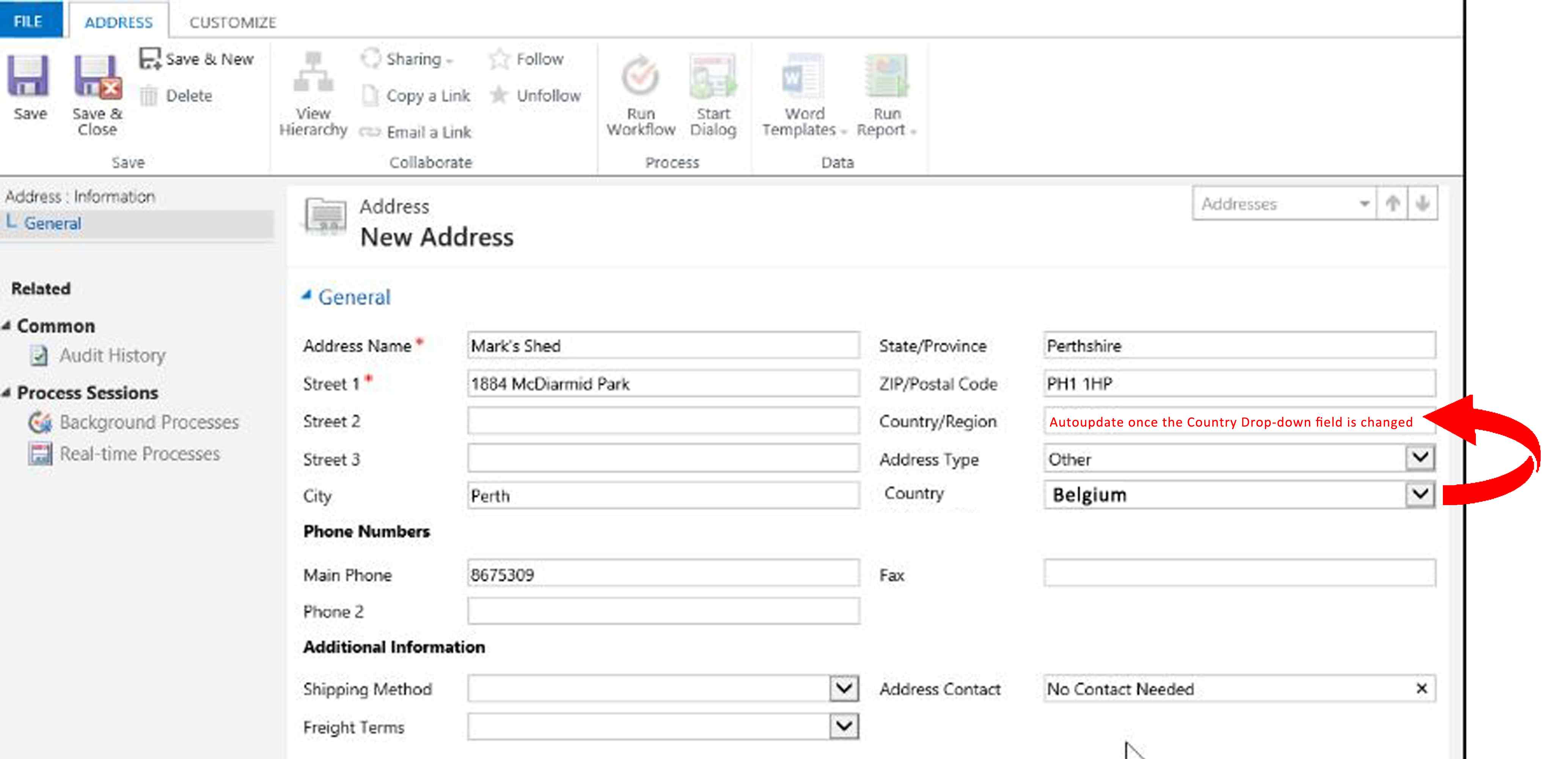
2570.Untitled_2D00_2.jpg

What are the possible ways to achieve this?

I wonder why the country field is not dynamic in Dynamics already...

*This post is locked for comments

I have the same question (0)
  • Verified answer
    ram r Profile Picture
    on at

    If you want it to be realtime you can do a JavaScript and if you are fine with after save then you can go for a plugin or a workflow.

    community.dynamics.com/.../know-how-d365-crm-javascript-optionset-related-methods-get-set-add-remove-retrieve-all-remove-all

  • Suggested answer
    Adrian Begovich Profile Picture
    1,027 Moderator on at

    Hi Sologo,

    JavaScript is definitely the best way to solve this problem. The general approach to building the JavaScript is as follows.

    1.    Create a JavaScript file and make it run On Change of the "Country" field.
    2.    Set the "Country/region" field based on the value of the "Country" field.
  • Verified answer
    Inogic Profile Picture
    703 on at

    To achieve the same you can use either JavaScript or plugin/Workflow based on your use case.

    If you want to populate the country at client side you can go with JavaScript and if you want to populate the country at server side then you can go with Workflow/Plugin.

    If you are using JavaScript

    Fetch and set value using “Xrm.Page.getAttribute(attribute).getText()”

    function onchangeCountry () {

    let obj = Xrm.Page.getAttribute("country ");

        If (obj != null) {

            //Get OptionSet Value

      Let countryLabel= obj.getText() ;

    Xrm.Page.getAttribute("Country/Region ").setValue(countryLabel);

        }

    }


    If this answered your question, please make sure to Mark this as an Answer.

    Thanks!

  • Suggested answer
    gdas Profile Picture
    50,091 Moderator on at

    Hi Solago,

    In addition I would suggest to implement business rules for this.

  • Verified answer
    Nithya Gopinath Profile Picture
    17,078 on at

    Hi Solago,

    You can register the JS function below on change of the custom-optionset in Form Properties in Form Editor.

    function onChangeCustomOption(){
     var customOptionSet = Xrm.Page.getAttribute("customOptionSetLogicalName");
     if(customOptionSet != null){
       var customOptionText = customOptionSet.getText();
       Xrm.Page.getAttribute("countryLogicalName").setValue(customOptionText);
     } 
    }

    Hope this helps.

  • Community Member Profile Picture
    on at

    Hi everyone,

    Thanks for the very helpful replies.

    I implemented the js approach mentioned below and auto-update of the "country/region" was successful.

    However, once I click save, the "country/region" is emptied out (nulled) after the page refreshes.

    There should be an additional step to save it as well ?

    Thank you

  • Community Member Profile Picture
    on at

    OK, the reason was that the default country field was read-only (which is what I want).

    Is it possible to save the new value in the field even if the field is read-only?  

  • Suggested answer
    gdas Profile Picture
    50,091 Moderator on at

    Hi Solago,

    Yes you can save the read-only field. Make sure you set setSubmitMode = always in the onload of the form.

    Xrm.Page.getAttribute("CountryFieldName").setSubmitMode("always")

Under review

Thank you for your reply! To ensure a great experience for everyone, your content is awaiting approval by our Community Managers. Please check back later.

Helpful resources

Quick Links

Responsible AI policies

As AI tools become more common, we’re introducing a Responsible AI Use…

Neeraj Kumar – Community Spotlight

We are honored to recognize Neeraj Kumar as our Community Spotlight honoree for…

Leaderboard > 🔒一 Microsoft Dynamics CRM (Archived)

#1
SA-08121319-0 Profile Picture

SA-08121319-0 4

#1
Calum MacFarlane Profile Picture

Calum MacFarlane 4

#3
Alex Fun Wei Jie Profile Picture

Alex Fun Wei Jie 2

Last 30 days Overall leaderboard

Featured topics

Product updates

Dynamics 365 release plans
