web
You’re offline. This is a read only version of the page.
close
Skip to main content

Announcements

News and Announcements icon
Community site session details

Community site session details

Session Id :
Small and medium business | Business Central, N...
Answered

See the list of all customers and the special prices that they have and export it to excel.

(0) ShareShare
ReportReport
Posted on by 85

Hi all ,

Is that possible to see the list of all customers and they special prices on bussines central?

Then i want to export it on excel.

I have the same question (0)
  • Suggested answer
    Bilal Haider Profile Picture
    485 on at

    Hi,

    Have not you tried the Price List report (You have already asked about this). Using that you will get special prices for all customers and you can use excel as output and can transfer to it.

    0456.Price-List.PNG

  • Suggested answer
    Bilal Haider Profile Picture
    485 on at

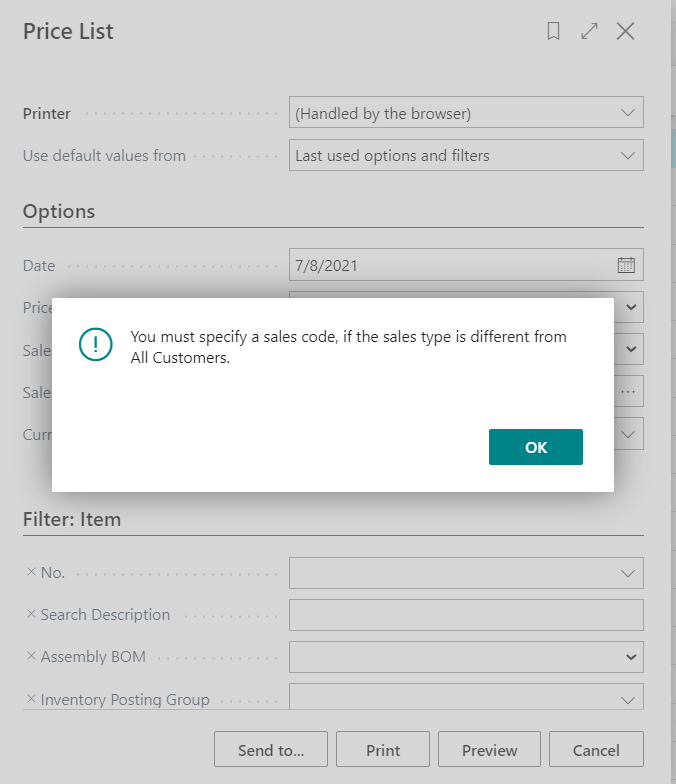
    On the report request page change the Sales Type to All Customers and then you will see for special prices for all of the customers.

    2133.Price-List.PNG

  • Nertila Tila12 Profile Picture
    85 on at

    Hi Bilal,

    Yeah i tried, but when i filter like this, only for sales type customer is shows me this:
    salesprice.PNG

    So to be runed this report needs to select one customer, in fact i want the list of all customer, and special prices. Those special prices are the same for all the products that customers buys,so if i look the name at the debitorcard I'd say the customer and his price group. How can i do that?

  • Suggested answer
    Bilal Haider Profile Picture
    485 on at

    In my previous reply i have shown in image to change the sales type to all customers. The option that is marked in black box.

    7624.Price-List.PNG

  • Nertila Tila12 Profile Picture
    85 on at

    On this report is not shows even the name of Customer, this report has only those fields:

    prices.PNG

    (Sorry for clicking the "Actions" without purpuse)

  • Nertila Tila12 Profile Picture
    85 on at

    I need to know what's the price the customer has. (Customer and the special price)

    for example some pay 23.- for everything and some have special prices of 20.-

  • Suggested answer
    Bilal Haider Profile Picture
    485 on at

    It means your current company has no data in sales price table. Open Sales Price page and see if it has any records.

    Also check if you are using any other filters on report.

  • Suggested answer
    MahGah Profile Picture
    15,613 on at

    Hi

    Maybe try the following method 

    Search for "Customer Price Group" then Navigate and Sales Price 

    Then make sure "Sales Type Filter" set to "None" and "Sales Code Filter" is blank. Then you should be able to see all special prices. Then from Page -> Open in Excel take them to Excel. 

    pastedimage1625750328795v1.png

    pastedimage1625750366073v2.png

Under review

Thank you for your reply! To ensure a great experience for everyone, your content is awaiting approval by our Community Managers. Please check back later.

Helpful resources

Quick Links

Season of Sharing Community Challenge Winners!

Congratulations to our community stars!

Women in Power Builds Momentum

Expanding mentorship, skilling, and AI innovation

Congratulations to the July Top 10 Community Leaders

These are the community rock stars!

Leaderboard > Small and medium business | Business Central, NAV, RMS

#1
OussamaSabbouh Profile Picture

OussamaSabbouh 595 Super User 2026 Season 2

#2
YUN ZHU Profile Picture

YUN ZHU 364 Super User 2026 Season 2

#3
Grigorios Mavrogeorgis Profile Picture

Grigorios Mavrogeorgis 331 Super User 2026 Season 2

Last 30 days Overall leaderboard

Featured topics

Microsoft Training Manuals

Product updates

Dynamics 365 release plans
