web
You’re offline. This is a read only version of the page.
close
Skip to main content

Announcements

No record found.

News and Announcements icon
Community site session details

Community site session details

Session Id :
Microsoft Dynamics AX (Archived)

Grouping on forms- Form customization

(0) ShareShare
ReportReport
Posted on by

Hi all,

I need one small help for doing the customization on below form.
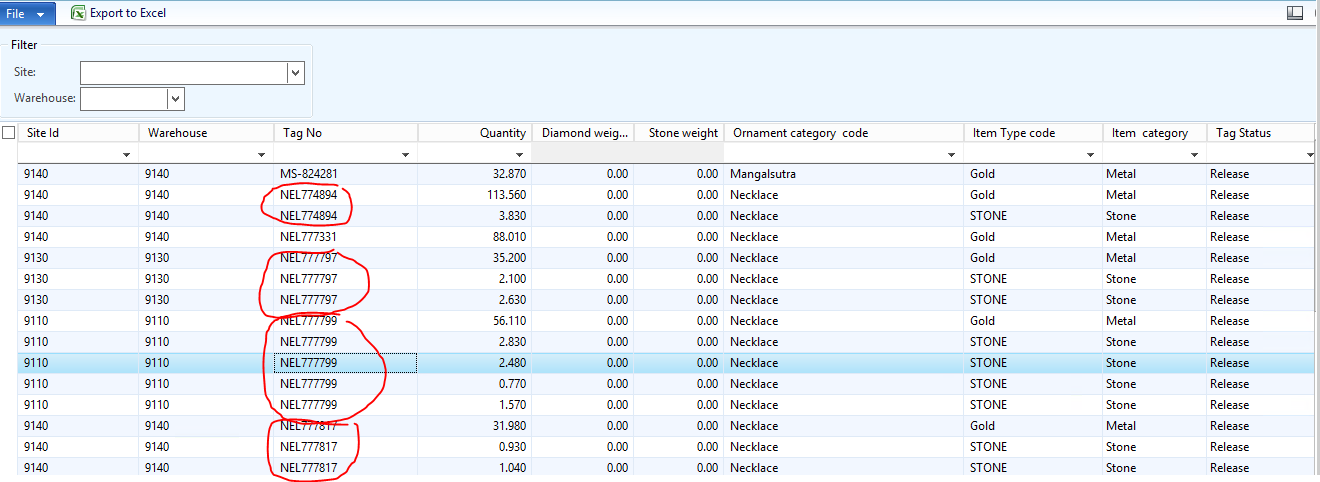
TagDetails.PNG

Requirement: If there is multiple tag no available in the form, then it should come in one line as NEL777797 or NEL777799 and the fourth column is weight column which holds only the gold weight  and the fifth column is stone weight should contain the sum of weights of all stone in one row. basically , instead of three rows i want one row for each tag.

I have used the view as a datasource for this form and apply grouping based on Tag no field.

Can i achieve this requirement on form level coding?

Edit:

Datasource: TagDetailView

Quantity: drag the field form TagdetailView datasource

Diamond weight: RealEdit Field

Stone Weigth : RealEdit field

Regards,

Pankaj Kumar

*This post is locked for comments

I have the same question (0)
  • Chaitanya Golla Profile Picture
    17,225 on at

    Hi,

    As you mentioned that you used a view as the form datasource, then I think by applying groupby on Tagno field and aggregate functions sum on columns weight and gold weight fields(on underlying query) this could be achieved.  Is there any reason you want to use form coding again.

  • Community Member Profile Picture
    on at

    Hi Chaityana,

    As there is multiple category of the tag as Stone and Diamond as well. and i have only one field as Weight(Fourth column) in the Query, I have taken two field of realEdit on GRID as Diamond weight(Fifth column) and stone weight(sixth column) i want the Sum of Stone weight should show in Stone weight column and Sum of diamond weight in Diamond weight column.

    Regards,

    Pankaj Kumar

  • Suggested answer
    Martin Dráb Profile Picture
    239,632 Most Valuable Professional on at

    Yes, it's possible. Both views and forms are based on queries, therefore the approach is the same for both - you have to add grouping and aggregation to the query.

    If you have an existing form, change the query in code (QueryBuildDataSource.addGroupByField() is one method you'll need).

    Don't forget to verify that the form can work correctly with aggregated data instead of actual table records.

  • Community Member Profile Picture
    on at

    Hi Martin,

    5th and 6th weight column , i have taken on grid, it doesn't exist in the view's field, only One weight field exists is holding the weight of all types whether it is Gold, stone or diamond, so if i do the grouping based on tag no and do the sum of field it is not giving me as expected result

    Regards,

    Pankaj Kumar

  • Martin Dráb Profile Picture
    239,632 Most Valuable Professional on at

    Ah, sorry, I thought your question was whether you can use grouping in forms.

    With grouping and aggregation alone, you can summarize weight grouped either by tag only, or by tag and type (I don't know the field name, as it's not shown in your screenshot). What you want can't be achieved by this approach.

    In general, you can't queries to create new calculated fields. That's possible only with display methods and computed columns. I think a view with computed columns would be the right approach in the case.

  • Community Member Profile Picture
    on at

    I have added more information in this post, can you please suggest me in details how i can achieve this.

    Regards,

    Pankaj Kumar

  • Martin Dráb Profile Picture
    239,632 Most Valuable Professional on at

    I assume that Diamond weight and Stone weight fields are an unsuccessful attempt to calculate them in display methods. I'm going to ignore them.

    What if we simplify the problem to the following? Does it represent your situation?

    Input:

    • Tag (string)
    • Weight (real)
    • ItemType (enum)

    Desired output:

    • Tag
    • Calculated field: sum(Weight) over records with ItemType = Gold (for the given tag)
    • Calculated field: sum(Weight) over records with ItemType = Stone (for the given tag)
  • Community Member Profile Picture
    on at

    Yes, thanks for getting the exact scenario..but here i am facing the challenge to show the one tag no in grid, and at the same time calculating the Stone weight and Diamond weight representing in other column as well.  as you have noticed weight is representing by one Quantity field.

    if i am modifying the query in this way, i am not getting the satisfactory result.
    TagHeader.PNG

    So that's why i am thinking for customize the code on the form level, if you think that can be solved using computed column of view, then please suggest any reference as instance to achieve the same.

    Regards,

    Pankaj Kumar

  • Martin Dráb Profile Picture
    239,632 Most Valuable Professional on at

    I said that you can't achieve this with just grouping and aggregation methods. I would group the data by Tag only and use subqueries to calculate the weight of gold and stone. The blog post AX2012: Subqueries in views should give you some idea how to do it.

    Ideally first write the SQL code you want to get and only then start designing your computed columns. Later you can compare whether the generated SQL code is the same as what you wanted.

  • Community Member Profile Picture
    on at

    Hi Martin,

    I have achieved it using Computed column of view, but the new scenario is that i want stone weight in one row for the same tag.

    2086.TagNo.PNG

    Currently it is showing 0.00 but i want 4.73 must be filled and duplicate tag should not be visible in the form.

    Please suggest me how to achieve that .

    Regards,

    Pankaj Kumar

Under review

Thank you for your reply! To ensure a great experience for everyone, your content is awaiting approval by our Community Managers. Please check back later.

Helpful resources

Quick Links

Introducing the 2026 Season 1 community Super Users

Congratulations to our 2026 Super Stars!

Meet the Microsoft Dynamics 365 Contact Center Champions

We are thrilled to have these Champions in our Community!

Congratulations to the April Top 10 Community Leaders

These are the community rock stars!

Leaderboard > 🔒一 Microsoft Dynamics AX (Archived)

#1
CP04-islander Profile Picture

CP04-islander 24

#2
Michel ROY Profile Picture

Michel ROY 14

#3
Jagadabi Profile Picture

Jagadabi 6

Last 30 days Overall leaderboard

Featured topics

Product updates

Dynamics 365 release plans
