All - We'retrying to activate a PO workflow on GP2010. This is the error received in the event viewer.
The description for Event ID 0 from source Microsoft.Dynamics.Workflow cannot be found. Either the component that raises this event is not installed on your local computer or the installation is corrupted. You can install or repair the component on the local computer.
If the event originated on another computer, the display information had to be saved with the event.
The following information was included with the event:
Action:
DynamicsApproval
Current User LogOnName:
APEX\donnette.spencer
Input parameters:
Unable to serialize the input parameters.
Exception type:
System.Exception
Exception message:
100,000.00 is not a valid value for Decimal.
Stack Trace:
at System.ComponentModel.BaseNumberConverter.ConvertFrom(ITypeDescriptorContext context, CultureInfo culture, Object value)
at System.ComponentModel.TypeConverter.ConvertFromInvariantString(String text)
at Microsoft.Dynamics.Workflow.ExpressionConverter.CreateCodePrimitive(Type primitiveType, String stringValue)
at Microsoft.Dynamics.Workflow.ExpressionConverter.CreateBinaryExpression(CodeExpression targetRef, String propName, List`1 editorValues, Object target, CodeBinaryOperatorType operatorType)
at Microsoft.Dynamics.Workflow.ExpressionConverter.CreateExpression(CodeExpression targetRef, String propName, List`1 editorValues, Object target, String op)
at Microsoft.Dynamics.Workflow.ExpressionConverter.CreateSimpleExpression(String propertyName, String op, List`1 editorValues, CodeExpression targetRef, Object target)
at Microsoft.Dynamics.Workflow.ExpressionConverter.CreateSimpleExpression(String propertyName, String op, List`1 editorValues, CodeExpression targetRef, Object target)
at Microsoft.Dynamics.Workflow.ExpressionConverter.CreateSimpleExpression(XmlNode simpleNode, StepConditionEvaluationObject target)
at Microsoft.Dynamics.Workflow.ExpressionConverter.CreateCodeExpression(XmlNode xmlNode, StepConditionEvaluationObject target)
at Microsoft.Dynamics.Workflow.ExpressionConverter.CreateCodeExpression(XmlNode xmlNode, StepConditionEvaluationObject target)
at Microsoft.Dynamics.Workflow.ExpressionConverter.CreateCodeExpression(XmlNode xmlNode, StepConditionEvaluationObject target)
at Microsoft.Dynamics.Workflow.ExpressionConverter.CreateCodeExpression(String fromExpression, StepConditionEvaluationObject target)
at Microsoft.Dynamics.Workflow.ExpressionConverter.CreateRuleExpressionCondition(String fromExpression, StepConditionEvaluationObject target)
at Microsoft.Dynamics.Workflow.Schedule.DynamicsApproval.CheckStepCondition(WorkflowStep step)
at Microsoft.Dynamics.Workflow.Schedule.DynamicsApproval.Condition(Object sender, ConditionalEventArgs e)
at System.Workflow.Activities.CodeCondition.Evaluate(Activity ownerActivity, IServiceProvider provider)
at System.Workflow.Activities.IfElseActivity.Execute(ActivityExecutionContext executionContext)
at System.Workflow.ComponentModel.ActivityExecutor`1.Execute(T activity, ActivityExecutionContext executionContext)
at System.Workflow.ComponentModel.CompositeActivityExecutor`1.Execute(T activity, ActivityExecutionContext executionContext)
at System.Workflow.ComponentModel.ActivityExecutor`1.Execute(Activity activity, ActivityExecutionContext executionContext)
at System.Workflow.ComponentModel.ActivityExecutorOperation.Run(IWorkflowCoreRuntime workflowCoreRuntime)
at System.Workflow.Runtime.Scheduler.Run()
Exception type:
System.FormatException
Exception message:
Input string was not in a correct format.
Stack Trace:
at System.Number.StringToNumber(String str, NumberStyles options, NumberBuffer& number, NumberFormatInfo info, Boolean parseDecimal)
at System.Number.ParseDecimal(String value, NumberStyles options, NumberFormatInfo numfmt)
at System.ComponentModel.DecimalConverter.FromString(String value, NumberFormatInfo formatInfo)
at System.ComponentModel.BaseNumberConverter.ConvertFrom(ITypeDescriptorContext context, CultureInfo culture, Object value)
the message resource is present but the message is not found in the string/message table
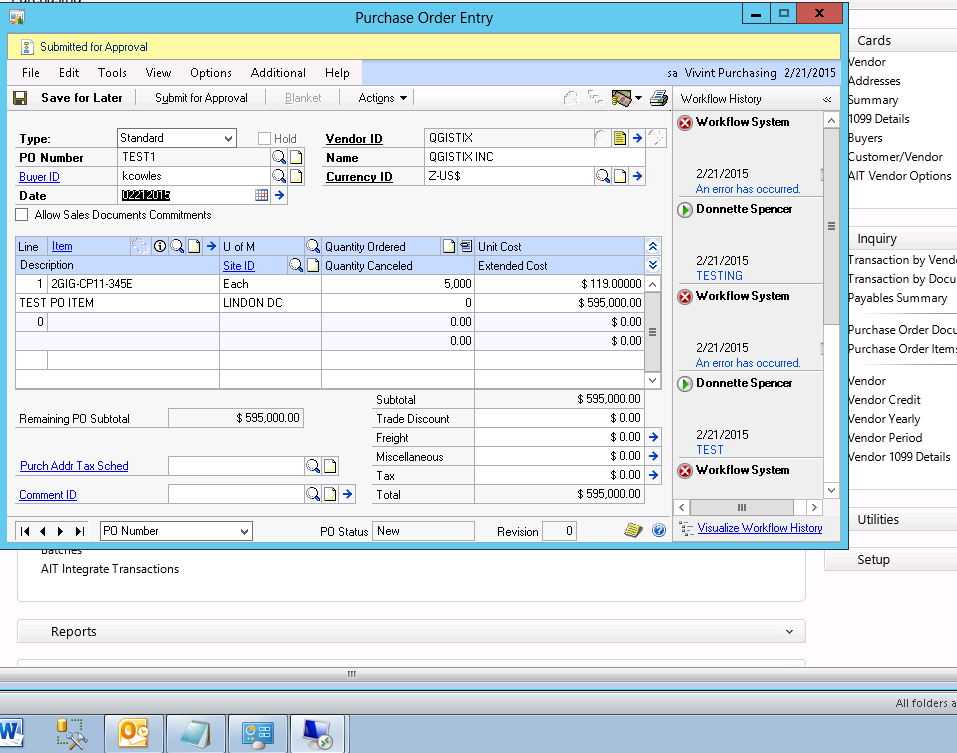
I've re-installed Workflow. Where do I look next?
Thank you,
Donnette


