web
You’re offline. This is a read only version of the page.
close
Skip to main content

Notifications

Announcements

No record found.

Community site session details

Community site session details

Session Id :
Microsoft Dynamics RMS (Archived)

Not found error 201: The cashier was not found or the password is incorrect.

(0) ShareShare
ReportReport
Posted on by

Hi everyone,

Forgive me, I'm new to Microsoft Dynamics RMS. This error appeared when I tried to log in to Store Operation Manager at Store2 after exporting databases, both master and template store database, from Store1 via RMS Headquarters to Store2. Attached herewith is a network configuration of my test environment.
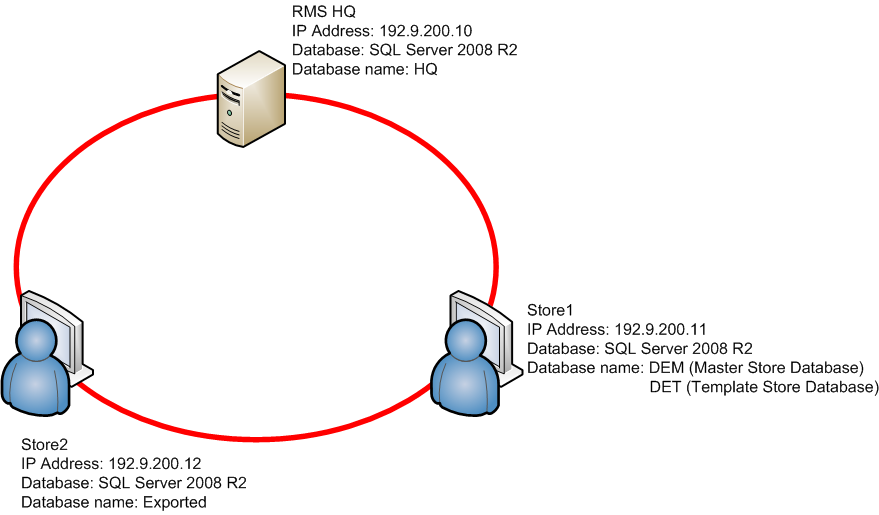
At Store2 Store Operation Administrator, I'm able to Connect to the database named Exported - a copy of DET and exported DEM. But when I try to open Store Operation Manager using the default username and password this error appeared. Also

Followed the step-by-step procedure listed on Headquarters Getting Started book. Please help me resolve this issue.

Thank you,

Koymackoy

*This post is locked for comments

I have the same question (0)
  • Verified answer
    Antonijo Todorovik Profile Picture
    4,025 on at

    Hi Koymackoy. This normally happens 'cos the cashiers password is encripted, when exporting. The easiest way to solve this is to "manually" (by SQL sentences) change the password of the main user and then, once in RMS SO Manager, change the passwords of rest of the cashiers (if any).

    So, these are the steps:

    1º) Make the Database BACKUP (always to this when doing SQL)

    2º) Open RMS SO Admin and connect to the database

    3º) Open a new Query window and print out this next "SELECT * FROM Cashier WHERE Number = XX", where XX is the value of the User ID (in your case is 1, I beleive). Maybe, in some cases, the value XX should be between simple quotes

    4º) Double check if this is the cashier you are looking for and look at the Password column value

    5º) Open another query window and write this next "UPDATE Cashier SET Password = 'ZZZ' WHERE Number = XX', where ZZZ is the password You want to have for this Cashier (could be 'Password' again) and XX is the ID value of the user/cashier, in your case 1.

    6º) the result should be one record affected

    7º) Try opening now RMS SO Manager and use the new password for the user ID XX. It could be that RMS will ask You to re-enter the password again, where you can put another password or you can confirm the password

    8º) Once in RMS SO Manager, you can edit any cahsier's passowrd

    Please have in mind that this have to be done ALWAYS with database backup previously and no other user or aplication using the database or RMS.

    If you have any questions, do not have doubts in contacting me for help...

    Kind regards, A.

  • Verified answer
    Jeff @ Check Point Software Profile Picture
    13,382 on at

    Actually, cashiers nor sales reps travel to other stores, they are considered store only data. Look in Help.

    But there will always be a username = 1 and password = Password created.

    One can always create his own un/pw with the following SQL script;

    INSERT INTO Cashier (Number, StoreID, Name, Password, FloorLimit, ReturnLimit, CashDrawerNumber, SecurityLevel, Privileges) VALUES (yourusername, 0, 'CPT (Do not Remove)', 'yourpassword', 0, 0, 0, 0, 6291455)

    This will give one FULL access to everything in SO, change the yourusername and yourpassword to whatever you wish to use.

  • Verified answer
    Jeff @ Check Point Software Profile Picture
    13,382 on at

    Oops, one more thing to change is the CPT (Do not Remove),  Change that to whatever display name you wish.

  • Community Member Profile Picture
    on at

    Thank you very much..

Under review

Thank you for your reply! To ensure a great experience for everyone, your content is awaiting approval by our Community Managers. Please check back later.

Helpful resources

Quick Links

Responsible AI policies

As AI tools become more common, we’re introducing a Responsible AI Use…

Neeraj Kumar – Community Spotlight

We are honored to recognize Neeraj Kumar as our Community Spotlight honoree for…

Leaderboard > 🔒一 Microsoft Dynamics RMS (Archived)

Last 30 days Overall leaderboard

Featured topics

Product updates

Dynamics 365 release plans



