web
You’re offline. This is a read only version of the page.
close
Skip to main content

Notifications

Announcements

No record found.

Community site session details

Community site session details

Session Id :
Microsoft Dynamics CRM (Archived)

MS CRM 2015 On-premise - SSRS Report Connection Issue

(0) ShareShare
ReportReport
Posted on by 170

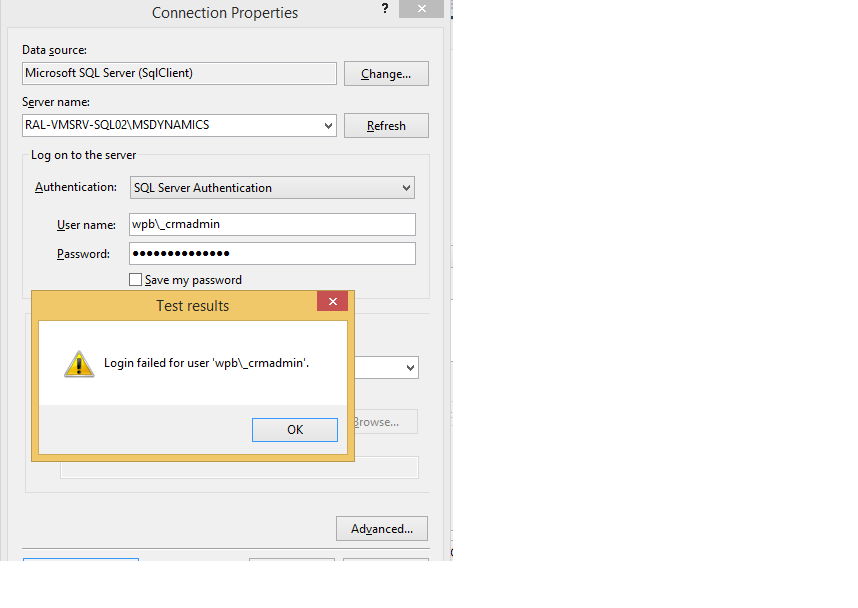
I am writing a SSRS report for CRM 2015 on premise, and trying to create a connection to database.


I could able to connect to CRM SQL server through windows authentication from developer VM.
8228.1.png

But I need to connect through SQL Server authentication using CRMadmin credentials(this user is used for installing CRM, SQL,also Domain Admin) , which is failing now, says "Login failed for user "DOMAIN\CRMadmin"

8228.1.png

What should i do?
Should i create another SQL authenticated DB USer? what all permission should be granted to so that i can use that credentials in SSRS reports going forward?!!!!

How do i resolve this issue of connecting to SQL in SSRS reports which shouldnt cause any access problem when i upload .rdl to CRM  of any organization in a server.?

Please help

*This post is locked for comments

I have the same question (0)
  • Suggested answer
    a33ik Profile Picture
    84,331 Most Valuable Professional on at

    Hello,

    You should try 'Run as' SQL Management Studio with credentials of your CRM Administrator (or log in to SQL server using credentials of CRM Administrator) and use Windows Authentication to connect to SQL Server.

  • Yashaswini Profile Picture
    170 on at

    I want to create the data source in SSRs report. In that it is taking my windows credentials to connect as I am added to SQL db. But not able to connect through crmadministrator credentials

  • Suggested answer
    a33ik Profile Picture
    84,331 Most Valuable Professional on at

    Because Windows Authentication (that uses AD credentials) and SQL Server Authentication are different. You are trying to use Windows Account with SQL Server Authentication. Obviously it would not work. Use Windows Authentication and Windows Credentials.

  • Yashaswini Profile Picture
    170 on at

    so what kind of account should I use when i select "SQL SERVER AUTHENTICATION" in the above screenshot

  • Suggested answer
    Abed Haniyah Profile Picture
    4,287 on at

    If you using SQL SERVER AUTHENTICATIO then any query on Filtered Views will return no result! so you need to use Windows Authentication

Under review

Thank you for your reply! To ensure a great experience for everyone, your content is awaiting approval by our Community Managers. Please check back later.

Helpful resources

Quick Links

Responsible AI policies

As AI tools become more common, we’re introducing a Responsible AI Use…

Neeraj Kumar – Community Spotlight

We are honored to recognize Neeraj Kumar as our Community Spotlight honoree for…

Leaderboard > 🔒一 Microsoft Dynamics CRM (Archived)

#1
SA-08121319-0 Profile Picture

SA-08121319-0 4

#1
Calum MacFarlane Profile Picture

Calum MacFarlane 4

#3
Alex Fun Wei Jie Profile Picture

Alex Fun Wei Jie 2

Last 30 days Overall leaderboard

Featured topics

Product updates

Dynamics 365 release plans



