web
You’re offline. This is a read only version of the page.
close
Skip to main content

Announcements

No record found.

News and Announcements icon
Community site session details

Community site session details

Session Id :
Finance | Project Operations, Human Resources, ...
Suggested Answer

Modified Data Entity Error on Table Browser

(0) ShareShare
ReportReport
Posted on by 209

Hi all,

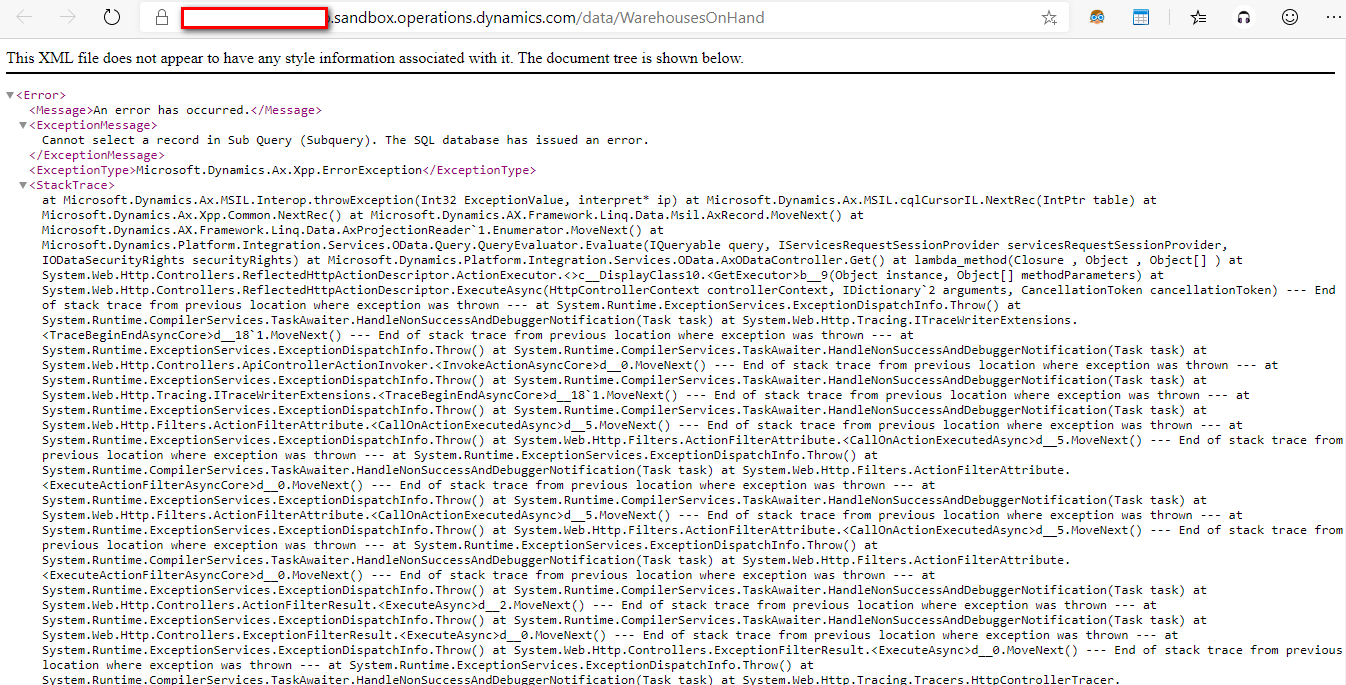
Im having error on a modified Data Entity when deployed to Sandbox Environment, please see screenshot:
3482.Error.png

The modification is for InventWarehouseOnHandEntity, just added a additional table to its view datasource then added some field to the Data Entity fields.

It is working on my Development Environment and shows fields in Table browser /data/WarehousesOnHand.

But when i deployed it in our sandbox environment, the error shows.

Any fix suggestion is really helpful. Thanks.

I have the same question (0)
  • WillWU Profile Picture
    22,363 on at

    Hi Chel,

    Please try to full build it.

    Don't forget to synchronize the database.

    https://docs.microsoft.com/en-us/dynamics365/fin-ops-core/dev-itpro/dev-tools/build-operations

  • XSpy Profile Picture
    209 on at

    Hi Will,

    Thank you for your reply, I have done database synchronization and Full build in my development environment before testing it and it is working.

    But after deploying the modification in our sandbox environment, this error occured.

    My modifications are only Extensions of the Entity and the Staging Table, adding only some fields to the Entity fields and Staging Fields.

    Thanks, any more suggestion will really help.

  • WillWU Profile Picture
    22,363 on at

    Hello,

    I'm sorry for that.

    I think you should try refreshing the database.

    https://docs.microsoft.com/en-us/dynamics365/fin-ops-core/dev-itpro/database/database-refresh

  • Martin Dráb Profile Picture
    239,451 Most Valuable Professional on at

    You talk about the table browser, but /data/WarehousesOnHand is the OData service, isn't it?

    Can't you find any details in event logs?

  • Suggested answer
    nmaenpaa Profile Picture
    101,172 Moderator on at

    Perhaps you didn't check in all changes? Or didn't deploy all custom packages?

    Does the Data entity (view) work in table browser? As Martin noted, your screenshot is from OData enpoint result, not table browser.

  • Navneeth Nagrajan Profile Picture
    2,613 Super User 2026 Season 1 on at

    Did you modify the query with additional fields after creating the data entity and didn't synchronise the database after doing so? If yes, then have you updated or regenerated those fields created in the staging table?


    Navneeth Nagrajan| Dynamics 365 Technical Consultant 

Under review

Thank you for your reply! To ensure a great experience for everyone, your content is awaiting approval by our Community Managers. Please check back later.

Helpful resources

Quick Links

Introducing the 2026 Season 1 community Super Users

Congratulations to our 2026 Super Stars!

Meet the Microsoft Dynamics 365 Contact Center Champions

We are thrilled to have these Champions in our Community!

Congratulations to the April Top 10 Community Leaders

These are the community rock stars!

Leaderboard > Finance | Project Operations, Human Resources, AX, GP, SL

#1
Giorgio Bonacorsi Profile Picture

Giorgio Bonacorsi 608

#2
André Arnaud de Calavon Profile Picture

André Arnaud de Cal... 591 Super User 2026 Season 1

#3
CP04-islander Profile Picture

CP04-islander 430

Last 30 days Overall leaderboard

Product updates

Dynamics 365 release plans
