web
You’re offline. This is a read only version of the page.
close
Skip to main content

Notifications

Announcements

No record found.

Community site session details

Community site session details

Session Id :
Microsoft Dynamics GP (Archived)

Document date, and posted date.

(0) ShareShare
ReportReport
Posted on by

Hello,

According to accounting department document date, and posted date must be the same, some of the employees told me: you'd better change them, they must be the same. But they must be the same as document date. So, after a very tired meeting I understood it. How can I set every transaction by document date in the purchase order module?. Here you have a attachment of one case.
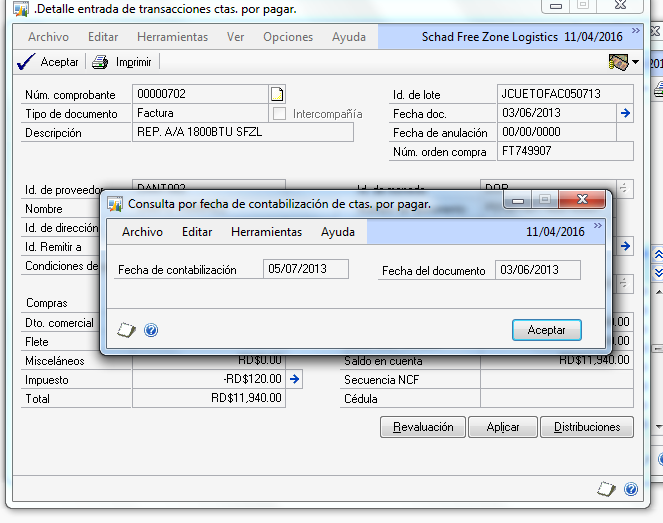
error-de-fecha.png

Thanks,

Freddy Abreu.

*This post is locked for comments

I have the same question (0)
  • Verified answer
    MattPaulen Profile Picture
    6,912 on at

    Hi Freddy,

    It looks like your system is currently set up where the posting date is coming from the Batch ID.  If you go to Tools >> Setup >> Posting >> Posting, it will open up the Posting Setup Window.  Choose Purchasing as the Series and the Payables Trx Entry as the Origin.  Look for the Posting Date From and see what it is set as.

    7573.Posting-Setup.PNG

    If you want the Document Date to be the same as the Posting Date then it should be set to Transaction and not Batch.  This will default the Posting Date to the Document Date.

    Repeat this in the Posting Setup for any other screens that you want this to take effect in.

  • Community Member Profile Picture
    on at

    This could cause problems when the document date is for a closed accounting period.  What if an invoice comes in late?  Does your accounting department really change prior period information that may be closed?  Having the posted date separate from the document date is a good tracking tool to see how long an invoice may take to get 'approved' and processed.  

  • Community Member Profile Picture
    on at

    Hello,

    I know it going to sound weird, but you're my hero, it worked.

  • Community Member Profile Picture
    on at

    Yes, they're already aware of this situation, we had a meeting, and we talked about every detail, thanks for responding!.

Under review

Thank you for your reply! To ensure a great experience for everyone, your content is awaiting approval by our Community Managers. Please check back later.

Helpful resources

Quick Links

Responsible AI policies

As AI tools become more common, we’re introducing a Responsible AI Use…

Neeraj Kumar – Community Spotlight

We are honored to recognize Neeraj Kumar as our Community Spotlight honoree for…

Leaderboard > 🔒一 Microsoft Dynamics GP (Archived)

#1
mtabor Profile Picture

mtabor 1

Last 30 days Overall leaderboard

Featured topics

Product updates

Dynamics 365 release plans



