web
You’re offline. This is a read only version of the page.
close
Skip to main content

Notifications

Announcements

No record found.

Community site session details

Community site session details

Session Id :
Supply chain | Supply Chain Management, Commerce
Suggested Answer

Group Put-Away Cluster

(0) ShareShare
ReportReport
Posted on by

Has anyone started using the new Group Put-Away Cluster?  I am having issues with the initial set-up on Creating Group Cluster.

I have the same question (0)
  • Guy Terry Profile Picture
    28,924 Moderator on at

    Hi tammyann1973

    I have never used it. What problem are you having?

    Did you notice that MS have published a video on this topic?:

    docs.microsoft.com/.../put-away-clusters

  • Community Member Profile Picture
    on at

    Hi Guy,

    Yes I have reviewed the video, but after I receive in my product it won't let me Create a Cluster.  The video only shows setting up the Cluster Profile and not the Mobile Menu options for Creating and Assigning the Cluster.

  • Guy Terry Profile Picture
    28,924 Moderator on at

    Hi

    It is not enabled in my play environment, but I do have some documentation on it.

    Create a Mobile device menu item (Mode = Indirect) with Activity code = Assign to putaway cluster.

    Create another mobile device menu item (Mode = Work, Use existing work = Yes) and set Directed by to Cluster putaway.

    On your PO item receiving mobile device menu item, enable Sort and assign putaway cluster.

    When you receive items, the Putaway work that is created will be assigned a Putaway cluster profile Id.

    When you have finished receiving items, go to the Assign to putaway cluster menu item (Cluster Id can be created manually, or automatically), and scan each LP (or Work Id) that should be assigned to a single Putaway cluster. When you're done, use Close cluster.

    Go to your Cluster putaway menu item. Enter the Cluster Id, and off you go!

  • Community Member Profile Picture
    on at

    Hello,

    On my PO Item Receiving Mobile Device Menu, I do not have an option to enable Sort.

    pastedimage1588863469385v1.png

  • Guy Terry Profile Picture
    28,924 Moderator on at

    You can't use it with Mixed LP Receiving. You'll need to change it to Purchase order item receiving or Purchase order line receiving.

  • Community Member Profile Picture
    on at

    When I changed it to PO Item Receiving I still didn't get an option

    pastedimage1588865765696v1.png

  • Guy Terry Profile Picture
    28,924 Moderator on at

    Er, ok. I guess its possible that the documentation I have is from pre-release. Perhaps its that Assign putaway cluster, which you have there.

  • MJHughes2000 Profile Picture
    20 on at

    Hi tammyann1973, did you ever get this piece figure out?  I am also just trying to figure out this new functionality but cannot seem to assign work IDs to a cluster using the indirect menu item "Assign to putaway cluster."

  • Suggested answer
    AliceBarendregt Profile Picture
    1,470 on at

    Hi Tammy and MJHughes, 

    Hopefully, you both were able to solve the issues you encountered earlier already. If not, see my comments below. 

    The mobile device menu items that you need to set up as part of the putaway cluster functionality are the menu items that were specified by Guy Terry earlier as well.

    1. Receive and sort cluster 
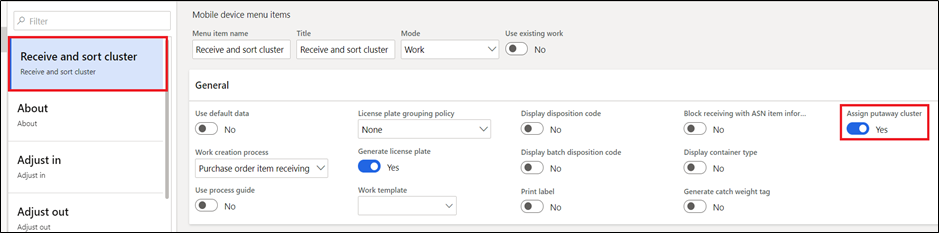
    pastedimage1591781935807v1.png

    2. Assing cluster - this menu item must only be used if the assign putaway cluster at receipt is not marked for use on the putaway cluster profile. 
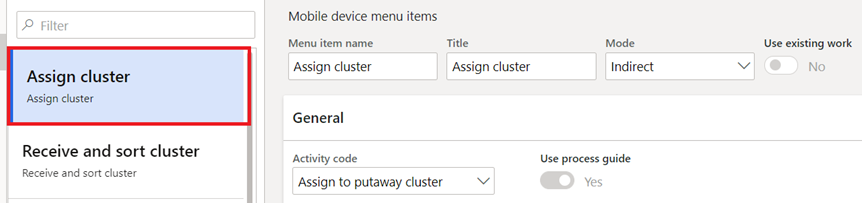
    pastedimage1591781978932v2.png

    3. Cluster putaway - to be used for putting away the cluster once it has been assigned. 

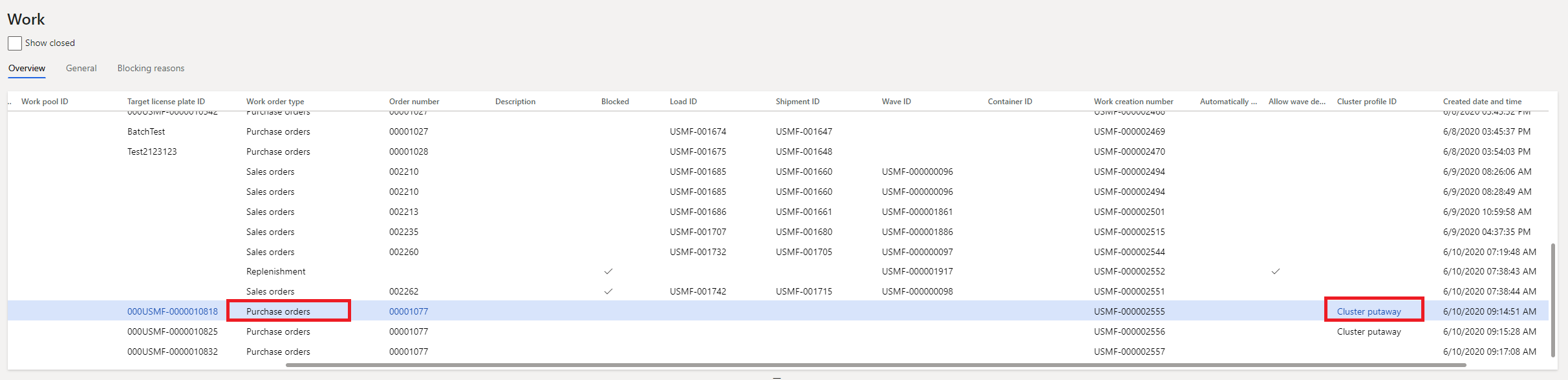
    Depending on your setup, upon receiving the PO, the system will display a message that the work and LP have been sorted. In case you auto-generate the cluster-ID it will also mention to which cluster-ID it has been assigned. Moreover, the putaway cluster will be assigned towards your purchase order work as well. 

    pastedimage1591782103329v3.png

    pastedimage1591782394283v5.png

    The cluster profile ID setup that I used can be found below. 
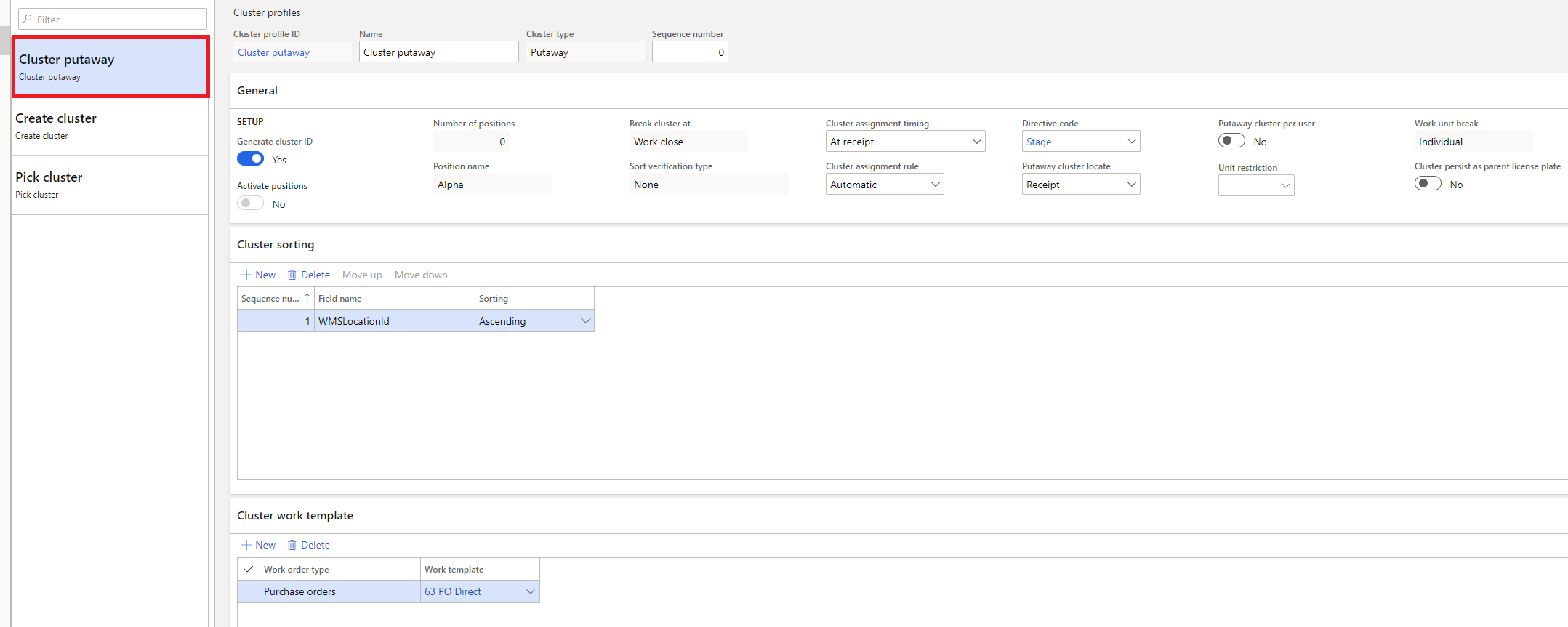
    pastedimage1591782225748v4.png

    Any questions, let me know. 

    Thanks, 

    Alice

  • MJHughes2000 Profile Picture
    20 on at

    Thanks Alice.

    Have you seen the training feature exploration video put out by MSFT (www.microsoft.com/.../RE4f5aB)  I am wondering how he was able to simply receive the PO items without assigning them to a cluster.  Later, he simply used the "assign to cluster" mobile device mobile item to assign them to a cluster he identified.  So far, MSFT has only told me that I'd have to manually assign a cluster profile to each work ID to do that.  That does work but seems highly inefficient.

    Ultimately, I want the receiver to receive the product and apply the receiving label to the box.  Then a user can come and gather any receipts and assign them to the putaway cluster which would likely be a fixed name on their fork lift.  Finally, they would putaway the receipts in the cluster they assigned them to.  Pretty much exactly how he did it in the video, but I am not having any luck with that process.  

    The setup above asked me to assign the receipt to a cluster ID, but it did not let me create a new cluster ID.  I'll keep playing with the configs, but if you have any input on how to reach the desired outcome I mentioned above, that would be amazing!

    Thanks

    Michael

Under review

Thank you for your reply! To ensure a great experience for everyone, your content is awaiting approval by our Community Managers. Please check back later.

Helpful resources

Quick Links

Responsible AI policies

As AI tools become more common, we’re introducing a Responsible AI Use…

Neeraj Kumar – Community Spotlight

We are honored to recognize Neeraj Kumar as our Community Spotlight honoree for…

Leaderboard > Supply chain | Supply Chain Management, Commerce

#1
Siv Sagar Profile Picture

Siv Sagar 283 Super User 2025 Season 2

#2
Laurens vd Tang Profile Picture

Laurens vd Tang 213 Super User 2025 Season 2

#3
André Arnaud de Calavon Profile Picture

André Arnaud de Cal... 152 Super User 2025 Season 2

Last 30 days Overall leaderboard

Featured topics

Product updates

Dynamics 365 release plans