web
You’re offline. This is a read only version of the page.
close
Skip to main content

Announcements

No record found.

News and Announcements icon
Community site session details

Community site session details

Session Id :
Customer experience | Sales, Customer Insights,...
Suggested Answer

Customer journey Run Workflow tile for Task assignment - Regarding field

(0) ShareShare
ReportReport
Posted on by 75

Hello,

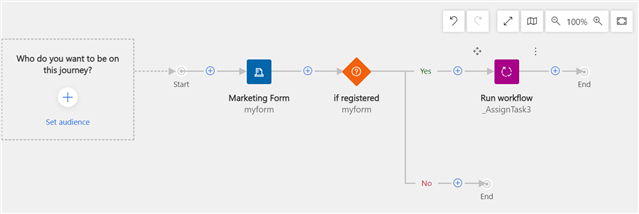
I need to create a Customer journey that includes a specific form (set to Update Contacts/Leads) and when a customer registers through that form, Lead & Contact are created (or matched with existing one) after which a workflow runs that creates and assigns Task to specific Sales representative to follow up with each Lead that registered through that form.

I attached an example of a Customer journey below (first screenshot), however, I'm not sure if this is the best practice and if Create Lead tile is supposed to be included. Do you have any suggestions for how the Customer journey be structured to function as described above?

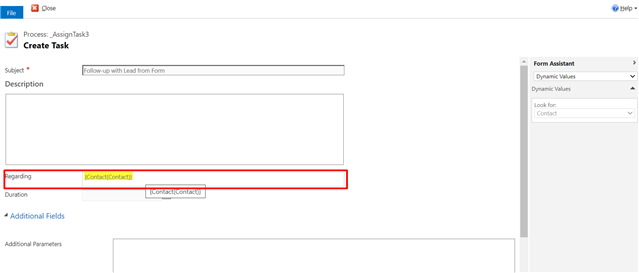
Additionally, within the Workflow (second screenshot attached below), the Regarding field of the Task should display the Lead created after the form registration, what dynamic expression should be used there since the Workflow needs to be based on Contact entity to appear within Customer journey? This is also linked to the previous question of how should the customer journey be structured.
pastedimage1629294689291v1.png_2D00_640x480.png

pastedimage1629294785923v3.png_2D00_640x480.png

Thank you very much in advance.

All the best, Marianna

I have the same question (0)
  • Suggested answer
    Nya Profile Picture
    29,060 on at

    Hi Marianna,

    If there is no additional operations to the contacts, there is no need to create a workflow.

    A task tile can be inserted instead of the workflow.

    pastedimage1631264112077v1.png

    After the contacts register the form, the tasks will be generated and the regarding field will be populated as the contacts automatically.

    pastedimage1631264188767v2.png

  • MariannaK Profile Picture
    75 on at

    Hello Nya,

    This approach does not work as it offers only three options to which the Task can be assigned and I need to assign it to a specific Sales representative, not the different Owners.

    Additionally, the Task needs to be regarding specific Lead, not only Contact.

    What would you suggest as an approach here?

    Thanks in advance.

    All the best,

    Marianna

Under review

Thank you for your reply! To ensure a great experience for everyone, your content is awaiting approval by our Community Managers. Please check back later.

Helpful resources

Quick Links

Introducing the 2026 Season 1 community Super Users

Congratulations to our 2026 Super Stars!

Congratulations to our 2025 Community Spotlights

Thanks to all of our 2025 Community Spotlight stars!

Leaderboard > Customer experience | Sales, Customer Insights, CRM

#1
ManoVerse Profile Picture

ManoVerse 166 Super User 2026 Season 1

#2
Jimmy Passeti Profile Picture

Jimmy Passeti 51 Most Valuable Professional

#3
NeerajPawar Profile Picture

NeerajPawar 42

Last 30 days Overall leaderboard

Product updates

Dynamics 365 release plans
