web
You’re offline. This is a read only version of the page.
close
Skip to main content

Notifications

Announcements

No record found.

Community site session details

Community site session details

Session Id :
Microsoft Dynamics CRM (Archived)

Workflow process showing "In Progress" Status region

(0) ShareShare
ReportReport
Posted on by

Hi,

I am working on workflows i have 10 workflows activated for different operations and entities

but from yesterday most of workflow processes getting stuck in "In progress" stage

please suggest me how to resolve this ,so that all my workflows would work fine
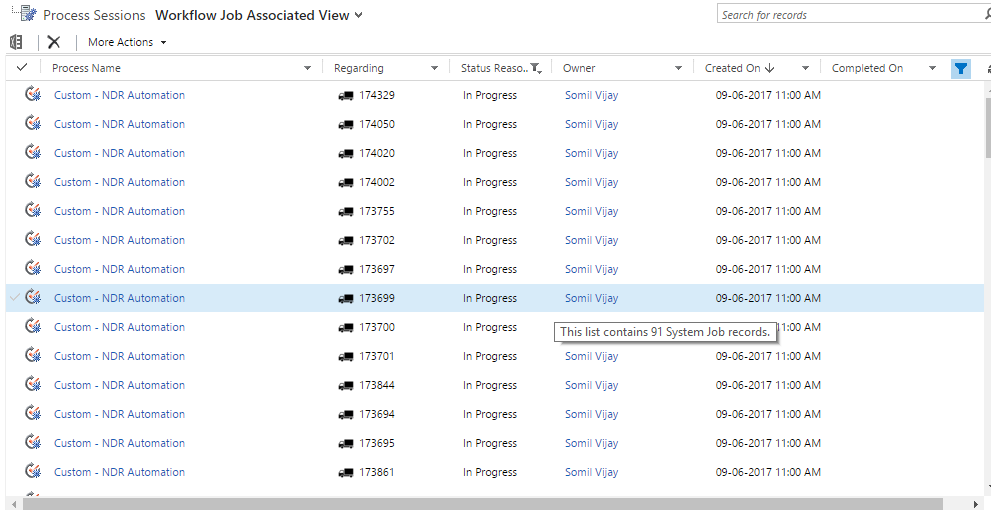
5277.in-progress.png

*This post is locked for comments

I have the same question (0)
  • Thomas David Dayman Profile Picture
    11,323 on at

    Does it give you more information when you click into one of those processes?

  • Community Member Profile Picture
    on at

    No there is no more information even there is no status of stages executed.

  • Community Member Profile Picture
    on at

    now i am getting this error in process details

    "WorkflowDataAccess: Unexpected number of records selected. Expected: 1, actual: 0. Query: System.Data.SqlClient.SqlCommand."

  • Suggested answer
    Kishor Kumar Profile Picture
    3,710 on at

    Check whether the credentials of the SQL is change in case if its on premises or check the workflow again, because the respective parameters for the workflow is not passed to it. So the workflow is in in progress condition Sanjay.

  • Suggested answer
    Andreas Cieslik Profile Picture
    9,267 on at

    if you have like 10 workflows activated, it would be interesting for you to identify if some of them interfere with each other.

    For testing purposes you could try to analyse it on on-premise system (debugging). Reduce complexity turn off some workflows or test the workflows separately if possible.

  • Community Member Profile Picture
    on at

    Hi kishor

    I am using dynamics 365 online

    and there is no change in credentials.

  • Community Member Profile Picture
    on at

    Hi Andreas

    I don't know how to test workflow on Online System

    workflows are dependent on other but its working all fine in last 15 days

  • Suggested answer
    Andreas Cieslik Profile Picture
    9,267 on at

    Hi Sanjay,

    in this case I would first check your Dynamics 365 Online health status.

    If everythings looks green I would contact Microsoft Support.

  • Community Member Profile Picture
    on at

    health.png

    this is service heath report just a minute ago seems like this is not the problem what i mentioned above

  • Andreas Cieslik Profile Picture
    9,267 on at

    If health report looks fine, I would create a support ticket with Microsoft.

Under review

Thank you for your reply! To ensure a great experience for everyone, your content is awaiting approval by our Community Managers. Please check back later.

Helpful resources

Quick Links

Responsible AI policies

As AI tools become more common, we’re introducing a Responsible AI Use…

Neeraj Kumar – Community Spotlight

We are honored to recognize Neeraj Kumar as our Community Spotlight honoree for…

Leaderboard > 🔒一 Microsoft Dynamics CRM (Archived)

#1
SA-08121319-0 Profile Picture

SA-08121319-0 4

#1
Calum MacFarlane Profile Picture

Calum MacFarlane 4

#3
Alex Fun Wei Jie Profile Picture

Alex Fun Wei Jie 2

Last 30 days Overall leaderboard

Featured topics

Product updates

Dynamics 365 release plans



