web
You’re offline. This is a read only version of the page.
close
Skip to main content

Notifications

Announcements

No record found.

Community site session details

Community site session details

Session Id :
Small and medium business | Business Central, N...
Answered

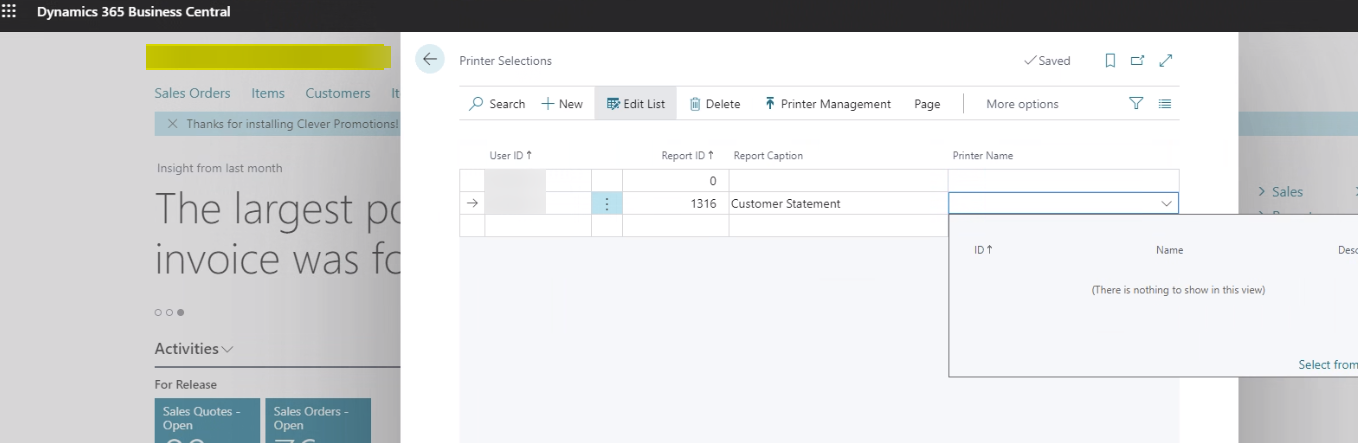
Business Central Cloud - printers not available in printer selection window

(0) ShareShare
ReportReport
Posted on by 249

Hello,

None of the printers are available in the selection:
pastedimage1631567033851v1.png

I recall in the on-prem installations, all available printers were listed.

I read Microsoft documentation but it is not clear to me, does the universal print need to be setup and should I select add all universal print printers to be able to see the same printers as are available in the Windows printers and scanners page?

thank you!!

I have the same question (0)
  • Suggested answer
    MahGah Profile Picture
    15,529 on at

    Hi 

    BC SaaS is different than on-premise for printers. You basically have a few options. All options are paid options and each has different method/price.

    1) Use Microsoft Universal Printer as you mentioned. Set that up and you will seen those printers. I think they charge per print. 

    2) Use PrintNode (https://www.printnode.com/en) and get the API. Then use free app such as following to bring all printers to BC 

    https://appsource.microsoft.com/en-us/product/dynamics-365-business-central/PUBID.insight-works%7CAID.b0c8bcc7-2924-4cd2-8562-4e71ebd07323%7CPAPPID.b0c8bcc7-2924-4cd2-8562-4e71ebd07323 

    3) Use Print-it app 

    https://appsource.microsoft.com/en-us/product/dynamics-365-business-central/PUBID.fenwicksoftware%7CAID.print-it-with-cloud-companion-app%7CPAPPID.581d572d-6a8d-4116-a1b2-8281f40daa19

    What is a difference between Print-it and Printnode? for Printnode you use their software and they give you some tire like 1 connection, 2 connection and certain number of prints. With Prin-it you can have as many connections as you want but you pay per print (not page but print). 

    connection: is a server or individual device. Anything that you want to bring installed printers into cloud. 

    Thanks  

  • Suggested answer
    YUN ZHU Profile Picture
    95,763 Super User 2025 Season 2 on at

    Hi, From Microsoft, "Because Business Central online is a cloud service, it can't directly reach local printers connected to users' devices, but it can connect to cloud-enabled printers."

    Hope this will help.

    https://docs.microsoft.com/en-us/dynamics365/business-central/ui-specify-printer-selection-reports

    pastedimage1631581052274v1.png

    Thanks.

    ZHU

  • Alicja_ Profile Picture
    249 on at

    Thank you MahGah, that is what I was looking for regarding printer selections.

    ZHU, thank you, that was my understanding, however I am able to print from BC browser and PWA to my local USB printer without any additional setup. I can change if I want to print to PDF or the physical printer, so I guess I am not sure where exactly the limitations are within the browser printing? 

  • Suggested answer
    MahGah Profile Picture
    15,529 on at

    @Alicja_

    You are welcome. 

    Based on my experience printing from browser has no limitations. Sometimes has it's own challenges. For example:

    Shipper needs to print shipping label on Label Printer 1 and Packing List on Printer 2. Then every time user needs to select different printer in browser. 

    Or user works from home and wants to print using printer in office. User needs to have all printers installed in her/his device. 

    Instead adding printers to BC let you select printer for user/report (similar to Nav). 

    Thanks  

  • Alicja_ Profile Picture
    249 on at

    @MahGah

    thank you again for your reply, very helpful!

    One last concern/question I have, with the browser printing option, will I be able to print from the handheld?

  • Suggested answer
    MahGah Profile Picture
    15,529 on at

    @Alicja_

    That is all depends on your device and software you use. I only had experience with RF Smart which has its own printing solution.  But in theory for Android device you need solution such  as Google Cloud Print or for iOS you need Airprint.

    Unless you find a way that your device connect to printer and printer show up as an option in device.

    But I do not have much of experience here.

Under review

Thank you for your reply! To ensure a great experience for everyone, your content is awaiting approval by our Community Managers. Please check back later.

Helpful resources

Quick Links

Responsible AI policies

As AI tools become more common, we’re introducing a Responsible AI Use…

Neeraj Kumar – Community Spotlight

We are honored to recognize Neeraj Kumar as our Community Spotlight honoree for…

Leaderboard > Small and medium business | Business Central, NAV, RMS

#1
OussamaSabbouh Profile Picture

OussamaSabbouh 2,116

#2
Khushbu Rajvi. Profile Picture

Khushbu Rajvi. 764 Super User 2025 Season 2

#3
YUN ZHU Profile Picture

YUN ZHU 635 Super User 2025 Season 2

Last 30 days Overall leaderboard

Featured topics

Product updates

Dynamics 365 release plans



