web
You’re offline. This is a read only version of the page.
close
Skip to main content

Notifications

Announcements

No record found.

Community site session details

Community site session details

Session Id :
Microsoft Dynamics CRM (Archived)

Question on Advanced Find - Filtering out 'Activity Type to exclude Campaign Activity' is not working

(0) ShareShare
ReportReport
Posted on by 40

Hi, 

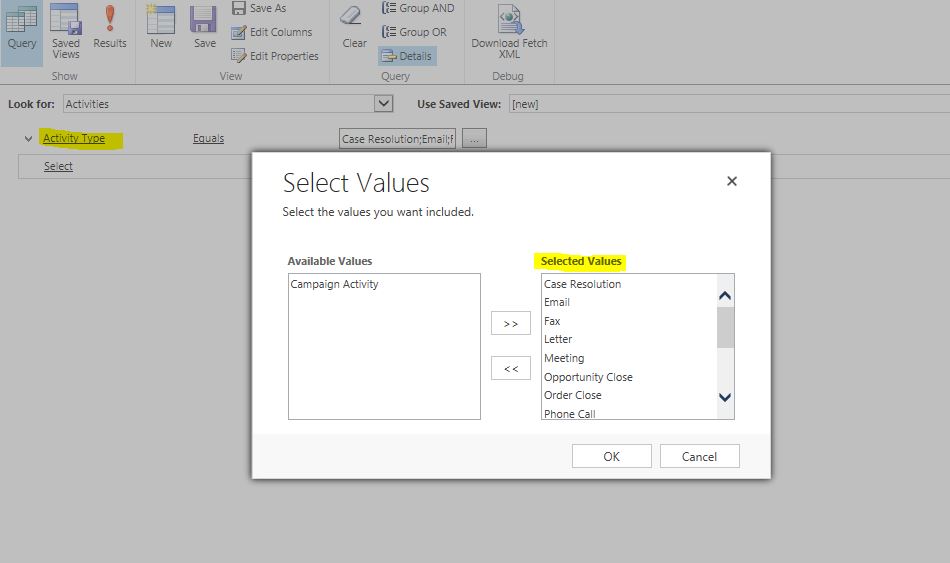
I am trying to create a view to 'exclude mail shots (emails) that were sent part of  a ' campaign activity'. 

I find there is an 'Activity Type' filter in the 'Activities' and I tried excluding 'Campaign Activity' from it but looks like this is not working. Is this a known issue in CRM 2013 or am I missing something here ?

Thanks for your help.
7563.Capture.JPG

*This post is locked for comments

I have the same question (0)
  • Suggested answer
    Aiden Kaskela Profile Picture
    19,696 on at

    Hi,

    In CRM, lots of records are types of activities - email, phone call, fax, etc. They all have the same fields and function the same way, they may just be tailored a little differently from each other (email shows CC but phone call doesn't).

    In your advanced find, you're searching on Activities (all record types), and limiting it to all activities that are not Campaign Activities.

    Hope this helps! I'd appreciate if you'd mark this as a Verified answer.

    Thanks,

     Aiden

  • mattermani Profile Picture
    40 on at

    Thanks Aiden. If I understand you correctly, you are suggesting that  this query actually filters the 'Campaign Activity' records (and not emails sent as part of campaigns as I expect).  Is that right ?

    My intention is to create a view that DOES NOT display the emails that were created as part of a campaign but every other activity types. Is there any other way ?

  • Verified answer
    Community Member Profile Picture
    on at

    Hi,

    This should be possible if you user outer join between email and campaign activity, I believe via "regarding" field. I would recommend a tool, It allows you to create complex queries before you update CRM view with FetchXml:

    FetchXML Builder for Xrm Tool Box

    http://fxb.xrmtoolbox.com/

    http://www.xrmtoolbox.com/

    This task need you to first create a desired view in the tool, and later replace a customisable system view (already present) with custom FetchXml.

    If you're happy with the answer, please mark it as correct.

    Thanks,

    Piotr

  • mattermani Profile Picture
    40 on at

    That's helpful. But I am afraid this wont work either since filtering on 'regarding' field will only get the  directly linked activities to the account alone.  (thanks for pointing to the FetchXml tool btw).

  • Verified answer
    Aiden Kaskela Profile Picture
    19,696 on at

    Hi,

    Yes, that was what I was getting at. You should be able to do this a with FetchXml.

    An email that's part of a marketing campaign is an email record, regarding a campaign activity. This query would return all emails that are part of a campaign:

    <fetch distinct="false" mapping="logical" output-format="xml-platform" version="1.0">
     <entity name="activitypointer">
      <attribute name="activitytypecode"/>
      <attribute name="subject"/>
      <order descending="false" attribute="modifiedon"/>
      <link-entity name="campaignactivity" alias="ae" to="regardingobjectid" from="activityid"/>
     </entity>
    </fetch>


    Since you want all activities except for those which have an email for a campaign, you would use an outer join on the link and specify a null condition on the primary key (additional details: https://community.dynamics.com/crm/f/117/p/181742/451055#451055 )

    If you want to do this from within the advanced find, you could download a free tool like Intelligent Query (http://www.cobalt.net/cobaltintelligentquery) which will handle the outer join for you. Using that tool, your advanced find would look something like this:

    basic-query.png

    Hope this helps! I'd appreciate if you'd mark this as a Verified answer.

    Thanks,

     Aiden

  • Verified answer
    mattermani Profile Picture
    40 on at

    Hi Aiden/Piotr,

    Many thanks for your ideas. I believe I got this working but with a little twist to what you had suggested above.

    1. I tried Cobalt (nice idea and like it) to exclude the 'Campaign Activity' that 'does not contain data'. It seems to work as expected from 'advanced find' but as soon as I look at the saved view from the 'associated activities view' of company, it could not filter the emails that were part of Campaigns from the associated view. 

    2. I had a look at the fetch xml of the cobalt view and realized it was not updating it with link-type as 'outer' (as in your other post). I tried the below but still it did not work from the associated activity view

    <fetch version="1.0" output-format="xml-platform" mapping="logical" distinct="false">
      <entity name="activitypointer">
        <attribute name="activitytypecode" />
        <attribute name="subject" />
        <attribute name="statecode" />
        <attribute name="prioritycode" />
        <attribute name="modifiedon" />
        <attribute name="activityid" />
        <attribute name="instancetypecode" />
        <order attribute="scheduledstart" descending="true" />
        <link-entity name="campaignactivity" from="activityid" to="regardingobjectid" alias="ao" link-type="outer">
          <filter type="and">
            <condition attribute="activityid" operator="null" />
          </filter>
        </link-entity>
      </entity>
    </fetch>

    So, I next tried the fetchxml route. 

    Finally, instead of linking 'Campaign Activity', I just filtered the Activities by the 'RegardingObjectTypeCode'  to exclude all campaign related types and there was the result that I was expecting and it also works from the 'associated activity view' of the company.  

    <fetch version="1.0" output-format="xml-platform" mapping="logical" distinct="false" >
      <entity name="activitypointer" >
        <attribute name="activitytypecode" />
        <attribute name="subject" />
        <attribute name="statecode" />
        <attribute name="prioritycode" />
        <attribute name="modifiedon" />
        <attribute name="activityid" />
        <attribute name="instancetypecode" />
        <filter type="and" >
          <condition attribute="regardingobjecttypecode" operator="not-in" >
            <value>4400</value>
            <value>4401</value>
            <value>4402</value>
            <value>4403</value>
            <value>4404</value>
          </condition>
        </filter>
        <order attribute="scheduledstart" descending="true" />
      </entity>
    </fetch>

    (I used FetchXmlBuilder to save it back to a view).

    Please let me know if you find anything that could go wrong with this, to filter out activities that are not related to campaigns but this does seem to work as expected.  

    Thank you once again for all the help.

  • Aiden Kaskela Profile Picture
    19,696 on at

    Hi,

    With the Intelligent Query add-in (I was a developer on that project, for full disclosure), it doesn't actually manipulate the FetchXml that you can export from the advanced find - it runs as a plugin on the RetrieveMultiple message, intercepting the query and manipulating the FetchXml on the way to the server. We had looked at saving manipulated FetchXml for the view but the Advanced Find wouldn't display the updates properly and you wouldn't be able to edit the query again.

    The RetrieveMultiple plugin is fired whenever multiple records are retrieved (all subgrids, views, etc), so if you set up the view and save it you should see the same results everywhere.

    Thanks,

     Aiden

Under review

Thank you for your reply! To ensure a great experience for everyone, your content is awaiting approval by our Community Managers. Please check back later.

Helpful resources

Quick Links

Responsible AI policies

As AI tools become more common, we’re introducing a Responsible AI Use…

Neeraj Kumar – Community Spotlight

We are honored to recognize Neeraj Kumar as our Community Spotlight honoree for…

Leaderboard > 🔒一 Microsoft Dynamics CRM (Archived)

#1
SA-08121319-0 Profile Picture

SA-08121319-0 4

#1
Calum MacFarlane Profile Picture

Calum MacFarlane 4

#3
Alex Fun Wei Jie Profile Picture

Alex Fun Wei Jie 2

Last 30 days Overall leaderboard

Featured topics

Product updates

Dynamics 365 release plans



