web
You’re offline. This is a read only version of the page.
close
Skip to main content

Notifications

Announcements

No record found.

Community site session details

Community site session details

Session Id :
Small and medium business | Business Central, N...
Suggested Answer

How to unapply a payment applied to multiple entries in bulk

(0) ShareShare
ReportReport
Posted on by 21

We have applied a large payment to a few thousand open sales invoices by mistake for a single customer. It's actually a duplicate. This customer is set with an automatic application method (apply to oldest). So when we applied this duplicate payment, it closed the oldest open invoices. We need to unapply this payment from these invoices and reverse it. The problem is I've only been able to unapply one invoice at a time. This would literally take all day. Is there a way to do this in bulk?

I have the same question (0)
  • Suggested answer
    Community Member Profile Picture
    on at

    Chris,

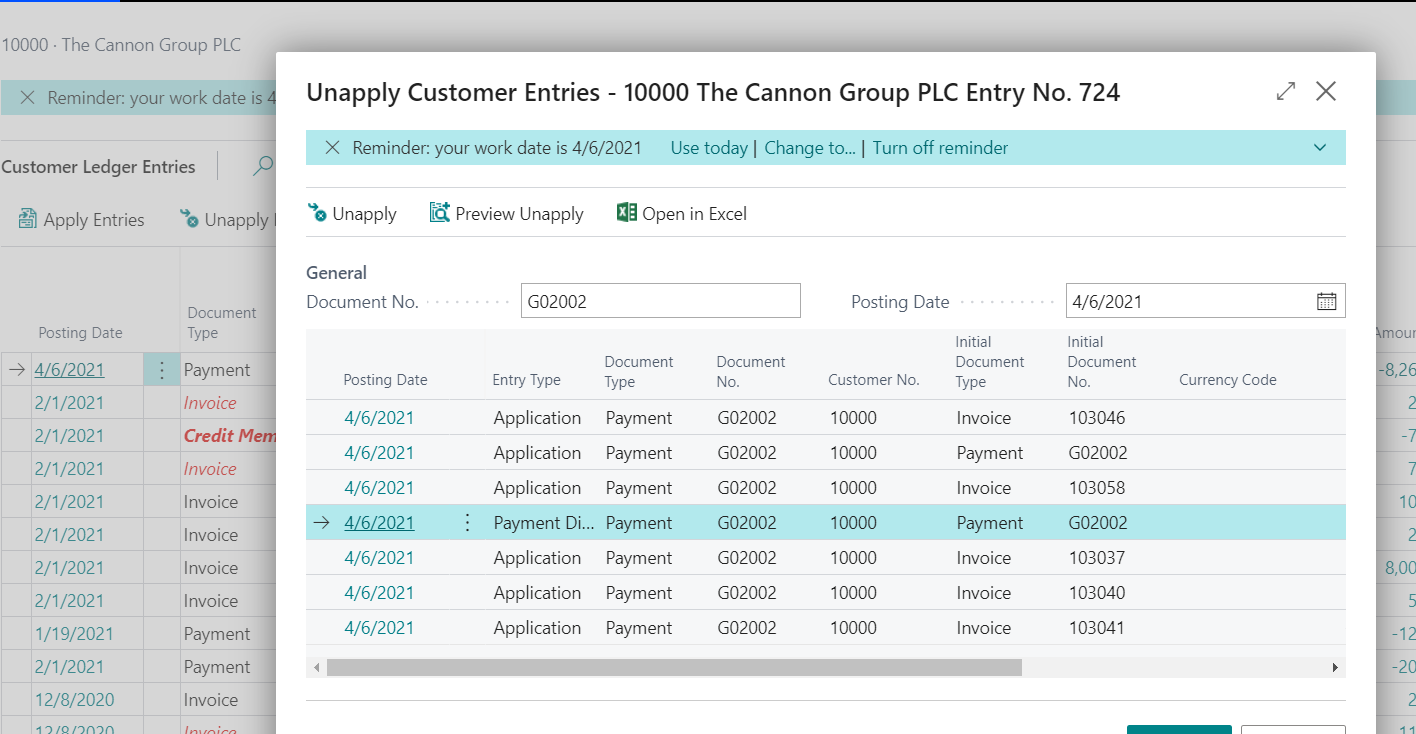
    I just made a payment in my Sandbox for 6 invoices/credit memos.
    pastedimage1620491099821v1.png

    You can see I highlighted the Payment Line for the payment and clicked Process/Unapply Entries. It opens the Unapply Customer Entries page. I will now highlight all the rows to Unapply them against the invoices/credit memos leaving the payment open.

    pastedimage1620491192457v2.png then all my Invoices/Credit Memos and the Payment show a remaining amount. pastedimage1620491251201v3.png
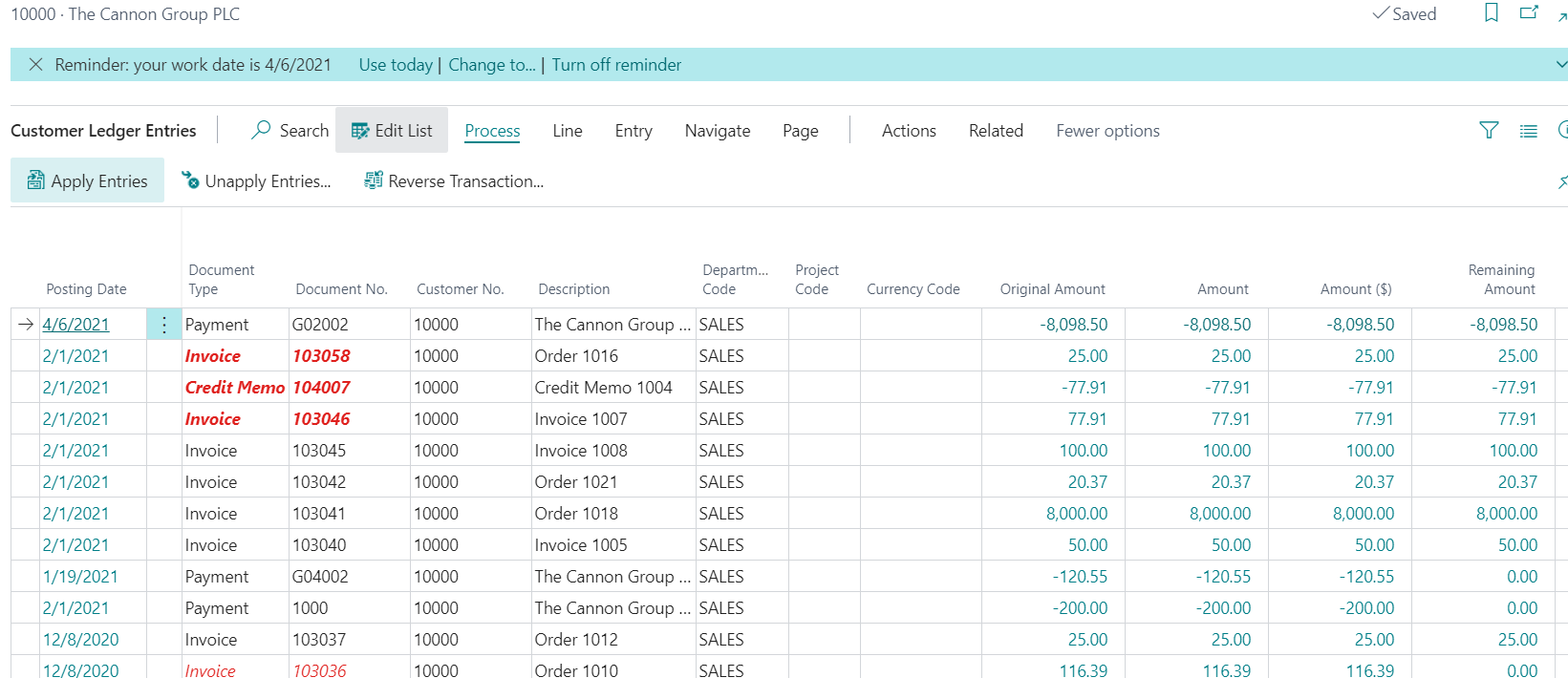
    Now you can reverse the payment, since it was a duplicate.

    Hope this helps.

    Thanks,

    Steve

  • Finn1980 Profile Picture
    21 on at

    Steve,

    I appreciate you jumping in and responding to this. The way you described and presented this process was exactly what I expected to see when I tried it myself. However, when I select the payment to be unapplied, I only get one applied invoice line, not the entire list. Is there something I'm missing?

    Screen-Shot-2021_2D00_05_2D00_10-at-10.41.38-AM.png

    This shows only one applied entry available to unapply:

    Screen-Shot-2021_2D00_05_2D00_10-at-10.43.39-AM.png

    Here's the long list of applied entries:

    Screen-Shot-2021_2D00_05_2D00_10-at-10.45.44-AM.png

  • Suggested answer
    Community Member Profile Picture
    on at

    Chris,

    After you highlighted the payment row for 310,419.xxand clicked Unapplied Entries the pic you show is filtered to Document No. PS-INV0398984, which is why the page only shows 2 lines. If you changed the Document No. to G02067 what appears? My document No. is 1000 and here is my pic:

    pastedimage1620669127424v1.png

    If I click on Applied Entries I see this:

    pastedimage1620669206653v2.png

    Hope this helps.

    Thanks,

    Steve

  • Finn1980 Profile Picture
    21 on at

    Yes I noticed that as well. Nothing happens if I change that document number field. It seems something else is playing into this functionality. Does it matter how these were applied originally? I created an entry in the cash receipt journal and used the oldest first application method which is set on the customer card.

    I really appreciate your help with this.

  • Suggested answer
    Community Member Profile Picture
    on at

    Chris,

    I just ran a test in Cronus taking my Customer Payment Method Oldest to Newest and making a 1000.00 payment. I let BC do the application. This is what appears on my Unapply page for the entry:

    pastedimage1620673270257v1.png

    I did another but each time I see the documents applied. Maybe a programmer can offer advise here.

    Thanks,,

    Steve

  • Community member Profile Picture
    2 on at
    I am trying to use the Correction field 'checked' to unapply the payments in bulk but it is not working is there any better way to accomplish this.


Under review

Thank you for your reply! To ensure a great experience for everyone, your content is awaiting approval by our Community Managers. Please check back later.

Helpful resources

Quick Links

Responsible AI policies

As AI tools become more common, we’re introducing a Responsible AI Use…

Neeraj Kumar – Community Spotlight

We are honored to recognize Neeraj Kumar as our Community Spotlight honoree for…

Leaderboard > Small and medium business | Business Central, NAV, RMS

#1
OussamaSabbouh Profile Picture

OussamaSabbouh 3,229

#2
Jainam M. Kothari Profile Picture

Jainam M. Kothari 1,867 Super User 2025 Season 2

#3
YUN ZHU Profile Picture

YUN ZHU 1,153 Super User 2025 Season 2

Last 30 days Overall leaderboard

Featured topics

Product updates

Dynamics 365 release plans



