web
You’re offline. This is a read only version of the page.
close
Skip to main content

Announcements

No record found.

News and Announcements icon
Community site session details

Community site session details

Session Id :
Microsoft Dynamics NAV (Archived)

NAV 2009 - Check Posting Error - Amount must be positive

(0) ShareShare
ReportReport
Posted on by 4,021

Please advise on this problem that I am testing in Sample Company "CRONUS".

1. User enters Adjustment Entries for Vendor No. 40000 using General Journal. This is a correction adjustment to transfer the balance to another Vendor No. 10000.
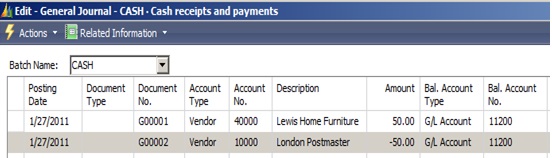
 8637.Nav2.jpg

2. The Vendor Ledger Entries for Vendor No. 40000 shows the $50.00 Credit as expected.

7024.Nav3.jpg 

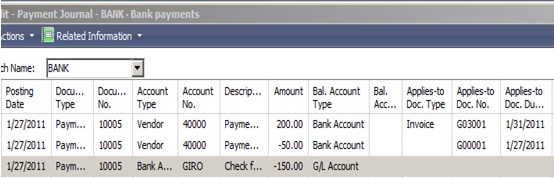
3. Create Check using "Suggest Vendor Payments" and Print Check. It create Check for $150.00 as expected.
 3362.Nav4.jpg

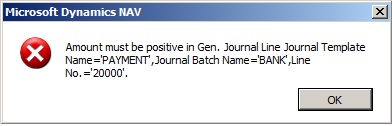
4. Post the Check, it gives following error. The error is on the line with -$50.00 that was originally entered in General Journal.

Amount must be positive in Gen. Journal Line Journal Template Name ='PAYMENT',Journal Batch Name ='BANK',Line No. ='20000'.
How can I post this Check?

Thank you.

*This post is locked for comments

I have the same question (0)
  • Verified answer
    Andri Wianto Profile Picture
    406 on at

    I think you should apply the 50 to Invoice -200, before create the check.

  • DinB Profile Picture
    4,021 on at

    Andri, Thanks for your quick reply. It allows me to apply before creating Check, but the user wants to show the $50 in the check Stub. Is this a limitation in NAV?

  • Andri Wianto Profile Picture
    406 on at

    The error is because:

    The Document Type is Payment, Account No. is Vendor.

    Hence, it should not be in minus amount.

    To overcome this error, change the Document Type into Invoice.

    But, IMHO, I think there is a mistake. Please make sure that your transaction is true.

    If you are sure that it is correct for you, then go on.

    On the other hand, if you feel that there is a mistake in the G/L Entries create, my suggestion for you is:

    You should reverse the entries for transaction no. 1.

    Then change the Payment Journal like this:

    Line 20000: Payment; GL-11200 -$50

    After posting, you could create a General Journal:

    Vendor 10000 -$50; GL-11200

  • ManishS Profile Picture
    86 on at

    Is it a transfer of amount to another vendor or a adjustment in account no.11200.

    You have debited Vendor 40000 & credit 11200 account.

    On the second entry Vender 10000 is credited & 11200 account is debited.

    11200 account will show +50 & -50 entry for two documents.

    What i think was to just pass a Journal Entry(Journal Voucher) where you must have debited vendor 40000 & credited 10000. In here 11200 does not hit.

  • Suggested answer
    Jens Glathe Profile Picture
    6,092 on at

    Hi MaxB,

    [quote user="MaxB"]

    ... the user wants to show the $50 in the check Stub. Is this a limitation in NAV?

    [/quote]

    Not a limitation. You can achieve this when you remove the document type from the entire transaction. But caution: when you have payment discounts or payment tolerances in this transaction, they won't be calculated and also won't be posted as these. It's sort of a quandary regarding payment processing.

    with best regards

    Jens

  • DinB Profile Picture
    4,021 on at

    Manish:
    Is it a transfer of amount to another vendor or a adjustment in account no.11200?

    It is a transfer of amount $50 to another vendor (correction). The balance in account no. 11200 does not need to change. If Journal Entry is not a good way to handle this situation, what is the best way to make the original correction where I need to transfer $50 balance from Vendor 40000 to Vendor 10000?

    Jens:
    You can achieve this when you remove the document type from the entire transaction.

    The Documents Types in the Payment Journal was automatically assigned by Suggest Vendor Payments function. I tried removing the document type. Then when I post the Payment, I get following Error.

    The Vendor Ledger, Vendor Balance, Check Amount ($150), Check Stub (showing $50) are all good. But it is not letting me Post.

    ANDRI:
    I think you should apply the 50 to Invoice -200, before create the check.

    This seems to be the best work around so far, but the only issue is the $50 credit does not show up in the Check Stub since it was applied before the Check Run.


  • Suggested answer
    Jens Glathe Profile Picture
    6,092 on at

    Hi MaxB,

    my proposal was to remove the document type for the entire transaction, i.e. the whole document. :)

    with best regards

    Jens

  • DinB Profile Picture
    4,021 on at

    Jens, that's right, I tried removing Document Type for the whole document, then I could post. I will see if I can use this method. Also, can you suggest what is the best way to make the original correction where I need to transfer $50 balance from Vendor 40000 to Vendor 10000? It seems using General Journal is not a good way. Thanks.

  • Suggested answer
    Jens Glathe Profile Picture
    6,092 on at

    Hi MaxB,

    try posting in two lines in the General Journal. You can use a technical interim account, but there is no need to do this.

    Line 1: Vendor 40000 $50

    Line 2: Vendor 10000 -$50

    with best regards

    Jens

  • DinB Profile Picture
    4,021 on at

    Jens, I mean how can I enter so that I don't need to remove Document Types in Payment Journal? It seems if I enter using General Journal, I need to remove the "Document Type" every time before Posting the Payment Journals. thanks.

Under review

Thank you for your reply! To ensure a great experience for everyone, your content is awaiting approval by our Community Managers. Please check back later.

Helpful resources

Quick Links

Introducing the 2026 Season 1 community Super Users

Congratulations to our 2026 Super Stars!

Meet the Microsoft Dynamics 365 Contact Center Champions

We are thrilled to have these Champions in our Community!

Congratulations to the March Top 10 Community Leaders

These are the community rock stars!

Leaderboard > 🔒一 Microsoft Dynamics NAV (Archived)

#1
TAHER_El_Mehdi Profile Picture

TAHER_El_Mehdi 2

#1
sliderxb Profile Picture

sliderxb 2

#1
broberts Profile Picture

broberts 2

Last 30 days Overall leaderboard

Featured topics

Product updates

Dynamics 365 release plans
