web
You’re offline. This is a read only version of the page.
close
Skip to main content

Announcements

News and Announcements icon
Community site session details

Community site session details

Session Id :
Finance | Project Operations, Human Resources, ...
Suggested Answer

Build fail on C:\DynamicsSDK\VSOAgent\_work\2\s\Metadata'

(0) ShareShare
ReportReport
Posted on by 1,461

I have 2 cloud-hosted Dev boxes.

I have a build definition that is using the default agent pool on Dev box (1).

I have another build definition using the default agent pool on Dev box (2) which is set up for Retail. 

Both these boxes point to the same branching for X++ so that I can just do a get latest if I did a change on the one. This is temporary because I need to continue developing on X++ for D365FO (1) and create deployable packages while starting to develop for Retail as well on (2).

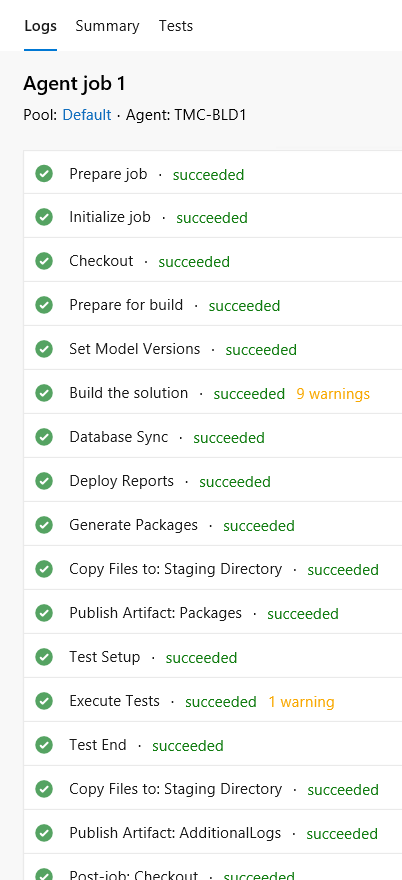
The build definition works fine for (1).

Agent pool = Default

Get source = Type Map and server path $/Dynamics 365/Trunk/Main
pastedimage1574978246746v3.png

For (2) I duplicated the build definition used by (1) and added Retail steps. When I ran this build, it fails with:

****

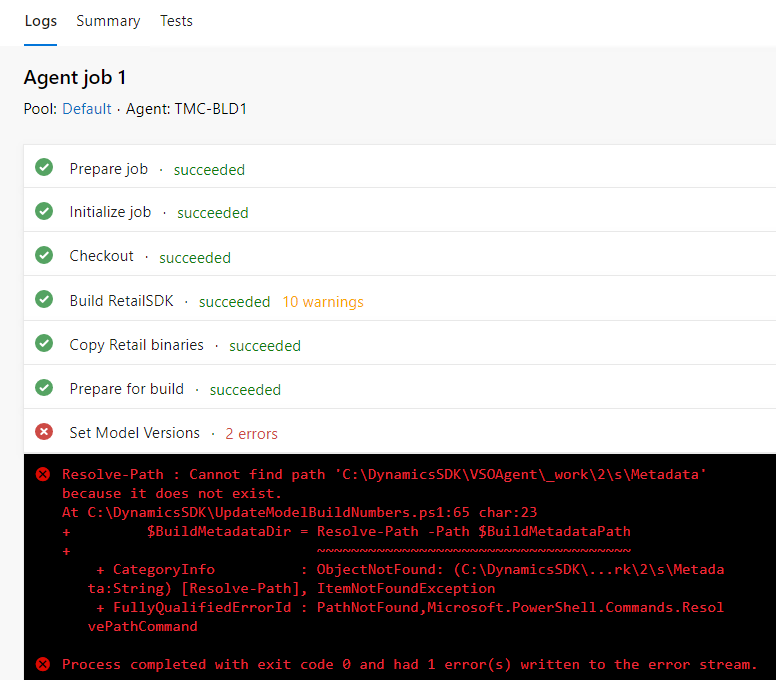
Resolve-Path : Cannot find path 'C:\DynamicsSDK\VSOAgent\_work\2\s\Metadata' because it does not exist. At C:\DynamicsSDK\UpdateModelBuildNumbers.ps1:65 char:23 + $BuildMetadataDir = Resolve-Path -Path $BuildMetadataPath + ~~~~~~~~~~~~~~~~~~~~~~~~~~~~~~~~~~~~~ + CategoryInfo : ObjectNotFound: (C:\DynamicsSDK\...rk\2\s\Metada ta:String) [Resolve-Path], ItemNotFoundException + FullyQualifiedErrorId : PathNotFound,Microsoft.PowerShell.Commands.Resol vePathCommand

****

I found the link below that references this error. 

https://community.dynamics.com/ax/f/microsoft-dynamics-ax-forum/240139/unable-to-create-the-continuous-build-using-vsts-and-lifecycle-services

However I do have models and descriptor files checked in under $/Dynamics 365/Trunk/Main.

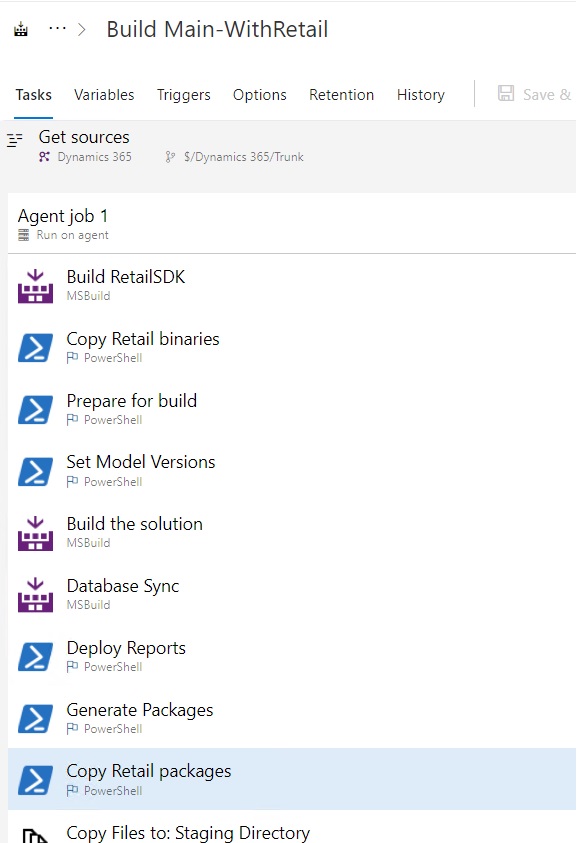
Build definition set up for (2):

I used this document to help me with the setup: docs.microsoft.com/.../integrate-retail-sdk-continuous-build

Agent pool = Default

Get Sources: Type Map with source path $/Dynamics 365/Trunk/Main

                    Type Map with source path $/Dynamics 365/Trunk/RetailSdk-Main

Build step added for Build RetailSDK: Project : $/Dynamics 365/Trunk/RetailSdk-Main/dirs.proj

                     MSBuild Version = Latest (I took the default value)

                     MSBuild Architecture: MSBuild x86 (I took the default value)

                   Configuration: $(BuildConfiguration)

                   Clean checkbox: was changed to checked

Powershell step added for Copy Retail binaries:  

                 Script Path: $/Dynamics 365/Trunk/RetailSdk-Main/BuildTools/Copy-RetailBinaries.ps1

               Arguments: -BuildMetadataPath "$(Build.SourcesDirectory)\Metadata"

               Control options:  Enabled is checked

I did not change the Set Model versions step. It is the same as what is for box (1).

Script path: $(DynamicsSDK)\UpdateModelBuildNumbers.ps1

Arguments: -BuildMetadataPath "$(Build.SourcesDirectory)\Metadata" -BuildNumber "$(Build.BuildNumber)" -ModelExclusions "$(ModelVersionExclusions)"

Then I added after the Generate Packages step a Powershell step for Copy Retail Packages:

            Script path: $/Dynamics 365/Trunk/RetailSdk-Main/BuildTools/Copy-RetailPackages.ps1

            Argument: -BuildPackagePath "$(Agent.BuildDirectory)\Packages" -BuildVersion "$(Build.BuildNumber)"
BuildSteps.jpg

As you can see below it completes successfully the 2 new Retail steps but fails on the Set Model Versions:
pastedimage1574977642383v1.png

Any idea why it fails on Set Model Versions for box(2) ? Both points to the same Azure DevOps where the models and descriptor files are checked in.


I have the same question (0)
  • Retha Profile Picture
    1,461 on at

    I found the issue. Even though the screenshot for the adding of the Retail mapping in Get Started shows that it doesn't matter that the Main branch server path is first and then the Retail branch server path, it does matter.

    Only after I  deleted the mapping for the Main branch server path re-added it after the Retail branch server path did it build successfully.

  • Suggested answer
    Joris dG Profile Picture
    17,782 on at

    You seem to be implying that you are doing development on a build VM. This is a recipe for all sorts of problems.

    Can you explain your setup?

  • Retha Profile Picture
    1,461 on at

    Sorry if my explanation gave you the impression that I develop on the Build environment. I'm not.

    I just have 2 build definitions on DevOps, one for each development environment from which I check in code to the repository on DevOps where the build definitions pick up the code.

  • Retha Profile Picture
    1,461 on at

    duplicate

  • Retha Profile Picture
    1,461 on at

    Sorry if my explanation gave you the impression that I develop on the Build environment. I'm not.

    I just have 2 build definitions on DevOps, one for each development environment from which I check in code to the repository on DevOps where the build definitions pick up the code.

  • Retha Profile Picture
    1,461 on at

    Sorry if my explanation gave you the impression that I develop on the Build environment. I'm not.

    I just have 2 build definitions on DevOps, one for each development environment from which I check in code to the repository on DevOps where the build definitions pick up the code.

  • Andreas Hofmann Profile Picture
    Microsoft Employee on at

    If the DynamicsSDK folder does not exist, this is likely not a build environment. These scripts must run on a build machine.

Under review

Thank you for your reply! To ensure a great experience for everyone, your content is awaiting approval by our Community Managers. Please check back later.

Helpful resources

Quick Links

Season of Sharing Community Challenge Launch!

Jump in, show your community spirit, and win prizes!

Women in Power Builds Momentum

Expanding mentorship, skilling, and AI innovation

Congratulations to the April Top 10 Community Leaders

These are the community rock stars!

Leaderboard > Finance | Project Operations, Human Resources, AX, GP, SL

#1
Giorgio Bonacorsi Profile Picture

Giorgio Bonacorsi 612

#2
André Arnaud de Calavon Profile Picture

André Arnaud de Cal... 592 Super User 2026 Season 1

#3
Abhilash Warrier Profile Picture

Abhilash Warrier 586 Super User 2026 Season 1

Last 30 days Overall leaderboard

Product updates

Dynamics 365 release plans



