web
You’re offline. This is a read only version of the page.
close
Skip to main content

Notifications

Announcements

No record found.

Community site session details

Community site session details

Session Id :
Supply chain | Supply Chain Management, Commerce
Answered

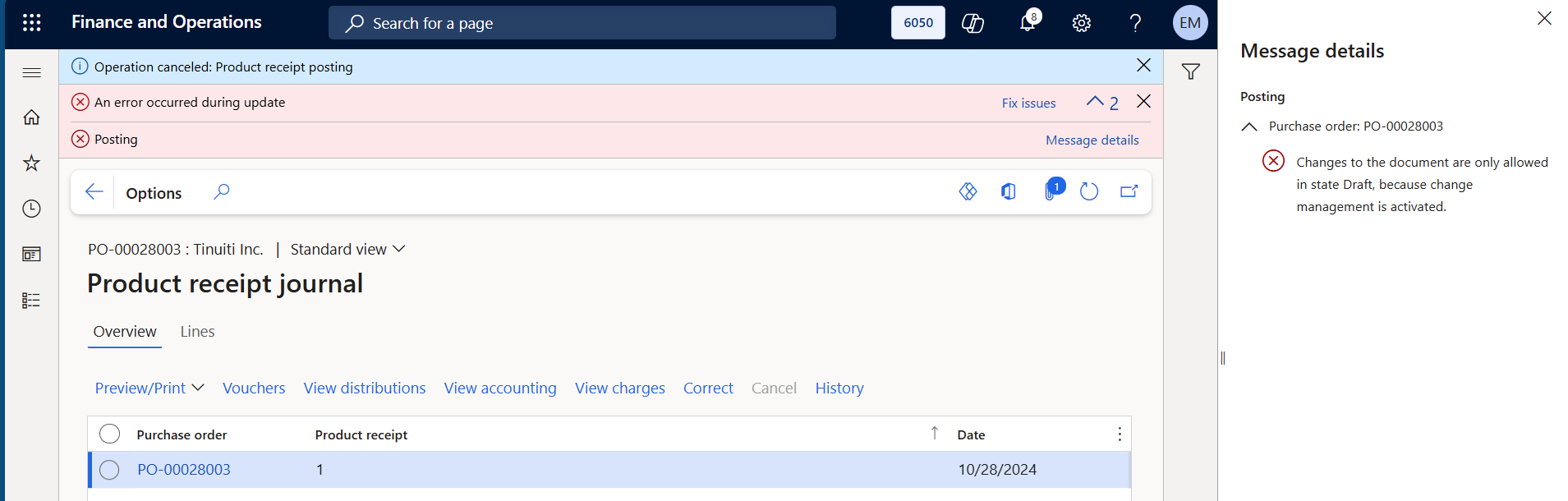
Changes to the document are only allowed in state Draft, because change management is activated.

(1) ShareShare
ReportReport
Posted on by 13

Hello, everyone.

I’m facing this issue above while trying to correct a product receipt that has already been completed, and below are the attempts I’ve conducted so far:


  1. Status change to Draft: I changed the order status to Draft, but the system does not allow me to use the correction button, stating that the action can only be performed when the status is Confirmed.

  2. Deactivation of Activate change management: I have already disabled the Activate change management flag directly in the purchase order (Header > Setup), through code changes, but the error persists.

  3. Workflow resend: I canceled the workflow and resent it. Since the order had already been approved earlier, it was automatically updated to Confirmed status.


In a previous situation, I encountered a similar issue when trying to perform a product receipt. The system displayed the same error message, and through code analysis, the developer identified that the receipt number I was trying to use had already been used in another order that had already been invoiced. As a result, the system was pulling data from that other PO, even though there was no restriction preventing the same ID from being used for identification.

At that time, I simply changed the receipt identification number, and the process went through smoothly.

However, this time the situation is different: I’m trying to correct a receipt that has already been processed, so I can’t change the ID, and the developer has confirmed that the system is not pulling data from another order.

If anyone has encountered something similar or has any suggestions, I would greatly appreciate it!

I have the same question (0)
  • Suggested answer
    Danny Bilodeau Profile Picture
    4,918 Super User 2025 Season 2 on at
    Hi, 
    From the message, it looks like system does not like the date change required. It seems that its that Date change that is being rejected because of change management. So you cant correct the packing slip because a date needs to be updated (require PO to be at draft) and you cant correct packing slip for a PO that is in draft.  
     
    I think you have to identify the date field that teh Packing Slip correction wants to update and adjust it on your PO before hand.  May be your developer can trace to identify that field.  
  • CU08052144-1 Profile Picture
    13 on at
    Hello @Danny Bilodeau

    This message appears both when the process is successful and when it fails, as it's configured just as a warning. I removed it from the post to avoid any confusion.

    Unfortunately, it's not related to the error, but thank you.
  • Suggested answer
    Navneeth Nagrajan Profile Picture
    2,430 Super User 2025 Season 2 on at
    HI CU08052144-1,
     
    A few suggestions:
    1. At the first step itself, if the purchase order workflow is activated and if the status changes to approved, it is better to reset the workflow back through X++ code to draft state. In addition to this, it is better to re-add the purchase order lines relevant to the product receipt number back.
     
    2. However, the step number 3 that you mentioned where your workflow is Cancelled and the order automatically changes back to Confirmed state, should allow you to correct the order line if the workflow status is set back to Draft state and post that ensure the workflow is approved by the Approver. Another point is to use a different receipt number while correcting your product receipt for the same PO to avoid any challenges.
     
    Ensure that the product receipt number if used is corrected to a different receipt number for the same PO you are looking to process.
     
    Hope this helps. Happy to answer questions, if any.
  • Verified answer
    CU08052144-1 Profile Picture
    13 on at

    Just to provide an update:

    The issue was not related to the status after all. The root cause was that, although the system allows the same product receipt number to be used multiple times across different vendors and purchase orders, this eventually caused a conflict in the code.

    The system began interpreting that we were trying to correct a purchase order that had already been invoiced, since it shared the same product receipt number as the current PO we were working on.

    To resolve the issue, we deployed a custom script to change the product receipt number on the current purchase order, which allowed us to proceed without further issues.

    Thank you very much!

Under review

Thank you for your reply! To ensure a great experience for everyone, your content is awaiting approval by our Community Managers. Please check back later.

Helpful resources

Quick Links

Responsible AI policies

As AI tools become more common, we’re introducing a Responsible AI Use…

Neeraj Kumar – Community Spotlight

We are honored to recognize Neeraj Kumar as our Community Spotlight honoree for…

Leaderboard > Supply chain | Supply Chain Management, Commerce

#1
Laurens vd Tang Profile Picture

Laurens vd Tang 296 Super User 2025 Season 2

#2
Siv Sagar Profile Picture

Siv Sagar 178 Super User 2025 Season 2

#3
André Arnaud de Calavon Profile Picture

André Arnaud de Cal... 123 Super User 2025 Season 2

Last 30 days Overall leaderboard

Featured topics

Product updates

Dynamics 365 release plans
