web
You’re offline. This is a read only version of the page.
close
Skip to main content

Announcements

No record found.

News and Announcements icon
Community site session details

Community site session details

Session Id :
Microsoft Dynamics AX (Archived)

How add new field in Voucher Transaction?

(0) ShareShare
ReportReport
Posted on by 3,805

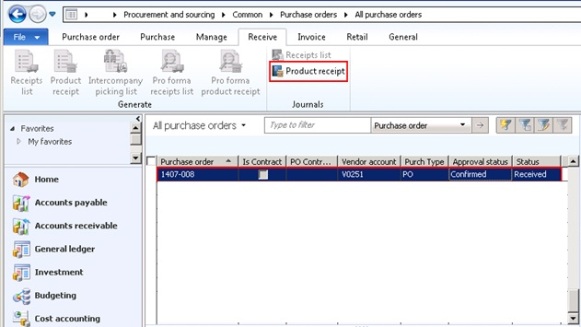
I have Purchase Order (PO) with status Received.

I click item menu Product receipt.
0412.5.jpg

in form product receipt.

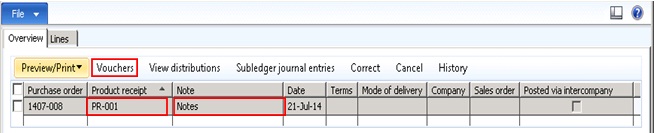
in grid, i add new field Note with product receipt code PR-001.. This field is located in VendPackingSlipJour.

And then i click Vouchers.
0601.6.jpg

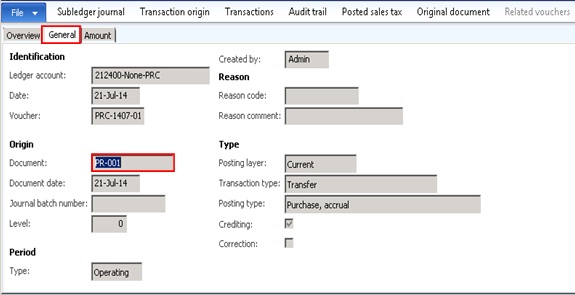
Tab General in Vouchers Transaction.

i see label Document with code like product receipt PR-001.. This field is located in GeneralJournalEntry.

Can i add new field in here?

Or, How can product receipt from VendPackingSlipJour entry in GeneralJournalEntry?
Help guide me.

What can i do.

Thanks...

*This post is locked for comments

I have the same question (0)
  • dolee Profile Picture
    11,279 on at

    Hi Pii,

    Isn't this the same question as community.dynamics.com/.../288135.aspx

    Did you try the suggestions and what kind of problems you having?

  • fajar Profile Picture
    3,805 on at

    Thanks Dominic Lee..

    Yes, you said "modify the \Classes\PurchFormLetter_PackingSlip\afterOperationBody method to add the "Note" field value to the voucher".

    In the method, i just see ::

    protected void afterOperationBody()

    {

       super();

       if (!this.purchParmUpdate().Proforma  && !this.isInBatch())

       {

           this.runShipCarrier();

       }

    }

    Where i can put the "Note" field value to the voucher ?

    Thanks..

  • fajar Profile Picture
    3,805 on at

    Anybody help me please..

    What class or methods for send data field from VendPackingSlipJour to Voucher Transaction..

    Thanks

Under review

Thank you for your reply! To ensure a great experience for everyone, your content is awaiting approval by our Community Managers. Please check back later.

Helpful resources

Quick Links

Introducing the 2026 Season 1 community Super Users

Congratulations to our 2026 Super Stars!

Meet the Microsoft Dynamics 365 Contact Center Champions

We are thrilled to have these Champions in our Community!

Congratulations to the April Top 10 Community Leaders

These are the community rock stars!

Leaderboard > 🔒一 Microsoft Dynamics AX (Archived)

#1
CP04-islander Profile Picture

CP04-islander 24

#2
Michel ROY Profile Picture

Michel ROY 14

#3
Jagadabi Profile Picture

Jagadabi 6

Last 30 days Overall leaderboard

Featured topics

Product updates

Dynamics 365 release plans
