web
You’re offline. This is a read only version of the page.
close
Skip to main content

Announcements

No record found.

News and Announcements icon
Community site session details

Community site session details

Session Id :
Microsoft Dynamics AX (Archived)

Transfer order completed receive but still pending quantity in "receive remain"

(0) ShareShare
ReportReport
Posted on by

Hi All,

I got an issue on Transfer order, I did received all quantity already, but there is still pending 1 Qty in "Remain Receive" column.

In this journal, I just enter 100 Qty, shipped: 100, Received: 100 -> but why still pending 1 Qty there?
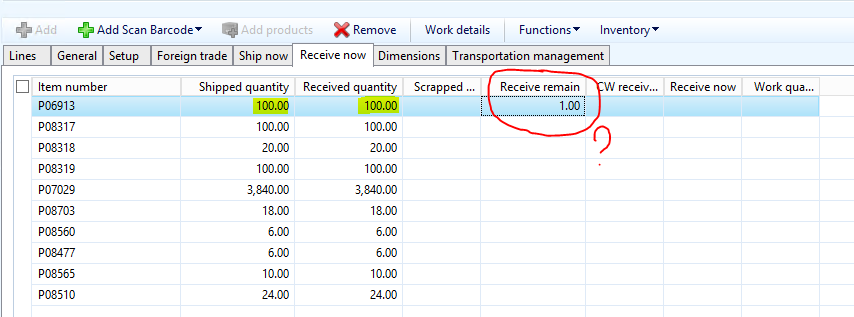
TO1.PNG

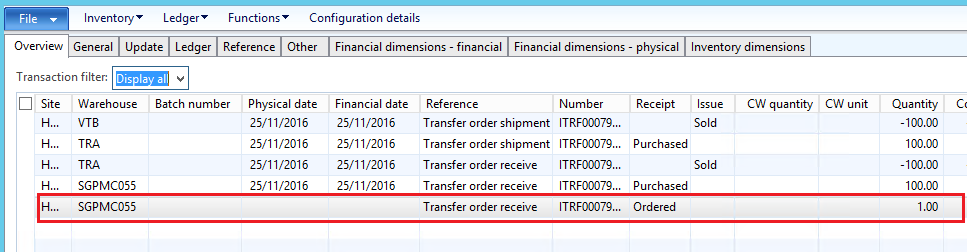
Inventory transaction:

6116.TO2.PNG

The "Cancel Delivery remainder" function is disable on this journal.

Please let me know how can I cancel this pending quantity?

Thank you.

*This post is locked for comments

I have the same question (0)
  • Verified answer
    Community Member Profile Picture
    on at

    Hi nglehang.

    We both know there is a bug in this situation. So you must open a call with Microsoft or your partner. You can even look for a solution on LCS portal, maybe there already a KB for solve this bug. For now I could recommend that you try to cancel pending quantity but you already had tried to do it.

    The only way that I Know to solve it for now is through inventTrans table. First you need to find out the inventTransOrigin of that transaction, then you'll be able to find out the register in inventTrans.

    1. Open inventTransOrigin table trough AOT.

    2. In  referenceID field enter with transfer order number.

    3. Filter by ItemID.

    4. Copy recID.

    5. Open inventTrans table and open the filter by grid.

    6. In inventTransOrigin field, paste the inventTransOrigin recID that you just copied trough inventTransOrigin table.

    7. Filter by itemID.

    8. Find out what line has that 1 quantity ordered.

    9. Remove the line.

    Be careful for not remove wrong line.

    I hope had helped you.

    Regards.

    Richardson.

  • Community Member Profile Picture
    on at

    Thank you a lot, Richardson.

    I will try to do as you suggested.

Under review

Thank you for your reply! To ensure a great experience for everyone, your content is awaiting approval by our Community Managers. Please check back later.

Helpful resources

Quick Links

Introducing the 2026 Season 1 community Super Users

Congratulations to our 2026 Super Stars!

Meet the Microsoft Dynamics 365 Contact Center Champions

We are thrilled to have these Champions in our Community!

Congratulations to the April Top 10 Community Leaders

These are the community rock stars!

Leaderboard > 🔒一 Microsoft Dynamics AX (Archived)

#1
CP04-islander Profile Picture

CP04-islander 24

#2
Michel ROY Profile Picture

Michel ROY 14

#3
Jagadabi Profile Picture

Jagadabi 6

Last 30 days Overall leaderboard

Featured topics

Product updates

Dynamics 365 release plans