web
You’re offline. This is a read only version of the page.
close
Skip to main content

Notifications

Announcements

No record found.

Community site session details

Community site session details

Session Id :
Small and medium business | Business Central, N...
Answered

SQL query to join Item table and Record Link

(1) ShareShare
ReportReport
Posted on by 1,299

Hi Experts,

I am new to NAv and i am trying to pull out a report from NAV DB joining the Items table and the record link table, but seems that the Record Link ID in the Record Link table is just a bunch of numbers and basically now i dont know on which column should i be joining these two table, please help me here. I just need a sql query.

Thanks in advance for your help.

I have the same question (0)
  • Davyjones Profile Picture
    1,299 on at

    Is there no solution to this in SQL?

  • Verified answer
    Robert B. Profile Picture
    257 on at

    Hi Davyjones,

     You mentioned joining in SQL, so if you really need to do things in SQL, ask a Microsoft Partner to create a RecordID field type in the item table and update it with the associated value of the Item record with a processing only report.

      Let me know if you need help with that.

     Also on insert event of the item table this field needs to be populated. you can use these functions, just that I update a variable there instead of a new field.
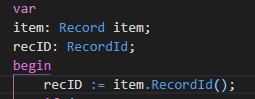
    pastedimage1572464979955v1.png

      That will give you the relation you need for SQL joins. 

    Cheers,

    Robert

    Please verify my answer, if you find it useful, that way others can find this solution easier!

  • Davyjones Profile Picture
    1,299 on at

    Hi Robert,

    Thanks for your response, I am kind of new to NAV, so basically you are suggesting that we create a new field and then update each repord in the item table for corresponding records type, is that right?  Can you please let me know or share link on how to create a RecordID field type in the item table.

    Thanks in advance for your response.

  • Suggested answer
    Robert B. Profile Picture
    257 on at

    Hi Davyjones,

      You can use a new field of type recordID to store the value.

       I pasted that snippet I wrote at the time with a variable, but it can be easily a new field created like this:

    pastedimage1573586066503v1.png

    Cheers,

    Robert

    Please verify my answer, if you find it useful, that way others can find this solution easier!

  • Davyjones Profile Picture
    1,299 on at

    This seems to be a good solution, but i dont think we can do this. I am still looking for a sql query to do it and i think there should be some way.

Under review

Thank you for your reply! To ensure a great experience for everyone, your content is awaiting approval by our Community Managers. Please check back later.

Helpful resources

Quick Links

Responsible AI policies

As AI tools become more common, we’re introducing a Responsible AI Use…

Neeraj Kumar – Community Spotlight

We are honored to recognize Neeraj Kumar as our Community Spotlight honoree for…

Leaderboard > Small and medium business | Business Central, NAV, RMS

#1
OussamaSabbouh Profile Picture

OussamaSabbouh 2,092

#2
YUN ZHU Profile Picture

YUN ZHU 663 Super User 2025 Season 2

#3
Sumit Singh Profile Picture

Sumit Singh 515

Last 30 days Overall leaderboard

Featured topics

Product updates

Dynamics 365 release plans



