web
You’re offline. This is a read only version of the page.
close
Skip to main content

Announcements

No record found.

News and Announcements icon
Community site session details

Community site session details

Session Id :
Finance | Project Operations, Human Resources, ...
Suggested Answer

Different approval flows per vendor in vendor invoice workflow

(2) ShareShare
ReportReport
Posted on by 27

Hallo Forum.

I am trying to set up a vendor invoice workflow in accounts payable. The solution is to solve a request where the client wants to different approval flows based on the vendor account.

Currently I have created a solution in the workflow designer, but I really don't think this is the most optimal way. 
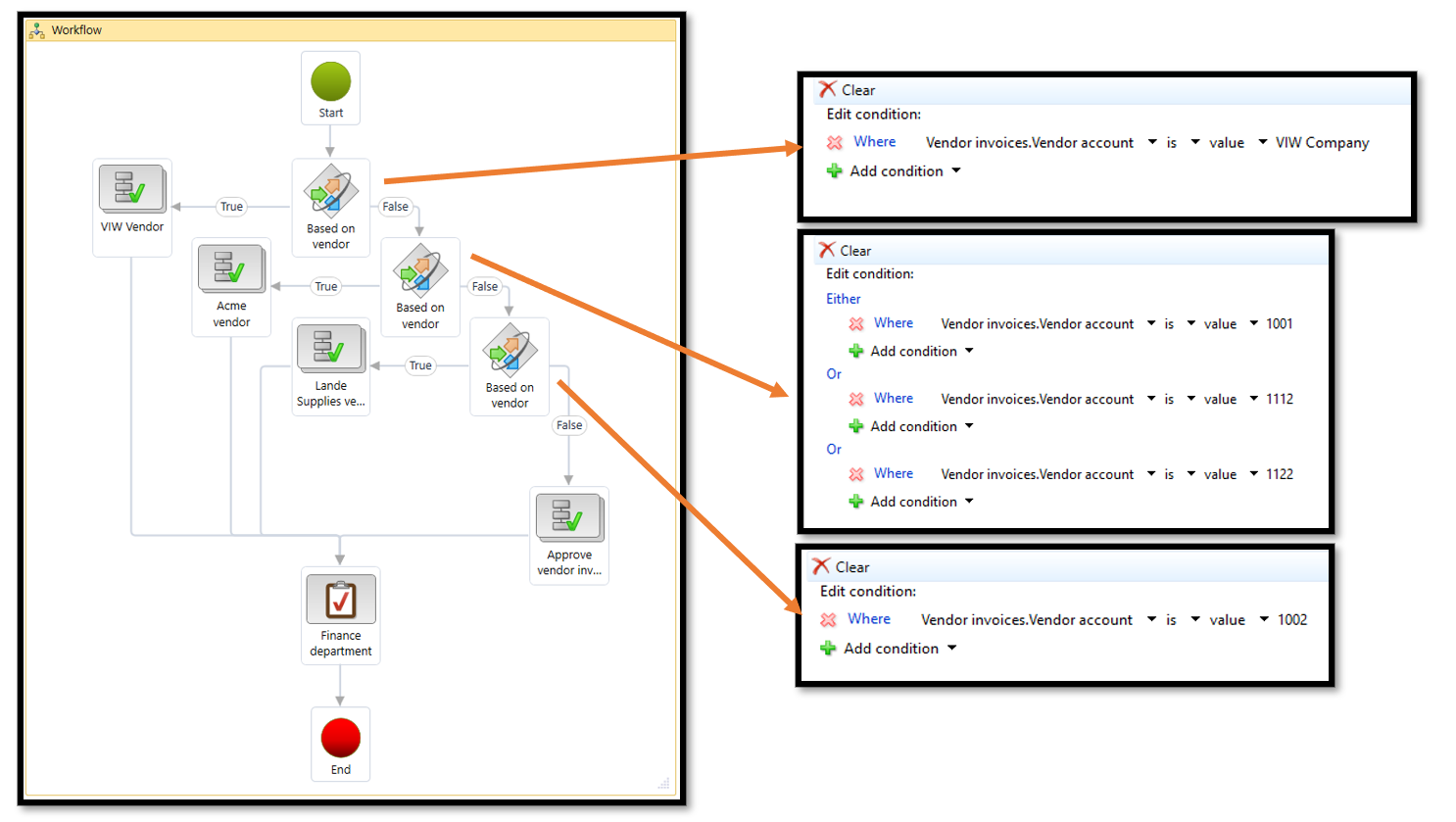
pastedimage1682619932527v1.png

Would there be a better solution where you can go into each of the vendors and select a "workflow id" which should be used then this vendor account is being used in an invoice?

Example: If Vendor account A submits an invoice it will active workflow id: 555.

Example: If Vendor account B or Vendor account C submits an invoice it will active workflow id: 777.

Example: If Vendor account D, Vendor account E or Vendor account F submits an invoice it will active workflow id.950.

It would be easier to maintain if you could simple select a default Workflow ID in the vendor, instead of going into the workflow and add the Vendor account to the conditional decision

I have the same question (0)
  • André Arnaud de Calavon Profile Picture
    303,347 Super User 2026 Season 1 on at

    Hi Benjamin,

    Can you elaborate on the differences and why they need to have a different route per vendor? When understanding the exact business requirement, there can be different solutions.

  • Benjamin N. Profile Picture
    27 on at

    Hallo André - I haven't had a meeting with the client yet. But I was asked to prepare a short presentation showing different ways of working with different routes for per vendor in the workflow.

    I guess it would have something to do with them wanting Vendor A to be approval by Dimension owners, Vendor B by Signing limits and Vendor C by a third option. I am not sure about that.

    Andre do you know if there is a way to set a default workflow per vendor? Example would be:

    I always want Workflow id 555 to run for Vendor A, And Workflow id 666 for Vendor B?  - Can you somehow set that up on the vendor itself?

    thank you.

  • Suggested answer
    saurabh bharti Profile Picture
    15,039 Moderator on at

    Hi,

    If that's the client requires to divert approval flow for different approvers then you can explore reason but lets say if you have to do do based on vendor ID.

    I would suggest not to do at vendor ID because in future if you have new vendor then what? Will you modify workflow every time? Not  a best practice.

    Instead you can identify a field like vendor group, segment, subsegment, purchase pool etc... or something and define workflow based on that so that you need not to change workflow every time

  • Anton Venter Profile Picture
    20,635 Super User 2026 Season 1 on at

    If I understand correctly, I would stick to a single workflow if I were you. I don't think it's possible to switch the workflows dynamically but I might be wrong about that.

  • Suggested answer
    André Arnaud de Calavon Profile Picture
    303,347 Super User 2026 Season 1 on at

    Hi Benjamin,

    Per workflow, you can set activation conditions to be able to meet this requirement. However, also like mentioned above, it would be better to have easy maintenance for the future. Talk with the customer and guide him to avoid pains in the future.

    If he has valid reasons, you might consider creating a customization with settings outside of the workflow configuration and use a custom participant provider to read the workflow configurations and provide approvers based on settings in a custom table.

Under review

Thank you for your reply! To ensure a great experience for everyone, your content is awaiting approval by our Community Managers. Please check back later.

Helpful resources

Quick Links

Introducing the 2026 Season 1 community Super Users

Congratulations to our 2026 Super Stars!

Congratulations to our 2025 Community Spotlights

Thanks to all of our 2025 Community Spotlight stars!

Leaderboard > Finance | Project Operations, Human Resources, AX, GP, SL

#1
André Arnaud de Calavon Profile Picture

André Arnaud de Cal... 509 Super User 2026 Season 1

#2
Giorgio Bonacorsi Profile Picture

Giorgio Bonacorsi 375

#3
Adis Profile Picture

Adis 268 Super User 2026 Season 1

Last 30 days Overall leaderboard

Product updates

Dynamics 365 release plans
