web
You’re offline. This is a read only version of the page.
close
Skip to main content

Announcements

News and Announcements icon
Community site session details

Community site session details

Session Id :
Microsoft Dynamics CRM (Archived)

Removing business unit in gamification

(0) ShareShare
ReportReport
Posted on by 7

Hi, 

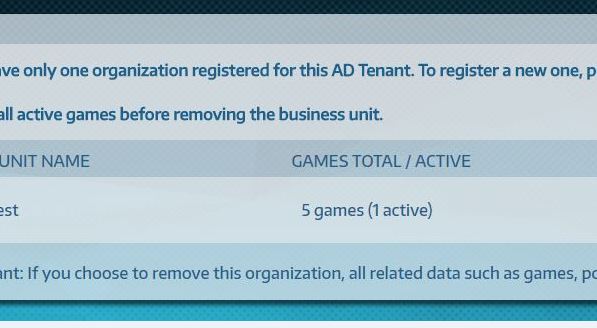
I'm having problems changing my Gamification organization. I installed Gamification to our test environment and then tested a couple of games. Now it shows that I have 5 games and 1 of them is still in active status. I believe this one active is the game I removed in Saved games mode (the game was not yet activated) and now I can't find it anywhere to activate and close it. And prior to this I can't remove the organization and change it to our production instance. Can somebody help me what to do next?
gamification2.JPG

*This post is locked for comments

I have the same question (0)
  • Suggested answer
    Rajkumar Rajaraman Profile Picture
    on at

    At first you need to delete/remove/assign-another-BU teams which is on that business unit.

    After that disabled your BU

    Than try to delete BU

  • Katsku Profile Picture
    7 on at

    Thanks for your quick reply. I am not sure I understand. I can't delete the current organization from gamification, since there is that one active game and I can't find it anywhere, it lingers in the air...    

  • Suggested answer
    Rajkumar Rajaraman Profile Picture
    on at

    Refer this article:

    crmtipoftheday.com/.../tip-887-gamification-and-multiple-organizations

    Hope this helps

  • Katsku Profile Picture
    7 on at

    Thanks again! That's the article I red and tried to do as it says, but all I get in the production environment is a blank page. When I hit the start activation, I do not get an activation code or a choice to deactivate the other tenant. All I get is a blank page, with on empty field for the activation code.

  • Suggested answer
    Rajkumar Rajaraman Profile Picture
    on at

    Have you noticed a new Area has been added to the Sitemap dedicated to Gamification related elements.

    Refer this article:

    www.magnetismsolutions.com/.../how-to-setup-gamification-in-dynamics-365

  • Katsku Profile Picture
    7 on at

    I have noticed and did everything as in the article. I ques my problem is that when I try to activate Gamification in prod environment I do not get the window stating that organization has been registered and security key. At this point of the process I only see empty field for the Security key.

Under review

Thank you for your reply! To ensure a great experience for everyone, your content is awaiting approval by our Community Managers. Please check back later.

Helpful resources

Quick Links

Season of Sharing Community Challenge Winners!

Congratulations to our community stars!

Women in Power Builds Momentum

Expanding mentorship, skilling, and AI innovation

Congratulations to the July Top 10 Community Leaders

These are the community rock stars!

Leaderboard > 🔒一 Microsoft Dynamics CRM (Archived)

#1
RichardM Profile Picture

RichardM 1

Last 30 days Overall leaderboard

Featured topics

Product updates

Dynamics 365 release plans
