web
You’re offline. This is a read only version of the page.
close
Skip to main content

Announcements

No record found.

News and Announcements icon
Community site session details

Community site session details

Session Id :
Supply chain | Supply Chain Management, Commerce
Suggested Answer

Asset Management: Suppress overlapping maintenance jobs

(1) ShareShare
ReportReport
Posted on by 6
Hello

I have an issue with setup in asset management, specifically maintenance plans.
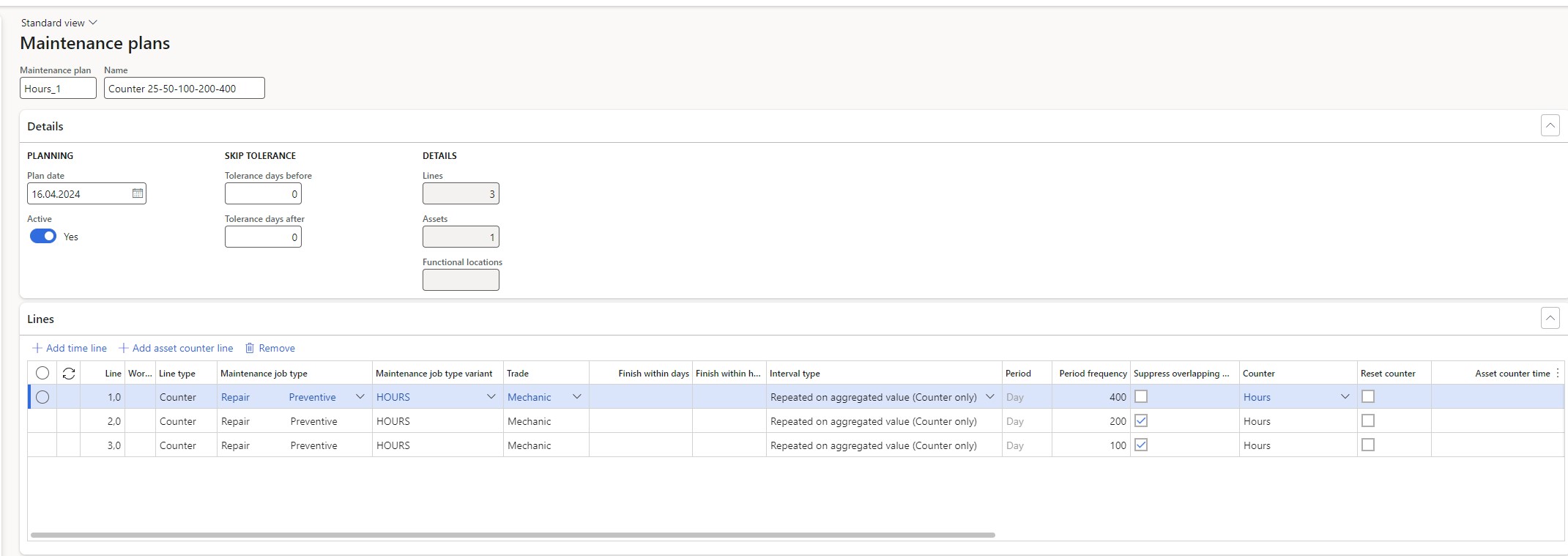
// When i update counter with 100h and run the plan, maintenance request is created.
But if i update the counter with another 100h and re run the plan, another request is getting created and now i have two requests but there should only be one ( the newest one created for 200h ),
according to the setup it should suppress the previous one. ( testing was done with Tolerance days Set up but i did not received desired outcome ).

Also i have tried this scenario: Registered counter for 400 hours, rerun the plan and 3 maintenance schedule lines were created instead of one. According to the MS Documentation, there should be one line created.
I have also tested it with setup of Tolerance days /Before/ and /After/ but i have received same outcome.

Thanks in advance to everyone insights provided.
I have the same question (0)
  • Suggested answer
    Kevin Xia Profile Picture
    Microsoft Employee on at
    Hi,
    You can check out this official document: Maintenance plans - Supply Chain Management | Dynamics 365 | Microsoft LearnA maintenance plan defines when a pre-planned preventive maintenance job is to be carried out on an asset.
    Best regards,
    Kevin
  • CU27040843-2 Profile Picture
    5 on at
    Hello Kevin Xia,

    Thank you for your answer,

    This issue is based on "counter line".

    For example, we need to change the oil filter to 100km / 200 km / 300 km.

    Now we import one counter for 100 km and the M.P will create 1 work order or schedule line, but we decided not to change the oil filter on 100 km.
    Now we import one more counter for 100 km ( now they are 200km) and the M.P will create one more work or schedule line, but if we put tolerance days or suppers overlap ... nothing happens.... in other words we don't need two work orders ... all we need is 1 work order.

    We made the correct setup:
    1st line: 300km
    2nd line: 200 km 
    3rd line: 100 om

    Thank you,
    All the best,
    Alek


  • Suggested answer
    CU01081050-1 Profile Picture
    4 on at
    Hi, as per Microsoft documentation, this behavior is by design. The Suppress Overlap function does not support the interval type you used.

Under review

Thank you for your reply! To ensure a great experience for everyone, your content is awaiting approval by our Community Managers. Please check back later.

Helpful resources

Quick Links

Introducing the 2026 Season 1 community Super Users

Congratulations to our 2026 Super Stars!

Meet the Microsoft Dynamics 365 Contact Center Champions

We are thrilled to have these Champions in our Community!

Congratulations to the April Top 10 Community Leaders

These are the community rock stars!

Leaderboard > Supply chain | Supply Chain Management, Commerce

#1
André Arnaud de Calavon Profile Picture

André Arnaud de Cal... 152 Super User 2026 Season 1

#2
Laurens vd Tang Profile Picture

Laurens vd Tang 116 Super User 2026 Season 1

#3
Zain Mehmood Profile Picture

Zain Mehmood 89 Most Valuable Professional

Last 30 days Overall leaderboard

Product updates

Dynamics 365 release plans
