web
You’re offline. This is a read only version of the page.
close
Skip to main content

Notifications

Announcements

No record found.

Community site session details

Community site session details

Session Id :
Microsoft Dynamics CRM (Archived)

CRM 2013 server-side sync issue: a server certificate required to connect to the email server using SSL could not be validated

(0) ShareShare
ReportReport
Posted on by 1,032

Hello,

I am having my first go with the CRM 2013 server-side sync with Exchange 2010. However I am having some issues with the self-signed SSL certificate I have generated.

Basically I started following the instructions on the blog post by Nuno Costa. I proceeded to generate a self-signed SSL certificate for my Dynamics CRM implementation, and I accessed my CRM through the https://crmserver.domain.local which seems to be working fine. The issue I have, however, is that CRM 2013 has issues with the certificates as it tells me in the alerts when I try to test a mailbox:

Email cannot be received for the mailbox <mailbox name> because a server certificate required to connect to the email server using SSL could not be validated. The mailbox has been disabled for receiving email and the owner of the email server profile <profile name goes here> has been notified.

Could someone please advise how to sort out this issue? Below is a screenshot of my Server Profile configuration.
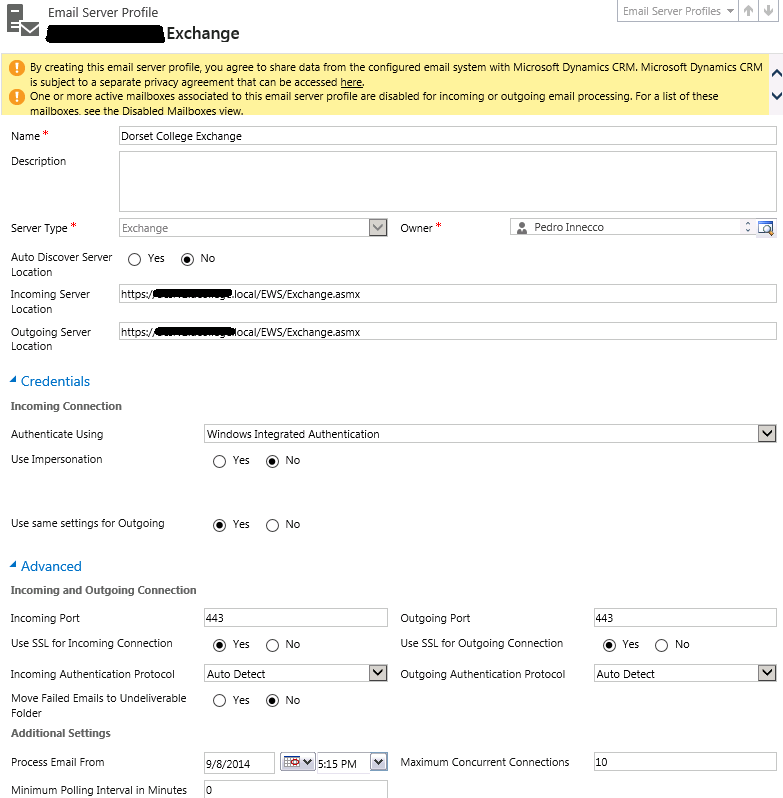
Thanks in advance.

Regards,
P.

*This post is locked for comments

I have the same question (0)
  • Kamakshi Parate Profile Picture
    on at

    Hello Pedro,

    You can take a loot at this article :-

    www.microsoft.com/.../set-up-email-through-server-side-synchronization.aspx

    social.microsoft.com/.../serverside-synchronization-setup-on-premise-crm-2013-and-on-premise-exchange

    Regards,

    Kamakshi Parate

    Microsoft Dynamicsâ„¢ CRM Support Engineer

  • Verified answer
    pmdci Profile Picture
    1,032 on at

    Thanks but in the end solved the problem by importing the certificates of each server to one another. In the future I might do some something at the domain level.

  • Mark H Profile Picture
    5 on at

    I am currently experiencing the same problem.

    Can you provide further details on where you imported the certificates?

    Thanks

    Mark

  • markus yaldu Profile Picture
    20 on at

    Thanks for the solution.

Under review

Thank you for your reply! To ensure a great experience for everyone, your content is awaiting approval by our Community Managers. Please check back later.

Helpful resources

Quick Links

Responsible AI policies

As AI tools become more common, we’re introducing a Responsible AI Use…

Neeraj Kumar – Community Spotlight

We are honored to recognize Neeraj Kumar as our Community Spotlight honoree for…

Leaderboard > 🔒一 Microsoft Dynamics CRM (Archived)

#1
SA-08121319-0 Profile Picture

SA-08121319-0 4

#1
Calum MacFarlane Profile Picture

Calum MacFarlane 4

#3
Alex Fun Wei Jie Profile Picture

Alex Fun Wei Jie 2

Last 30 days Overall leaderboard

Featured topics

Product updates

Dynamics 365 release plans



