web
You’re offline. This is a read only version of the page.
close
Skip to main content

Notifications

Announcements

No record found.

Community site session details

Community site session details

Session Id :
Microsoft Dynamics CRM (Archived)

Execute workflow based on est.close date field in lead form

(0) ShareShare
ReportReport
Posted on by

I  need to execute my workflow  one day before estimated close date these date can be changed at any time workflow need to execute exactly 1 day before estimated close date. Here i have created workflow in the if condition i have checked the estimated close date again to filter the duplicate queues. but i dint know the exact condition. I want to check current date with estimated close date. Is it possible please guide me.
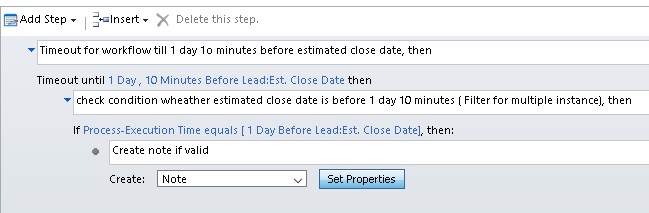
3005.Workflow2.jpg

*This post is locked for comments

I have the same question (0)
  • Suggested answer
    tw0sh3ds Profile Picture
    5,600 on at

    Your second condition does not make sense, Process-execution date will be hardly ever equal to any time (you would be lucky as it has to be exact same time, even with milliseconds!). You should leave only first condition (without this strange 10minutes...). So the workflow should wait until one day before, then it will create a note. I'm not sure what do you mean by duplicates in this case, you have to be more specific regarding your requirements.

  • Community Member Profile Picture
    on at

    I trigger this workflow on record creation and Est.close date( Estimated close date ) field change event. when i create record with one date means it will create note one day before that estimated close date after i update the  Est.close date( Estimated close date ) means another note has been updated one day before that new  Est.close date( Estimated close date ). New  Est.close date( Estimated close date ) workflow trigger will not affect the old trigger it create 2 notes. While i tried to update the Est. close date field simultaneously new instance of workflow has created but i want to create the note only with the latest estimated close date field value

  • Community Member Profile Picture
    on at

    Hi Prasanth

    I would like to recommend Tenfold for this integration.

    Our company Tenfold supports integration for MS Dynamics. Our CTI solution offers various functions to help you automate your sales call workflow like click to dial, call logging, easy task creation, among others. You can read more about the benefits of a Tenfold integration here: www.tenfold.com/.../dynamics

  • Verified answer
    tw0sh3ds Profile Picture
    5,600 on at

    Why are you triggering this workflow when you update Estimate Close Date? Unless the note was already created, the date in the workflow will be updated just fine you don't have to run the workflow again to update the waiting time. Unless you want to handle scenario when this date has passed and you change again the Est. close date and want the same logic from the beginning - in that case I think the only option would be some custom workflow activity

  • Community Member Profile Picture
    on at

    thank you pawel Gradecki can you give me the code to  handle scenario when the estimated date has passed and i change again the Est. close date Please help me it is very important for my project.

Under review

Thank you for your reply! To ensure a great experience for everyone, your content is awaiting approval by our Community Managers. Please check back later.

Helpful resources

Quick Links

Responsible AI policies

As AI tools become more common, we’re introducing a Responsible AI Use…

Neeraj Kumar – Community Spotlight

We are honored to recognize Neeraj Kumar as our Community Spotlight honoree for…

Leaderboard > 🔒一 Microsoft Dynamics CRM (Archived)

#1
SA-08121319-0 Profile Picture

SA-08121319-0 4

#1
Calum MacFarlane Profile Picture

Calum MacFarlane 4

#3
Alex Fun Wei Jie Profile Picture

Alex Fun Wei Jie 2

Last 30 days Overall leaderboard

Featured topics

Product updates

Dynamics 365 release plans



