web
You’re offline. This is a read only version of the page.
close
Skip to main content

Announcements

No record found.

News and Announcements icon
Community site session details

Community site session details

Session Id :
Microsoft Dynamics AX (Archived)

Error in P-Job in retail

(0) ShareShare
ReportReport
Posted on by 505

Hi Friends,

i am getting the SQL time our error while running the P-JOB in retail we have 55 stores in that 15 stores are getting the SQL time out error. for the same stores download sessions jobs are getting applied without any issue. pjob-error.JPG

Kindly provide your suggestions 

*This post is locked for comments

I have the same question (0)
  • Suggested answer
    Rodolfo Recalde Profile Picture
    on at

    Hi Ramesh,

    What is the AX version? prior to CU12?


    ***

    Check this KB:

    KB 3192079 Process status messages is throwing timeout errors
    Product and version: AX 2012 R3
    Release: CU12
    Fix type: Hybrid update
    Released Date: 10/20/2016

    PROBLEM
    Process status messages is throwing timeout errors.


    DESCRIPTION OF CHANGE
    Allow 'Timeout" configuration for metadata sync in Retail scheduler parameters form
    Add more indexes to HQMessageDB
    Improve HQMessageDB stored proc performance
    Ship an upgrade script for HQMessageDB


    ***

    With this KB installed, you can set the timeout time.

    Retail > Setup > Parameters > Retail Scheduler Parameters > General > Metadata sync SQL Timeout in seconds (Figure 1)
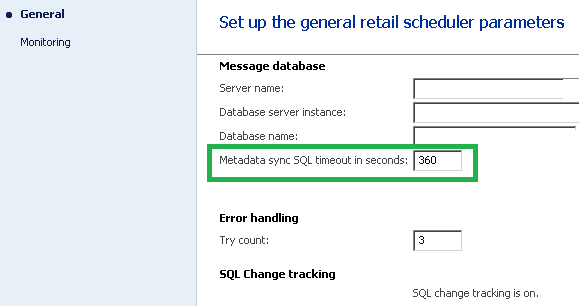
    RetailSchedulerParamDAX_5F00_Recalde.png

    Figure 1

    Other alternatives you can explore to try to solve the problem:

    1. Check for missing index in Async Server Mesage database.

    2. Delete old upload sessions (posted transactions)

    3. Always run the process in batch. Recursively (Decreasing the row of records to update).

    In most cases, options 1, 2 and 3  solve this problem. If you have a many number of records, stores and downlods sessions, verify the option 4.

    4. Modify Class > RetailCDXMonDataSync, Method > Run

    add property > cmd.set_CommandTimeout([NewTimeout]);

    in object (cmd = new System.Data.SqlClient.SqlCommand)

    (30 seconds is default value in System.Data.SqlClient) (Attention, it is exactly change that the KB modifies. Preferably, install KB. If you do not have the viability of time to upgrade the KB, customization can be an alternative)

    I Hope this Helps!

    Regards,

    Rodolfo Recalde.

Under review

Thank you for your reply! To ensure a great experience for everyone, your content is awaiting approval by our Community Managers. Please check back later.

Helpful resources

Quick Links

Introducing the 2026 Season 1 community Super Users

Congratulations to our 2026 Super Stars!

Meet the Microsoft Dynamics 365 Contact Center Champions

We are thrilled to have these Champions in our Community!

Congratulations to the April Top 10 Community Leaders

These are the community rock stars!

Leaderboard > 🔒一 Microsoft Dynamics AX (Archived)

#1
CP04-islander Profile Picture

CP04-islander 39

#2
Michel ROY Profile Picture

Michel ROY 14

#3
imran ul haq Profile Picture

imran ul haq 8

Last 30 days Overall leaderboard

Featured topics

Product updates

Dynamics 365 release plans