web
You’re offline. This is a read only version of the page.
close
Skip to main content

Announcements

No record found.

News and Announcements icon
Community site session details

Community site session details

Session Id :
Customer experience | Sales, Customer Insights,...
Answered

Running a Flow - Showing user a "Flow was successful" message. How to achieve this?

(0) ShareShare
ReportReport
Posted on by 35

Hi everyone,

We have multiple flows in Dynamics 365. Some of them are manually triggered. When an user runs on of these flows, he/she starts it but do not get any information if everything was succesful. There is only a confirmation that the flow was started but not that is has finished. See screenshot:
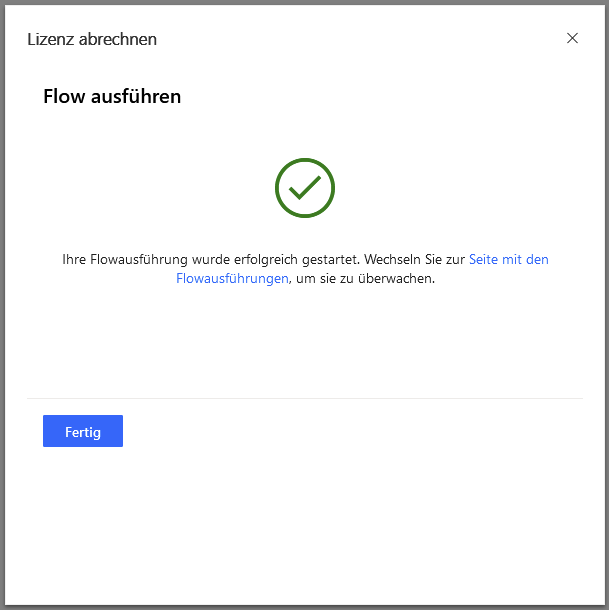
pastedimage1612529465000v1.png

I know that I can add an email notification to the flow but I need a way to show the user a pop up window or something similar.

Is there any way to achieve this? I looked into Triggers and Actions and could not find any possibility to do this.

Something like this would be enough:

pastedimage1612529605741v3.png

Thank you for any help!

I have the same question (0)
  • Verified answer
    meelamri Profile Picture
    13,218 User Group Leader on at

    Hi,

    Flows run asynchronously. There is no way to automatically detect the execution end of a flow.

    Javascript can be implemented to periodically check if the execution is finished thanks to a tag for example, but this requires a lot of development effort.  

    According to the Wave 1 2021 update, we will have the notification  feature on model driven app. So I recommend to wait for this feature. I guess we will be able to create an action on flow that will allow us to push the notification to a user.

    Notification feature will be available on June 2021

    pastedimage1612534353686v1.jpeg

    pastedimage1612534361065v2.jpeg

    https://docs.microsoft.com/en-us/power-platform-release-plan/2021wave1/power-apps/model-driven-app-adds-in-app-notifications

  • sits-ww Profile Picture
    35 on at

    Thank you! Thats really good news! We will wait

Under review

Thank you for your reply! To ensure a great experience for everyone, your content is awaiting approval by our Community Managers. Please check back later.

Helpful resources

Quick Links

Introducing the 2026 Season 1 community Super Users

Congratulations to our 2026 Super Stars!

Meet the Microsoft Dynamics 365 Contact Center Champions

We are thrilled to have these Champions in our Community!

Congratulations to the March Top 10 Community Leaders

These are the community rock stars!

Leaderboard > Customer experience | Sales, Customer Insights, CRM

#1
ManoVerse Profile Picture

ManoVerse 184 Super User 2026 Season 1

#2
11manish Profile Picture

11manish 138

#3
CU11031447-0 Profile Picture

CU11031447-0 100

Last 30 days Overall leaderboard

Product updates

Dynamics 365 release plans
