web
You’re offline. This is a read only version of the page.
close
Skip to main content

Announcements

No record found.

News and Announcements icon
Community site session details

Community site session details

Session Id :
Microsoft Dynamics AX (Archived)

My Dropdown list disappear

(0) ShareShare
ReportReport
Posted on by 495

Hello Guys,

Need to understand what is happening here. Some time ago I was tasked to implement classification of items in our DB.

This is what I have done

1. find a table in AX that would give me all the items numbers/codes

2. in that table I added the fields with the classification. 4 fields to be exact. I could now go to AOT open the table and see each item with their classification.

3. I then open EcoResProductDetailsExtended form and added the fields, my 4 fields to the design. I then compile and I was able to see the drop-down list(really don't recall doing anything else)

when I open an item I was able to click on the form and add classification to an item but today I tried to do that but my dropdown list has gone. the only thing that there is the last information. see image below.
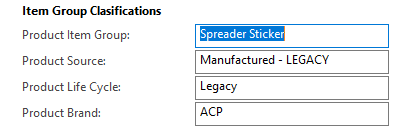
item-clasification.PNG

as you can see there is no drop-down list. so if I want to change the brand for this item I cant. 

Pleas,e can anyone help me with this? I would really appreciate it.

*This post is locked for comments

I have the same question (0)
  • Verified answer
    Catalyst619 Profile Picture
    355 on at

    Hi Lionel07,

    I would imagine the dropdown would come by giving your 4 custom fields an EDT (Extended Data Type) relating to your Product Item Group, Source, etc.

    Can you confirm those fields have an EDT assigned to them? If you add a 5th field, for example, a copy of "Product Item Group" and assign it the EDT, do you see the dropdown?  

    Make sure to compile your form and re-enter the module to see changes.

  • Lionel07 Profile Picture
    495 on at

    Thanks much Aleks, I didnt really understand how to use EDTs but i have done some readying and now I understand. thanks for your help.

  • Catalyst619 Profile Picture
    355 on at

    Awesome, I'm glad to hear. Feel free to mark your question as answered on the right side of my post if you feel it's been helpful.

Under review

Thank you for your reply! To ensure a great experience for everyone, your content is awaiting approval by our Community Managers. Please check back later.

Helpful resources

Quick Links

Introducing the 2026 Season 1 community Super Users

Congratulations to our 2026 Super Stars!

Meet the Microsoft Dynamics 365 Contact Center Champions

We are thrilled to have these Champions in our Community!

Congratulations to the March Top 10 Community Leaders

These are the community rock stars!

Leaderboard > 🔒一 Microsoft Dynamics AX (Archived)

#1
Joris dG Profile Picture

Joris dG 5

#2
Alexey Lekanov Profile Picture

Alexey Lekanov 2

#2
Henrik Nordlöf Profile Picture

Henrik Nordlöf 2 User Group Leader

Last 30 days Overall leaderboard

Featured topics

Product updates

Dynamics 365 release plans
