web
You’re offline. This is a read only version of the page.
close
Skip to main content

Notifications

Announcements

No record found.

Community site session details

Community site session details

Session Id :
Small and medium business | Business Central, N...
Suggested Answer

Purchase Order Report Dataset

(0) ShareShare
ReportReport
Posted on by 15

I'm trying to customize our Purchase Order Report (ID 1322, as Word Layout) so that I can insert a Cross Reference Number onto the report. When I open the Word Layout I click on the XML Mapping Pane and of course there is no variable that retrieves this information in order for me to insert it. I then go to Dynamics NAV Development Environment to add the variable I'm looking for (Cross Reference Number) to report 1322 and add it.

pastedimage1582135809250v1.pngpastedimage1582135809251v2.png

I go back to edit the Word Layout and the Variable is there, I add it and save it.

pastedimage1582135809251v3.png

When I run the report the Cross Reference does't show up 

pastedimage1582135809251v4.png

I know this vendor in particular has a cross reference set up in our system
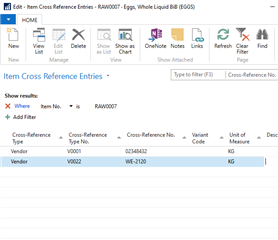
pastedimage1582135809252v5.png

What am I doing wrong? How could I make it so that the "Cross-Reference No." variable in Dynamics NAV Development Environment pulls the correct information in? Because the way its set up now it doesn't retrieve anything.

I have the same question (0)
  • Suggested answer
    Brian Wick Profile Picture
    on at

    Hello  - We currently do not have dedicated Dev support via the NAV/Dynamics 365 Business Central forums, but I wanted to provide you some additional resources to assist.  If you need assistance with debugging or coding I would recommend discussing this on one of our communities.

    www.yammer.com/dynamicsnavdev

    dynamicsuser.net/.../developers

    I will open this up to the community in case they have something to add.

  • Holo_AV Profile Picture
    96 on at

    Hi Jose

    Wanted to know if you got this solved. We have the same issue and need to put the Vendor Crossreference Number, in this case in our PO´s (50101 Report)

    Thanks

  • Suggested answer
    Renni Profile Picture
    960 on at

    Hello Have a look at report selections and make sure the new custom report is selected as the one to use it should say custom and your new report 

    3250.Capture.PNG

  • Holo_AV Profile Picture
    96 on at

    Each of our Items have a Crossreference in the POin the PO Custom Layout the field No_purchLine replace the Item#

    @Paul.thanks, the issue here is that we are unable to add as an extra field the cross-reference number in our Custom Report.

    Actually if an item has a cross reference field for the vendor, the PO takes that as the Item# and ignore our Item#. We want to be able to state both in the report, our Part# and the cross-reference# for that vendor. That is visible in the system in the PO, but not in the Custom Layout (to print/email) as we are unable to add that "extra field".

    Again, right now if the Item do not have a cross-reference# the system uses No_PurchLine as our Item #, but if the Item has a cross-reference#, that is replaced and becomes the No_PurchLine in the XML Mapping. So it is a bit confusing. In the XLM Mapping which code represent our Item# and which the Cross-reference item number? Why when a cross-reference # exist, replace ours in the Layout?

  • Suggested answer
    Renni Profile Picture
    960 on at

    Having a think about it and why do you need them both on the Purchase order ?

    You have them both on the purchase order screen.

    When the document prints it removes the reference you have and uses the cross reference which is the Vendors Item Number.

    This is ideal as the vendor does not recognise your item number so would not see it (stopping confusion at there end if it coincidently matches another item number of there's)

    When it comes back goods in will be able to find it from the PO number and see the item cross reference to book in

  • Holo_AV Profile Picture
    96 on at

    @Paul

    We need that our Vendor also work with our Item number as in many cases they will send that to a second Vendor to re-work, and the reference is our Item#, not theirs. That’s why we need it in the PO too

  • Suggested answer
    Renni Profile Picture
    960 on at

    Ok Fair enough :-)

    I was having a look as i use the RDLC layout more than the word layout and found this by an MVP i think this may help you

    thinkaboutit.be/.../

  • Holo_AV Profile Picture
    96 on at

    Thanks Paul, yes it seems this could help. I will try that.

  • Suggested answer
    Renni Profile Picture
    960 on at

    Did you manage to sort this ?

  • Holo_AV Profile Picture
    96 on at

    No. Sadly not yet

Under review

Thank you for your reply! To ensure a great experience for everyone, your content is awaiting approval by our Community Managers. Please check back later.

Helpful resources

Quick Links

Responsible AI policies

As AI tools become more common, we’re introducing a Responsible AI Use…

Neeraj Kumar – Community Spotlight

We are honored to recognize Neeraj Kumar as our Community Spotlight honoree for…

Leaderboard > Small and medium business | Business Central, NAV, RMS

#1
OussamaSabbouh Profile Picture

OussamaSabbouh 2,785

#2
Jainam M. Kothari Profile Picture

Jainam M. Kothari 1,007 Super User 2025 Season 2

#3
YUN ZHU Profile Picture

YUN ZHU 948 Super User 2025 Season 2

Last 30 days Overall leaderboard

Featured topics

Product updates

Dynamics 365 release plans
