web
You’re offline. This is a read only version of the page.
close
Skip to main content

Announcements

No record found.

News and Announcements icon
Community site session details

Community site session details

Session Id :
Finance | Project Operations, Human Resources, ...
Answered

How to take sales id from sales edit lines as parameter in post packing slip

(0) ShareShare
ReportReport
Posted on by 172

Hi there,

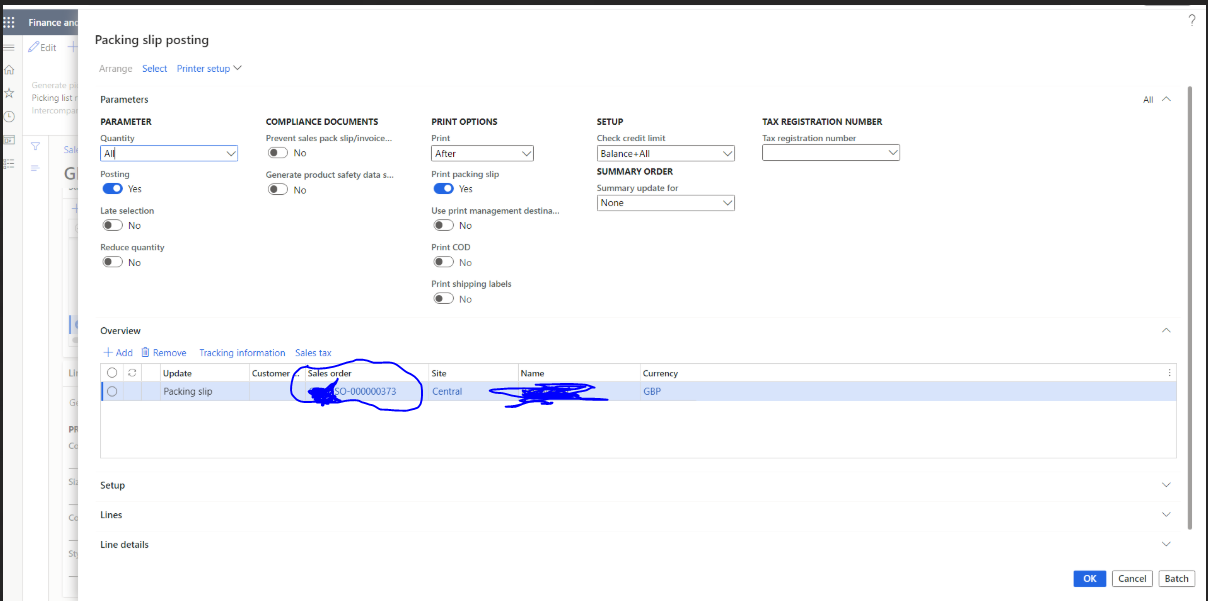
I need to add a custom report in post packing slip in place of sales packing slip, for that i attached my custom report using form setup > print management > sales packing slip > custom report

and to process that report i need to take salesid from sales edit lines as a parameter which I'm not getting how to achieve it. 
pastedimage1663053092503v3.png

After clicking on "Ok" my custom report will get generated but it needs that highlighted sales id as a parameter to process the report which I'm getting how to achieve it.

I have the same question (0)
  • Martin Dráb Profile Picture
    239,634 Most Valuable Professional on at

    Hmm, this dialog is used for parameters of packing slip posting. Are you sure that you want to use this instead of taking the information from the actual packing slip?

  • Ganesh Potnuru Profile Picture
    172 on at

    Hi Martin,

    The requirement is that i need to add a new custom report instead of the standard report which is generated after clicking on "Ok" , I thought that i need to take the sales id parameter from here to process the report for getting item name etc.. So, could you please suggest me which is the best way either from here or actual packing slip and how to take that sales id as parameter?

  • Verified answer
    Martin Dráb Profile Picture
    239,634 Most Valuable Professional on at

    When you click OK, a packing slip is posted and then the information about the packing slip is shown in a report. Therefore you want to use the packing slip itself, not the parameters that were used for creating the packing slip.

    To create a new design of the packing slip report, you'll need to duplicate and modify SalesPackingSlip report, register it in print management (possibly as a default) and configure it in print management. Regarding print management, look at PrintMgmtReportFormatPopulator and PrintMgmtDocType.getDefaultReportFormatDelegate.

Under review

Thank you for your reply! To ensure a great experience for everyone, your content is awaiting approval by our Community Managers. Please check back later.

Helpful resources

Quick Links

Introducing the 2026 Season 1 community Super Users

Congratulations to our 2026 Super Stars!

Meet the Microsoft Dynamics 365 Contact Center Champions

We are thrilled to have these Champions in our Community!

Congratulations to the April Top 10 Community Leaders

These are the community rock stars!

Leaderboard > Finance | Project Operations, Human Resources, AX, GP, SL

#1
Giorgio Bonacorsi Profile Picture

Giorgio Bonacorsi 802

#2
André Arnaud de Calavon Profile Picture

André Arnaud de Cal... 636 Super User 2026 Season 1

#3
Subra Profile Picture

Subra 534

Last 30 days Overall leaderboard

Product updates

Dynamics 365 release plans
