web
You’re offline. This is a read only version of the page.
close
Skip to main content

Notifications

Announcements

No record found.

Community site session details

Community site session details

Session Id :
Microsoft Dynamics CRM (Archived)

Contact - Case Associated View, Easy Customization Question

(0) ShareShare
ReportReport
Posted on by

If I select a Contact, then go to the sub-menu cases under that individual, I'm presented with the following "Case Associated View", but it never finds any cases. If I go to click "Add New Case" here, I found out why it doesn't find any cases. In my case entity, it would be looking for cases with this contact in the account field, rather than in my organization's contact field. Seems like a simple problem to me, how can I change this Case Associated View to look at a different field?
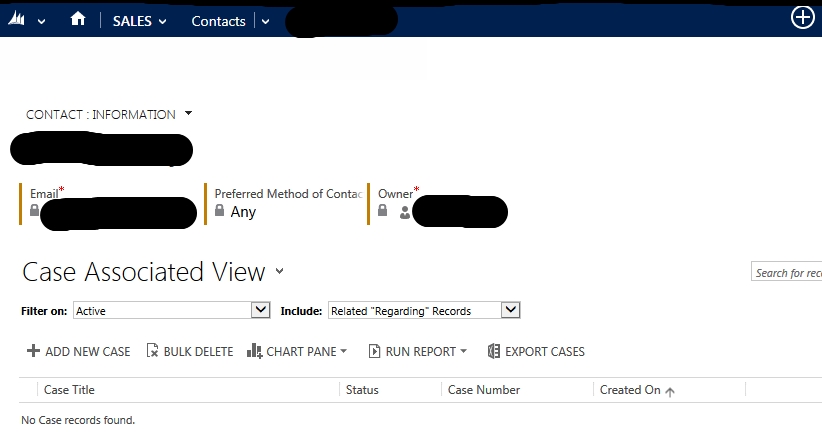
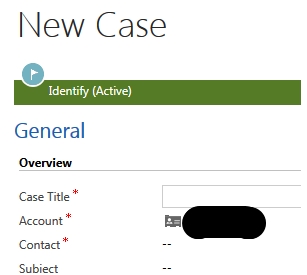
caseassociatedview.jpg

caseassociatedview2.jpg

*This post is locked for comments

I have the same question (0)
  • Suggested answer
    razdynamics Profile Picture
    17,308 User Group Leader on at

    Hi CRM User

    The Associated View is using the 1:N relationship Between Contact and Case, so You will need to make sure the case that is Created is Created from this, and not from another lookup . You can Create a Different Subgrid for other Custom lookups that will allow you to view the related records.

    Does this help? Kindly tick 'Yes' to Verify :)

    Best Wishes, Raz

  • Community Member Profile Picture
    on at

    Thank you for the quick reply Raz! My organization creates cases from a different area (Service - Cases - New Case) so I think that sounds similar to when you say a "different lookup".

    Not that familiar with subgrids and the like, but would I just be able to do a new 1:N relationship between contact and case, then create a new associated view?

  • razdynamics Profile Picture
    17,308 User Group Leader on at

    Hi I dont believe you need to create a new relationship, I think the relationships are all there, but the ones your currenly using are not for the associated view.  

    It seems the example in your screenshot your linking the Case to Account, not contact, so the Assciated view would appear on the Account to Case Associated View?

  • Community Member Profile Picture
    on at

    Hmm, I think some clarification is still needed. Yes I can go to an Account, then to the ribbon/sitemap up top and click on Cases which would show me the Account to Case Associated View.   What I am trying to do though is show cases associated with a contact, where the contact is the "Contact" field, not the "Account" field.   In a specific contact, if I go to cases on the ribbon/sitemap, the Contact to Case Associated view is not correct - it puts the Contact in the Account field, instead of putting it in the Contact Field.

Under review

Thank you for your reply! To ensure a great experience for everyone, your content is awaiting approval by our Community Managers. Please check back later.

Helpful resources

Quick Links

Responsible AI policies

As AI tools become more common, we’re introducing a Responsible AI Use…

Neeraj Kumar – Community Spotlight

We are honored to recognize Neeraj Kumar as our Community Spotlight honoree for…

Leaderboard > 🔒一 Microsoft Dynamics CRM (Archived)

#1
SA-08121319-0 Profile Picture

SA-08121319-0 4

#1
Calum MacFarlane Profile Picture

Calum MacFarlane 4

#3
Alex Fun Wei Jie Profile Picture

Alex Fun Wei Jie 2

Last 30 days Overall leaderboard

Featured topics

Product updates

Dynamics 365 release plans



