web
You’re offline. This is a read only version of the page.
close
Skip to main content

Announcements

No record found.

News and Announcements icon
Community site session details

Community site session details

Session Id :
Supply chain | Supply Chain Management, Commerce
Answered

Inventory blocking transaction

(0) ShareShare
ReportReport
Posted on by

Hi,

How can i block automatically transactions of an item that is being inventored?

Thank you

  • AliceBarendregt Profile Picture
    1,470 on at

    Hi Chourouk, 

    Do you mean that upon receiving you want to receive your purchase order in a different inventory status than indicated on the purchase order. This to ensure that the items that are being received are not marked yet as available for sale? 

    Thanks, 

    Alice

  • Community Member Profile Picture
    on at

    Hi Alice,

    In fact by inventory i mean counting.

    If i'm doing a counting action in a specific item, i need to block any transaction related to this item (transfer, mouvement, adjustment, transfer order)

    Thanks,

  • Dolores Young Profile Picture
    Microsoft Employee on at

    Hello Chourouk,

    How are you counting the items -are you spot counting, or doing a full stocktake?

    Regards

    Dolores

  • Verified answer
    AliceBarendregt Profile Picture
    1,470 on at

    Hi Chorouk, 

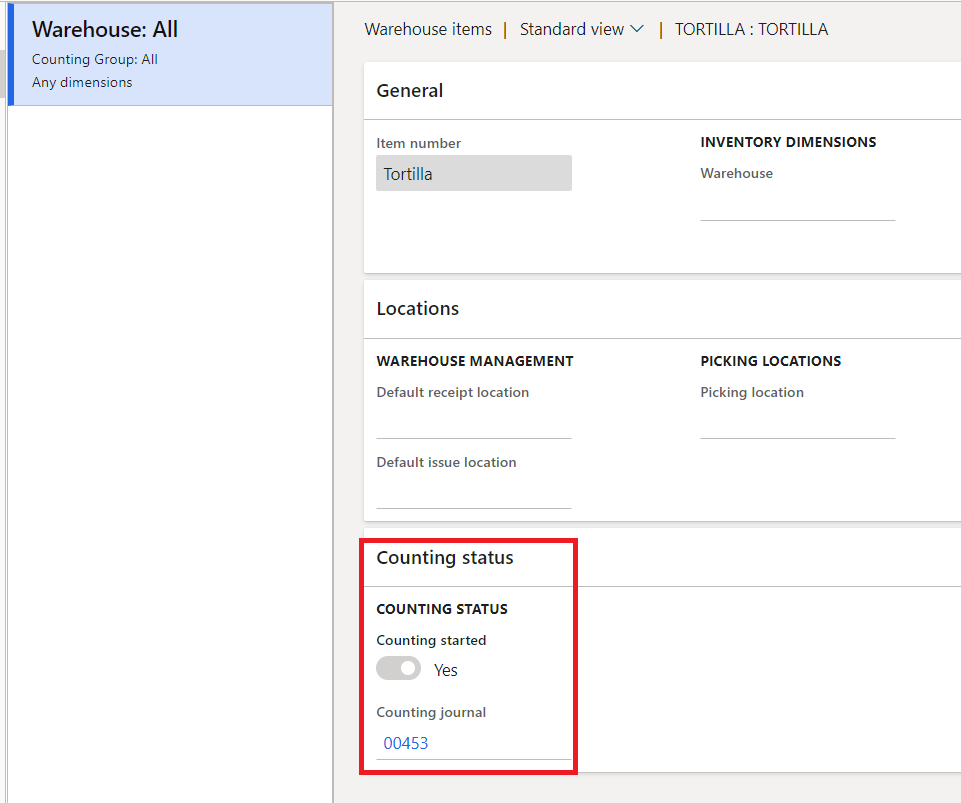
    As far as I know, you can only block the items during counting by means of creating a counting journal. When you have the "Lock items during counting" via the inventory and warehouse management parameters form active as well, the system will throw an error message when the user tries to execute sales order picking work for this item for instance. 
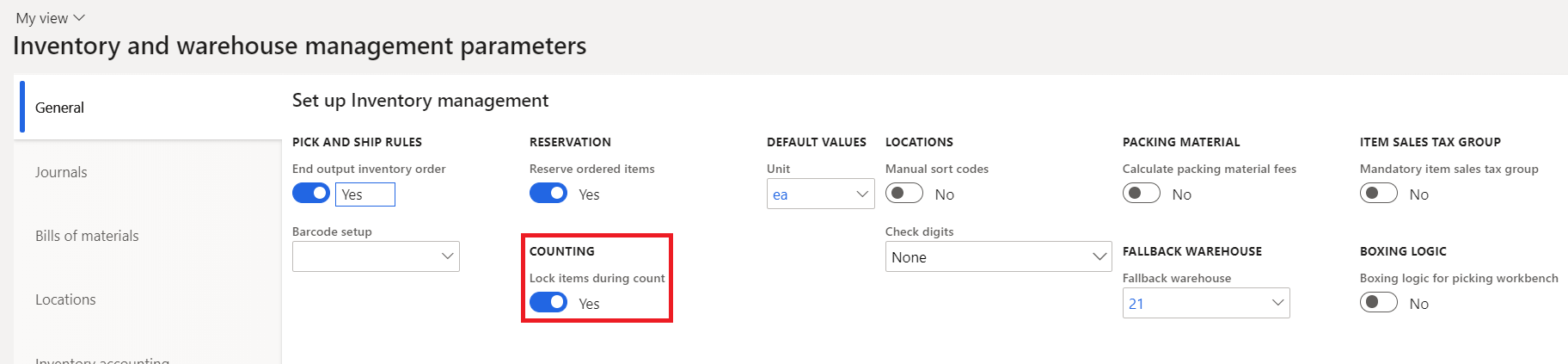
    pastedimage1594400908113v1.png

    Figure 1. Lock items during count parameter

    pastedimage1594400969126v2.png

    Figure 2. Counting journal 

    pastedimage1594401017204v3.png

    Figure 3. Warehouse item - counting status [Released product > Manage inventory > Warehouse items] 
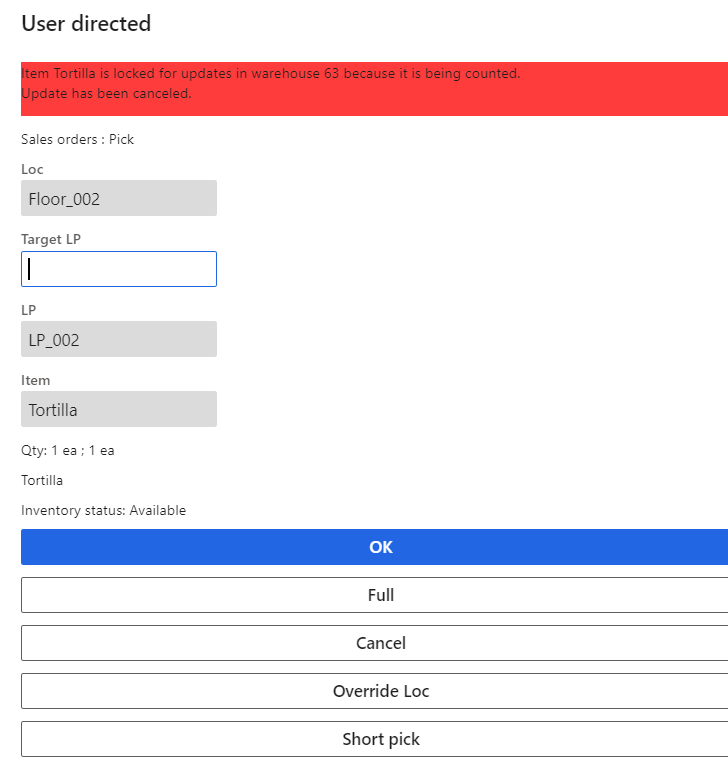
    pastedimage1594401211163v4.png

    Figure 4. Error message when the user tries to execute sales order picking work for the counted item

  • Suggested answer
    Rahul Mohta Profile Picture
    21,046 on at

    other way could be to use quality order and use full blocking

  • MEKSI-Anis Profile Picture
    54 on at

    Thank you Alice, i activated this parameter like you said:

    0486.pastedimage1594400908113v1.png

  • Community Member Profile Picture
    on at

    Thank you Alice, i used the parameter that you mentioned "Lock items during counting"

Under review

Thank you for your reply! To ensure a great experience for everyone, your content is awaiting approval by our Community Managers. Please check back later.

Helpful resources

Quick Links

Season of Sharing Community Challenge Winners!

Congratulations to our community stars!

Women in Power Builds Momentum

Expanding mentorship, skilling, and AI innovation

Leaderboard > Supply chain | Supply Chain Management, Commerce

#1
André Arnaud de Calavon Profile Picture

André Arnaud de Cal... 68 Super User 2026 Season 2

#2
Laurens vd Tang Profile Picture

Laurens vd Tang 63 Super User 2026 Season 2

#3
Patrick Mouwen Profile Picture

Patrick Mouwen 41

Last 30 days Overall leaderboard

Product updates

Dynamics 365 release plans