web
You’re offline. This is a read only version of the page.
close
Skip to main content

Notifications

Announcements

No record found.

Community site session details

Community site session details

Session Id :
Microsoft Dynamics AX (Archived)

display error

(0) ShareShare
ReportReport
Posted on by 406

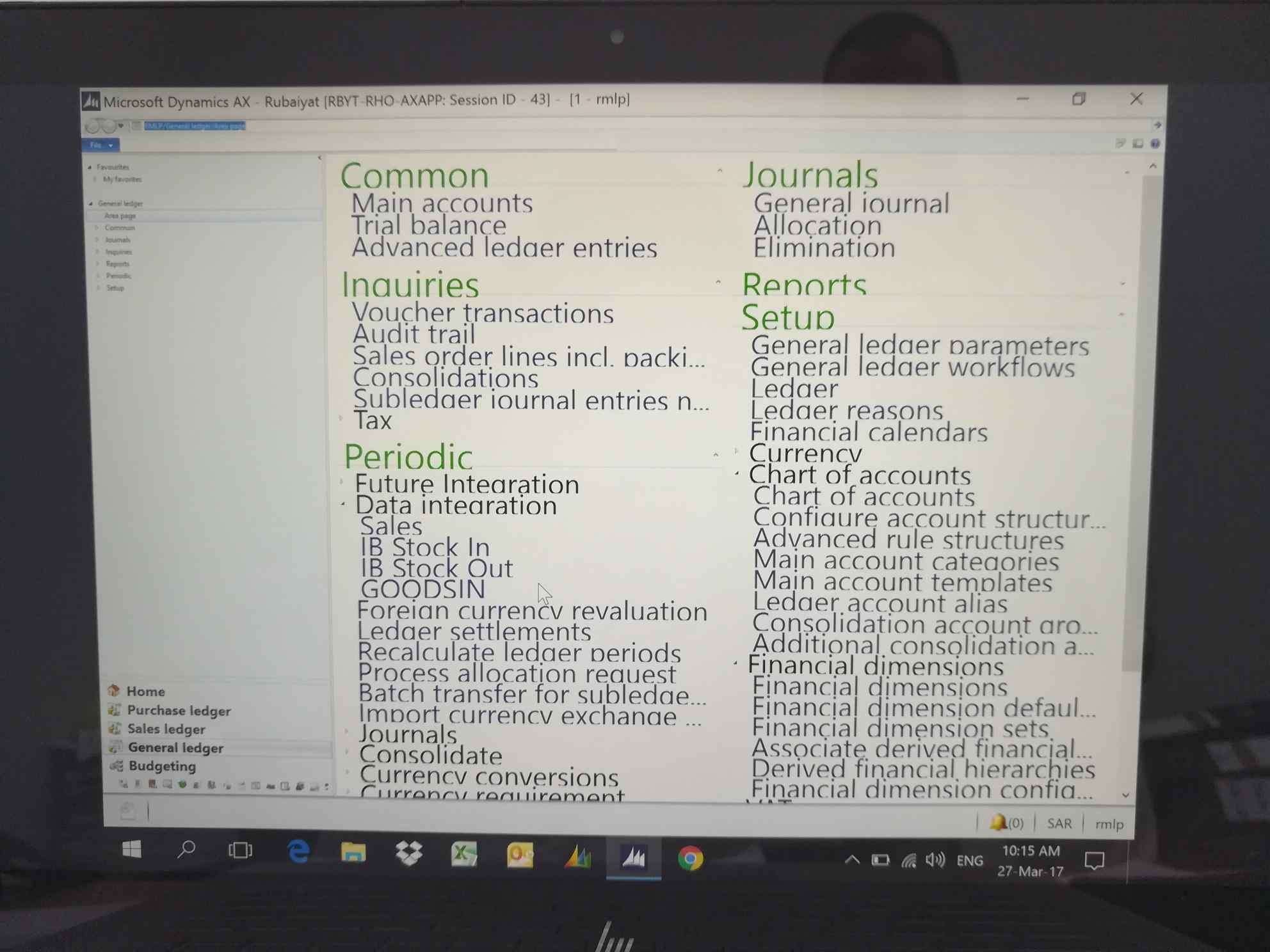
IMG_5F00_20170327_5F00_101545.jpg

Hi All,

once I installed the client I face this issue the display and the font as I mentioned on the attachment I also reinstall but the issue not solved, could anyone support me to solve this issue.

Regards.

*This post is locked for comments

I have the same question (0)
  • Verified answer
    Faisal Fareed Profile Picture
    10,796 User Group Leader on at

    Hi Mohamed,

    This is an issue of screen resolution not the AX, I would suggest you to adjust your screen resolution from you own machine. And also try with restart after you adjust resolution.

  • Verified answer
    André Arnaud de Calavon Profile Picture
    300,911 Super User 2025 Season 2 on at

    HI Mohamed,

    Faisal is correct here. I do have 4K resolution on my laptop and do have the same issue when using AX2012 on remote desktops. Setting the resolution to 1920*1080 solved the issue for me.

  • shelpaya Profile Picture
    406 on at

    thank you so much , the issue has been solved as your suggest resolution should be 1920*1080.

    Many thanks.

  • Suggested answer
    Pravasti AK Profile Picture
    2,985 on at

    Hi Shelpaya,

    *Right-click on the icon you use to launch AX and select Properties.

    *Select the Compatibility tab.

    *Mark the option called:  Disable display scaling on high DPI Settings

    *Launch AX using the Icon that you just changed the settings for.

    (or)

    Settings > System > Display > Change the size of text, apps and other items

    You can adjust the size there.

  • Murray Fife Profile Picture
    2,780 on at

    This happens when you remote desktop to the machine, and your resolution scaling on the client machine is set to something other than 100%.  The remote desktop inherits the scaling and will keep that scaling until you log out of the VM.

    I fix it by:

    1. Logging out of the VM session.
    2. Changing the text scaling on my client machine to 100%
    3. Logging back into the VM
    4. Change the text scaling on the client machine back to what it was

    Murray.

Under review

Thank you for your reply! To ensure a great experience for everyone, your content is awaiting approval by our Community Managers. Please check back later.

Helpful resources

Quick Links

Responsible AI policies

As AI tools become more common, we’re introducing a Responsible AI Use…

Neeraj Kumar – Community Spotlight

We are honored to recognize Neeraj Kumar as our Community Spotlight honoree for…

Leaderboard > 🔒一 Microsoft Dynamics AX (Archived)

#1
Martin Dráb Profile Picture

Martin Dráb 4 Most Valuable Professional

#1
Priya_K Profile Picture

Priya_K 4

#3
MyDynamicsNAV Profile Picture

MyDynamicsNAV 2

Last 30 days Overall leaderboard

Featured topics

Product updates

Dynamics 365 release plans
