web
You’re offline. This is a read only version of the page.
close
Skip to main content

Notifications

Announcements

No record found.

Community site session details

Community site session details

Session Id :
Microsoft Dynamics CRM (Archived)

CRM SharePoint Relative URL

(0) ShareShare
ReportReport
Posted on by

Hello,

I would like to know about how to change de Relative URL from the GUID to a different entitty attribute when  I am using the SharePoint / CRM integration. 

Could anyone help me?relativeURL.png
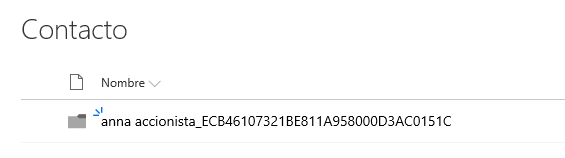
Thank you very much!

*This post is locked for comments

I have the same question (0)
  • Suggested answer
    Michel van den Brink Profile Picture
    4,697 on at

    Hello Anna,

    The URLs to SharePoint locations are stored in the entity called 'Document Location'

    Each record has a corresponding record in that entity which tells the SharePoint integration where the folder is.

    1. Go to the record you want to change (in this case the contact called 'Anna Accionista' and go into the 'Documents' section of the related entities.
    2. Click 'Edit Location' in the toolbar above the list of documents

      dynamicscommunity_5F00_editdoclocation.png

    3. From this dropdown only one item should appear, click that one
    4. Here you see the associated record, where you can change the relative url.
      Don't forget to also rename the folder in SharePoint! (Dynamics doesn't do this for you)

    Alternatively, you can also use Advanced Find to search through all records of 'Document Location'


    Hope this helps you. If you have any other questions, please let me know.

    If you found my answer helpful, please help the community by marking it as such/verifying it :-)

  • An08 Profile Picture
    on at

    Hello Michel,

    Thank you for your quick answer but I would like to go depeer.

    I want to configure it for every record automatically. To change manually every record is not the best option in my Project due to large number of documents we are managing in Dynamics.

    Could you help me?

    Thank you in advance!

  • Verified answer
    JohnAnonymous Profile Picture
    5,241 on at

    If you just want te remove the Guid, you can do so. Here's a link to a post describing the setting: spandcrm.com/.../removing-guids-from-folders-in-sharepoint-created-by-crm-2013

    If you want to have complete control, the only option would be to custom build a SharePoint integration. The out-of-the-box doen't have a lot of configuration options.

  • An08 Profile Picture
    on at

    Thank you!

Under review

Thank you for your reply! To ensure a great experience for everyone, your content is awaiting approval by our Community Managers. Please check back later.

Helpful resources

Quick Links

Responsible AI policies

As AI tools become more common, we’re introducing a Responsible AI Use…

Neeraj Kumar – Community Spotlight

We are honored to recognize Neeraj Kumar as our Community Spotlight honoree for…

Leaderboard > 🔒一 Microsoft Dynamics CRM (Archived)

#1
SA-08121319-0 Profile Picture

SA-08121319-0 4

#1
Calum MacFarlane Profile Picture

Calum MacFarlane 4

#3
Alex Fun Wei Jie Profile Picture

Alex Fun Wei Jie 2

Last 30 days Overall leaderboard

Featured topics

Product updates

Dynamics 365 release plans
