web
You’re offline. This is a read only version of the page.
close
Skip to main content

Notifications

Announcements

No record found.

Community site session details

Community site session details

Session Id :
Microsoft Dynamics AX (Archived)

Backordered Lines not showing up on Packing Slip

(0) ShareShare
ReportReport
Posted on by 1,632

I would like to have the Backordered Lines show up on the Packing Slip.  Currently if a single line ships partial, the remaining amount column shows the remaining amount.  But if the order has 2 lines, 1 that ships complete (or partial) and the other that is backordered, the other line does not show up at all.  There is a place on the Packing Slip to display this information but the lines are not showing up.

For Example:

What I get now:
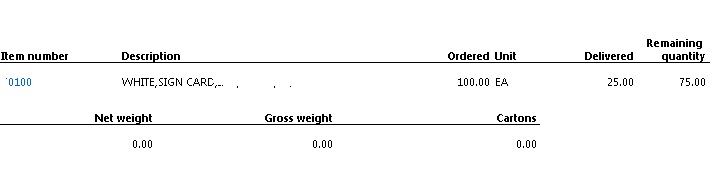
Backorder-Want.jpg

What I want the packing slip to have:
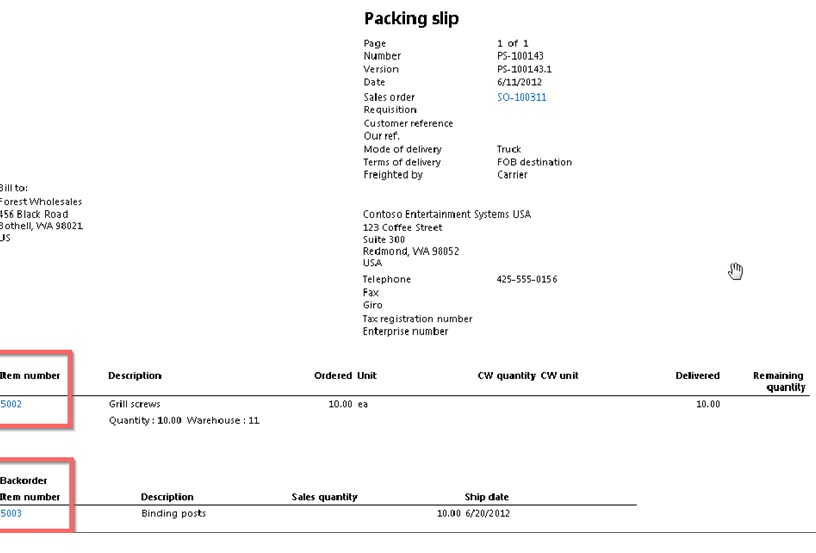
This has to be a simple setting that I'm missing (at least I hope it is).  I have been looking online and have found information about changing the form setup settings to display backorders, which I have done, but I still don't get backorders.

This is the information I reference above: http://ramdynamicsax.wordpress.com/2012/06/08/printing-backorder-item-lines-in-sales-order-packing-slip-and-invoice-report-in-ms-dynamics-ax-2012/

*This post is locked for comments

I have the same question (0)
  • FAC.Ansel Profile Picture
    1,632 on at

    Digging in to this further, it appears that the backorder information from the SalesLine Table is not being passed to the CustPackingSlipBackorderLine Table.  Is there a setting or check box or license configuration that would make this flow?

  • Andy Adamak Profile Picture
    4,074 on at

    The link you provided in your initial post has the answer... go to Accounts receivable -> Setup -> Forms -> Form setup

    Click the Packing slip link on the left, then under the "Backorder" group, change Backorder tracking to Not delivered.

  • FAC.Ansel Profile Picture
    1,632 on at

    In the "Contoso" environment, those steps work, but the production environment we have is not responding to the setting change.  The report is the standard SSRS report, so that has not changed.  From what I can tell in the tables, the backorder data is not populating in the CustPackingSlipBackorderLine table.  My assumption is that there is either a setting or license configuration that needs to be changed to allow the data to populate this table.

  • Andy Adamak Profile Picture
    4,074 on at

    Which version of AX are you running? 2012, R2, R3, and which CU?

  • FAC.Ansel Profile Picture
    1,632 on at

    AX 2012 R3

    version 6.3.164.0

  • FAC.Ansel Profile Picture
    1,632 on at

    After further research, I have found that the issue is with License Configuration.  In the DEV environment I turned on ALL the Licenses and now the packing slip shows the backorder lines.  

    So, the issue I have now is that I don't know which of the check boxes is the one that made the change.  If anyone knows which one it is, I would love to know.  If I am able to find it, then I will post it here to let anyone else that has this issue know how to fix it.

  • Suggested answer
    FAC.Ansel Profile Picture
    1,632 on at

    After Checking/applying all the License configurations in both "Sales and Marketing" and "Trade", the backorder lines are now printing on the packing slip.

  • Abdul Rawoof King Profile Picture
    5 on at

    can u explain what are the things you have changed exactly in Sales and Marketing >Trade Agreements...

    Thanks in Advance,

    Abdul rawoof

  • FAC.Ansel Profile Picture
    1,632 on at

    In System Administration > Setup > Licensing > License Configuration

    Check all the check boxes for "Sales and Marketing" and "Trade".  One of the settings within these categories controls the backorder line functionality on the forms.

  • Community Member Profile Picture
    on at

    We had the same problem, but already had everything ticked in the license configuration for sales and marketing and trade. It turned out that the sales order didn't have a delivery address (due to the customer not having one set up), and this is what prevents the CustPackingSlipBackorderLine records from being inserted. After adding a delivery address and posting another packing slip, it works as expected.

    Regards,

    David

Under review

Thank you for your reply! To ensure a great experience for everyone, your content is awaiting approval by our Community Managers. Please check back later.

Helpful resources

Quick Links

Responsible AI policies

As AI tools become more common, we’re introducing a Responsible AI Use…

Neeraj Kumar – Community Spotlight

We are honored to recognize Neeraj Kumar as our Community Spotlight honoree for…

Leaderboard > 🔒一 Microsoft Dynamics AX (Archived)

#1
Martin Dráb Profile Picture

Martin Dráb 4 Most Valuable Professional

#1
Priya_K Profile Picture

Priya_K 4

#3
MyDynamicsNAV Profile Picture

MyDynamicsNAV 2

Last 30 days Overall leaderboard

Featured topics

Product updates

Dynamics 365 release plans
