web
You’re offline. This is a read only version of the page.
close
Skip to main content

Notifications

Announcements

No record found.

Community site session details

Community site session details

Session Id :
Microsoft Dynamics 365 | Integration, Dataverse...
Suggested Answer

Trigger Workflow before record is assigned

(0) ShareShare
ReportReport
Posted on by 40

Hi to all,

want to trigger a workflow before a record is assigned, first I want to check if this assignment is allowed and then to let the record be assigned. I tried to change 'Start when' field to 'Before' but the record is assigned. Do you have any ideas how to achieve this?'

I have the same question (0)
  • Suggested answer
    Ricardo Gimenez Profile Picture
    on at

    Hello,

    You should not use a sync workflow to avoid an assignment. This kind of validation should be done through a plugin or a custom code. For example, if you create a sync workflow to be executed before an assignment, this is only a trigger, not a condition validation that will block the record assignment. 

    Could you please provide the exactly scenario that you want to reach before the assignment.

    Thanks,

  • k.karagiannnis Profile Picture
    40 on at

    The main scenario is, when a user tries to assign a phone call to a team or a user, I want to check if this is the correct team or user is member of the team. Correct team is based on a option set field on Regarding Case. If team (or user) is not allowed, then we would like to show a confirmation message to proceed or not with the assignment.

  • Suggested answer
    Ricardo Gimenez Profile Picture
    on at

    Ok, I got it. Please, try to use the following approach into your sync workflow.

    -Keep the trigger as you already configured (before Assign)

    -Insert a condition validation to check the option set value

    -Insert an action to Stop the Workflow as Cancelled

    Quick sample, where workflow is checking if Priority field has data, if not, the phone call record will not be assigned:
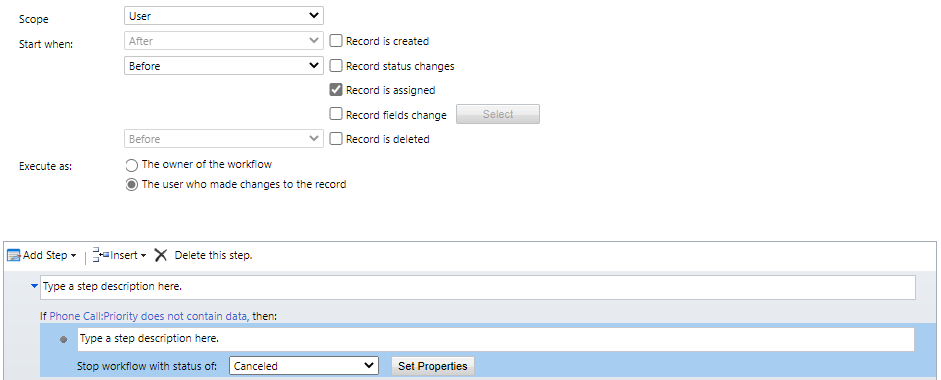
    pastedimage1630504092568v1.png

    Thanks,

  • k.karagiannnis Profile Picture
    40 on at

    But in this approach the workflow will stop. We want user to proceed with the assignment, but warn her/him if this assignment is not correct.

Under review

Thank you for your reply! To ensure a great experience for everyone, your content is awaiting approval by our Community Managers. Please check back later.

Helpful resources

Quick Links

Responsible AI policies

As AI tools become more common, we’re introducing a Responsible AI Use…

Neeraj Kumar – Community Spotlight

We are honored to recognize Neeraj Kumar as our Community Spotlight honoree for…

Leaderboard > Microsoft Dynamics 365 | Integration, Dataverse, and general topics

#1
#ManoVerse Profile Picture

#ManoVerse 93

#1
Siv Sagar Profile Picture

Siv Sagar 93 Super User 2025 Season 2

#3
Martin Dráb Profile Picture

Martin Dráb 62 Most Valuable Professional

Last 30 days Overall leaderboard

Product updates

Dynamics 365 release plans



