web
You’re offline. This is a read only version of the page.
close
Skip to main content

Announcements

No record found.

News and Announcements icon
Community site session details

Community site session details

Session Id :
Microsoft Dynamics AX (Archived)

Index mismatch between AOT and SQL Database

(0) ShareShare
ReportReport
Posted on by 1,307

Hi,

We recently moved AX from one environment to another. After the move, during database sync the below error occured.

SQL error description: [Microsoft][SQL Server Native Client 11.0][SQL Server]Fillfactor 0 is not a valid percentage;

fillfactor must be between 1 and 100.

SQL statement: ALTER TABLE "DBO".D2MFWLABEL ADD CONSTRAINT I_107916CONSTRAINTSIDX PRIMARY KEY CLUSTERED (PARTITION,APPLICATIONCONFIGID,LABELID,DEVICETYPEID,LANGUAGEID,UTILENTRYLEVEL) WITH (FILLFACTOR =0 )
Cannot execute a data definition language command on  ().

To fix this error when viewed in AOT and SQL Database,

the index appears in AOT but not in SQL Database. When tried to recreate the below error appeared.

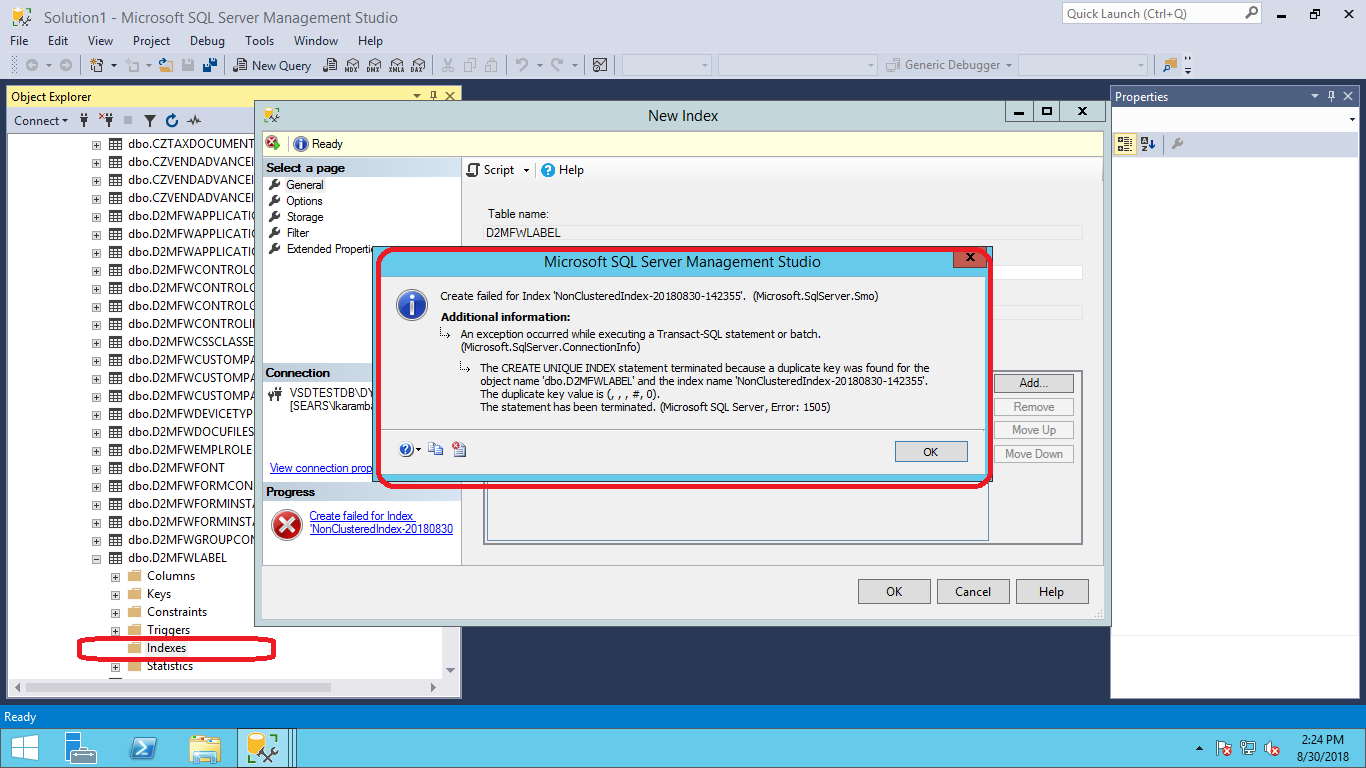
D2MFWLabel_5F00_Index_5F00_AOT.png   D2MFWLabel_5F00_IndexIssue.png

Let me know how to fix the index violation.

Thanks,

lakshmi

*This post is locked for comments

I have the same question (0)
  • André Arnaud de Calavon Profile Picture
    304,711 Super User 2026 Season 1 on at

    Hi Lakshmi,

    Did you copy both the model and business database or just the model? In that case, it can be caused by element specific object IDs for tables and fields. When copying a model, you also have to copy the AX business database or start with a blank database.

  • Mea_ Profile Picture
    60,286 on at

    Hi Lakshmi Karambakkam,

    You cannot create index because you have duplicate rows, first you need to cleanup data to remove duplicate rows that violates new index. Also don't create anything in SQL directly, because AX does not see this changes and will try to create new index during sync.  

  • Lakshmi Karambakkam Profile Picture
    1,307 on at

    Basically sql database is not recognizing the index (no index visible in sql database)that already exists in AOT. This is creating sync error. If i am not supposed to create a n index in sql to get in sync with AOT. What is the other way in solving this issue?

  • Mea_ Profile Picture
    60,286 on at

    If index is not in SQL, you need to fix duplicates that violate new index and then you can try to sync table from AOT, if it won't help try to drop the index in AOT and create it again and then sync.

  • Lakshmi Karambakkam Profile Picture
    1,307 on at

    There is no duplicate data. I checked. Any other way of synchronizing?

  • Mea_ Profile Picture
    60,286 on at

    Error on your screenshot says that it is there. Did you try to recreate index in AOT ?

  • Lakshmi Karambakkam Profile Picture
    1,307 on at

    I was able to remove index fields in AOT but the index did not get deleted. I tried twice. Weird but it happened. Then i did a database sync (thought it might refresh the table) but instead all the removed fields appeared back.

  • Mea_ Profile Picture
    60,286 on at

    Then you did not save the changes. If you delete index in AOT and do sync on this table it will remove index from SQL.

  • Lakshmi Karambakkam Profile Picture
    1,307 on at

    I did save the changes but still the index didn't get deleted . i again checked the data and found that there were data duplicates. i deleted the data and dropped the table

    and then did data synchronization but still the below error occured and in sql DB, the index didn't get created.

    SQL error description: [Microsoft][SQL Server Native Client 11.0][SQL Server]Fillfactor 0 is not a valid percentage; fillfactor must be between 1 and 100.

  • ManishKumarB Profile Picture
    15 on at

    Seems its very late, just to help others:

    1. As suggested above

         a. Use blank database or

         b. Remove duplicate data or

         c. In case if data is not much important clean the table and remove all the data from table in SQL.

    2. Synchronize the database from AOT.

    3. Refresh Database in SQL.

    Hope this will resolve the issue.

    Regards,

    Manish Kumar

Under review

Thank you for your reply! To ensure a great experience for everyone, your content is awaiting approval by our Community Managers. Please check back later.

Helpful resources

Quick Links

Introducing the 2026 Season 1 community Super Users

Congratulations to our 2026 Super Stars!

Meet the Microsoft Dynamics 365 Contact Center Champions

We are thrilled to have these Champions in our Community!

Congratulations to the April Top 10 Community Leaders

These are the community rock stars!

Leaderboard > 🔒一 Microsoft Dynamics AX (Archived)

#1
CP04-islander Profile Picture

CP04-islander 39

#2
Michel ROY Profile Picture

Michel ROY 14

#3
imran ul haq Profile Picture

imran ul haq 8

Last 30 days Overall leaderboard

Featured topics

Product updates

Dynamics 365 release plans
