web
You’re offline. This is a read only version of the page.
close
Skip to main content

Announcements

No record found.

News and Announcements icon
Community site session details

Community site session details

Session Id :
Microsoft Dynamics AX (Archived)

Planned PO converts units wrong and at firming PO the wrong qty is used.

(1) ShareShare
ReportReport
Posted on by

My problem is that planned PO trade quantity differs from purchase quantity when using unit conversion.

Everything looks fine in net req. and planned po generates the correct qty in requirement profile but when firming the planned PO it uses the stock qty which in this case is pcs but purchase unit is pack. one pack is 4122pcs, firmed PO becomes 4122 packs resulting in 16990884pcs :0

I have the correct units in BOM, on the items different fast tabs and on TA. Unit conversion seems fine as well and net requirement calculates correctly.

Also, I have tried to end the TA with a backdated "To Date" which made no difference.

I'm new on this forum and quite new in AX. I have tried to find any post dealing with this but only found price related or other errors with solutions i already knew, i can't find that i have set up the system wrong.
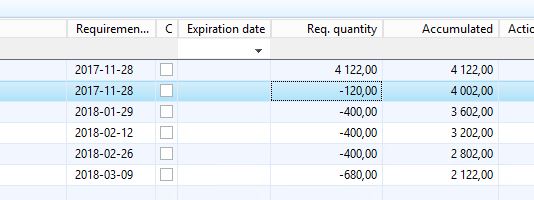

4784.netreq.JPG

planned-po.JPG

After firm of PlannedPO and recalculate netreq
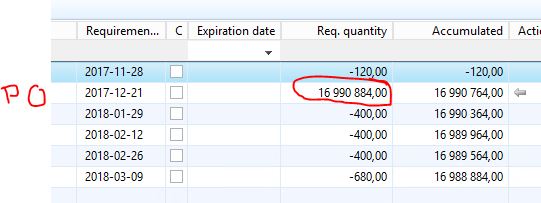
netreqAfterFirmOfPlannedPO.JPG

*This post is locked for comments

I have the same question (0)
  • Weaveriski Profile Picture
    23,620 Moderator on at

    Trade quantity is not a standard field I believe - what is your customisation to the system doing here? I am presuming that is on the planned order? I would expect that field is your issue

    You should also show your unit conversion and how the UOM on the screenshots as it is a UOM issue. It could be you have this the wrong way around as the result is the pcs multiplied by pcs to get a "pack", wheres you want a 1 pack PO for the 4122 inventory

  • Community Member Profile Picture
    on at

    Hi,

    Thanks for the answer. Yes, i checked and the field Trade Quantity is a customisation. Then it's likely the problem lies in that code. I will have it checked.

    In the meantime I post the unit conversion. To ensure there is no issues there.

    UOM.JPG

  • Verified answer
    Weaveriski Profile Picture
    23,620 Moderator on at

    Yes that looks fine, I would add in the reverse to cover that, so the button says 4122 pcs = 1 pack. Will assume the uom on the PO is pack!

    If you manually load  a PO for one pack the line details should show you the 4122 inventory quantity.

  • Community Member Profile Picture
    on at

    Hi,

    Issue solved. There was a customization in planned PO to consider special fields in Trade Agreement. In that calculation, unit conversion wasn't considered.

  • Weaveriski Profile Picture
    23,620 Moderator on at

    Glad you found it in the end!!

Under review

Thank you for your reply! To ensure a great experience for everyone, your content is awaiting approval by our Community Managers. Please check back later.

Helpful resources

Quick Links

Introducing the 2026 Season 1 community Super Users

Congratulations to our 2026 Super Stars!

Meet the Microsoft Dynamics 365 Contact Center Champions

We are thrilled to have these Champions in our Community!

Congratulations to the March Top 10 Community Leaders

These are the community rock stars!

Leaderboard > 🔒一 Microsoft Dynamics AX (Archived)

#1
Joris dG Profile Picture

Joris dG 5

#2
Andrew Jones a1x Profile Picture

Andrew Jones a1x 2

#3
Basit Profile Picture

Basit 1

Last 30 days Overall leaderboard

Featured topics

Product updates

Dynamics 365 release plans
