I have a SplitButton that I'm putting on a View (not an individual form) - the main Account one (Sales -> Accounts). i.e.,
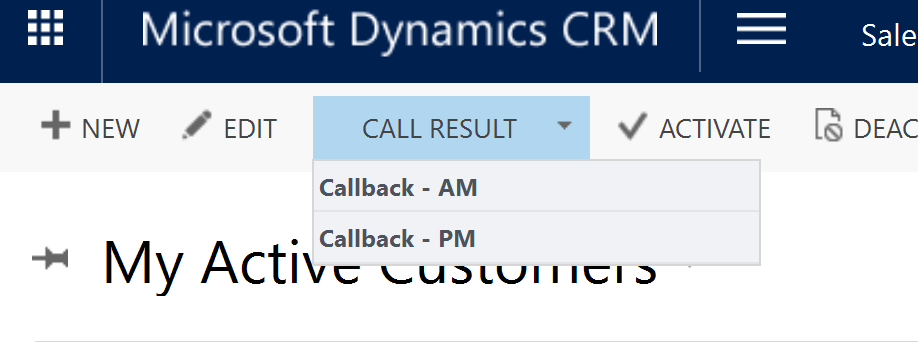
I am using the Ribbon Workbench. I've created the button with an associated Command that links to a javaScript file on the back end.
When I click on the header ("Call Result") the javaScript fires. But the child elements are not clickable.
The header and child elements are set up the same way in the Ribbon Editor. I have configured the Command, all the ToolTip and other language elements, and the CommandCore, which contains the same thing as the Command.
Here's my XML. Note I've tried this with a flyout as well.
<RibbonDiffXml>
  <CustomActions>
    <CustomAction Id="myprefix.account.Button1.Button.CustomAction" Location="Mscrm.HomepageGrid.account.MainTab.Management.Controls._children" Sequence="29">
      <CommandUIDefinition>
        <SplitButton Alt="$LocLabels:myprefix.account.Button1.Button.Alt" Command="myprefix.account.RunWorkflowAMCallback" Id="myprefix.account.Button1.Button" LabelText="$LocLabels:myprefix.account.Button1.Button.LabelText" Sequence="29" TemplateAlias="o3" ToolTipTitle="$LocLabels:myprefix.account.Button1.Button.ToolTipTitle" ToolTipDescription="$LocLabels:myprefix.account.Button1.Button.ToolTipDescription">
          <Menu Id="myprefix.account.Button1.Button.Menu">
            <MenuSection Id="myprefix.account.Section2.Section" Title="$LocLabels:myprefix.account.Section2.Section.Title" Sequence="10" DisplayMode="Menu16">
              <Controls Id="myprefix.account.Section2.Section.Controls" />
            </MenuSection>
            <MenuSection Id="myprefix.account.Section3.Section.0" Title="$LocLabels:myprefix.account.Section3.Section.0.Title" Sequence="20" DisplayMode="Menu16">
              <Controls Id="myprefix.account.Section3.Section.Controls" />
            </MenuSection>
          </Menu>
        </SplitButton>
      </CommandUIDefinition>
    </CustomAction>
    <CustomAction Id="myprefix.account.FlyOut.Button.CustomAction" Location="Mscrm.HomepageGrid.account.MainTab.Management.Controls._children" Sequence="44">
      <CommandUIDefinition>
        <FlyoutAnchor Alt="$LocLabels:myprefix.account.FlyOut.Button.Alt" Command="myprefix.account.RunWorkflowAMCallback" Id="myprefix.account.FlyOut.Button" LabelText="$LocLabels:myprefix.account.FlyOut.Button.LabelText" Sequence="44" TemplateAlias="o3" ToolTipTitle="$LocLabels:myprefix.account.FlyOut.Button.ToolTipTitle" ToolTipDescription="$LocLabels:myprefix.account.FlyOut.Button.ToolTipDescription">
          <Menu Id="myprefix.account.Button2.Button.Menu">
            <MenuSection Id="myprefix.account.Section3.Section" Title="$LocLabels:myprefix.account.Section3.Section.Title" Sequence="10" DisplayMode="Menu16">
              <Controls Id="myprefix.account.Section3.Section.Controls" />
            </MenuSection>
          </Menu>
        </FlyoutAnchor>
      </CommandUIDefinition>
    </CustomAction>
  </CustomActions>
  <Templates>
    <RibbonTemplates Id="Mscrm.Templates"></RibbonTemplates>
  </Templates>
  <CommandDefinitions>
    <CommandDefinition Id="myprefix.account.RunWorkflowAMCallback">
      <EnableRules>
        <EnableRule Id="Mscrm.SelectionCountAtLeastOne" />
      </EnableRules>
      <DisplayRules />
      <Actions>
        <JavaScriptFunction FunctionName="invokeWorkflowAMCallback" Library="$webresource:yp_fireWorkflow">
          <CrmParameter Value="FirstSelectedItemId" />
        </JavaScriptFunction>
      </Actions>
    </CommandDefinition>
  </CommandDefinitions>
  <RuleDefinitions>
    <TabDisplayRules />
    <DisplayRules />
    <EnableRules />
  </RuleDefinitions>
  <LocLabels>
    <LocLabel Id="myprefix.account.Button1.Button.Alt">
      <Titles>
        <Title description="Resolve This Call" languagecode="1033" />
      </Titles>
    </LocLabel>
    <LocLabel Id="myprefix.account.Button1.Button.LabelText">
      <Titles>
        <Title description="Call Result" languagecode="1033" />
      </Titles>
    </LocLabel>
    <LocLabel Id="myprefix.account.Button1.Button.ToolTipDescription">
      <Titles>
        <Title description="Resolve This Call" languagecode="1033" />
      </Titles>
    </LocLabel>
    <LocLabel Id="myprefix.account.Button1.Button.ToolTipTitle">
      <Titles>
        <Title description="Resolve This Call" languagecode="1033" />
      </Titles>
    </LocLabel>
    <LocLabel Id="myprefix.account.FlyOut.Button.Alt">
      <Titles>
        <Title description="FlyOut" languagecode="1033" />
      </Titles>
    </LocLabel>
    <LocLabel Id="myprefix.account.FlyOut.Button.LabelText">
      <Titles>
        <Title description="FlyOut" languagecode="1033" />
      </Titles>
    </LocLabel>
    <LocLabel Id="myprefix.account.FlyOut.Button.ToolTipDescription">
      <Titles>
        <Title description="FlyOut" languagecode="1033" />
      </Titles>
    </LocLabel>
    <LocLabel Id="myprefix.account.FlyOut.Button.ToolTipTitle">
      <Titles>
        <Title description="FlyOut" languagecode="1033" />
      </Titles>
    </LocLabel>
    <LocLabel Id="myprefix.account.Section2.Section.Title">
      <Titles>
        <Title description="Callback - AM" languagecode="1033" />
      </Titles>
    </LocLabel>
    <LocLabel Id="myprefix.account.Section3.Section.0.Title">
      <Titles>
        <Title description="Callback - PM" languagecode="1033" />
      </Titles>
    </LocLabel>
    <LocLabel Id="myprefix.account.Section3.Section.Title">
      <Titles>
        <Title description="AM Callback" languagecode="1033" />
      </Titles>
    </LocLabel>
  </LocLabels>
</RibbonDiffXml>
*This post is locked for comments
I have the same question (0)







