web
You’re offline. This is a read only version of the page.
close
Skip to main content

Notifications

Announcements

No record found.

Community site session details

Community site session details

Session Id :
Microsoft Dynamics 365 | Integration, Dataverse...
Answered

Customize Case Resolution

(0) ShareShare
ReportReport
Posted on by 80

Hello experts,

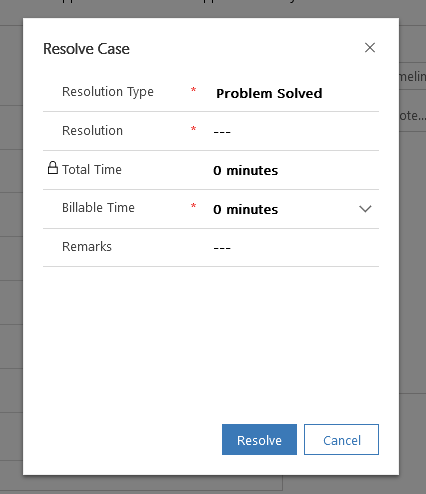
Unfortunately I have a problem with the adaptation of the form for resolving a case.

I would like to add another field to this form:
pastedimage1639726721370v1.png

The problem is that no matter which form I change, nothing happens with this one. What type is this form actually?

If I have understood correctly, the adjustment happens in the entity 'Case Resolution'. Here I have the following forms available:

pastedimage1639726843353v2.png

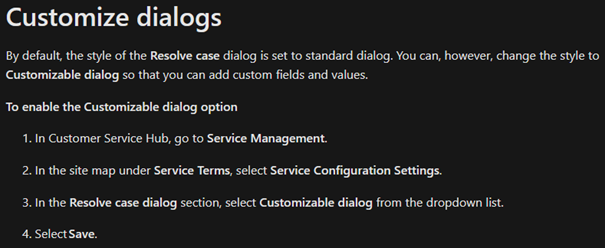
During my research I came across the following page: 

https://docs.microsoft.com/en-us/dynamics365/customer-service/modify-case-resolution-dialog

It describes the following approach:
pastedimage1639726957054v3.png

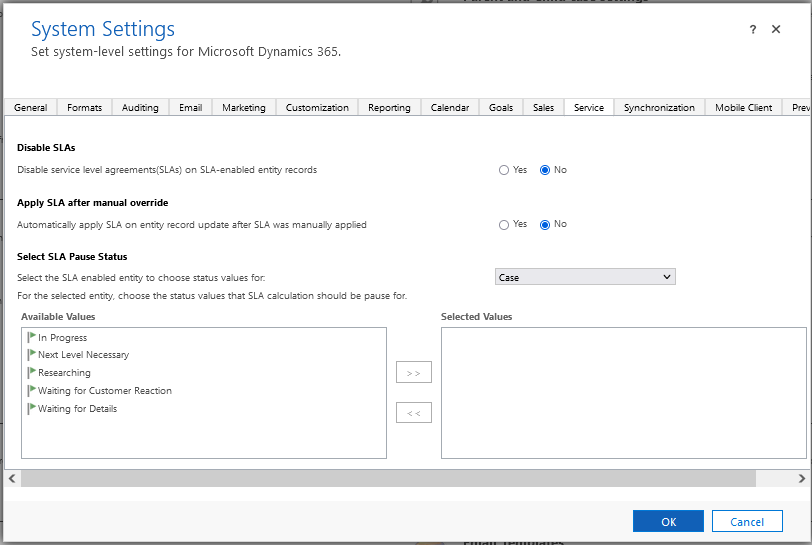
Unfortunately, this option is also not apparent to me:
pastedimage1639727032183v4.png

I hope that someone can help me in this regard and thank you in advance.

Kind regards,

Daniel

I have the same question (0)
  • Verified answer
    Community Member Profile Picture
    on at

    Hi danielst,

    Not in legacy web client(Settings > Service Management > ), you need set it in UCI--Customer Service Hub.

    pastedimage1639728612941v3.png

    In here, you can select 'Customizable dialog' as document said.

    pastedimage1639728659990v4.png

    Then you can add/Remove fields in the 'Information' main form of case resolution entity.

    pastedimage1639728730198v5.png

  • danielst Profile Picture
    80 on at

    Hi Leah Ju,

    That is exactly what I was looking for!

    Now everything works as desired.

    Thank you very much!

    Regards

    Daniel

Under review

Thank you for your reply! To ensure a great experience for everyone, your content is awaiting approval by our Community Managers. Please check back later.

Helpful resources

Quick Links

Responsible AI policies

As AI tools become more common, we’re introducing a Responsible AI Use…

Neeraj Kumar – Community Spotlight

We are honored to recognize Neeraj Kumar as our Community Spotlight honoree for…

Leaderboard > Microsoft Dynamics 365 | Integration, Dataverse, and general topics

#1
Siv Sagar Profile Picture

Siv Sagar 93 Super User 2025 Season 2

#2
#ManoVerse Profile Picture

#ManoVerse 76

#3
Martin Dráb Profile Picture

Martin Dráb 64 Most Valuable Professional

Last 30 days Overall leaderboard

Product updates

Dynamics 365 release plans



