web
You’re offline. This is a read only version of the page.
close
Skip to main content

Announcements

No record found.

News and Announcements icon
Community site session details

Community site session details

Session Id :
Finance | Project Operations, Human Resources, ...
Suggested Answer

How to pass Where Clause (Conditions) in Select Statement generating dynamically from some parameter table in X++ code

(0) ShareShare
ReportReport
Posted on by 135

I am working in a functionality where i have to generate the where clause dynamically and pass it on the while select loop to execute the further logic.

Below is the complete steps :- 

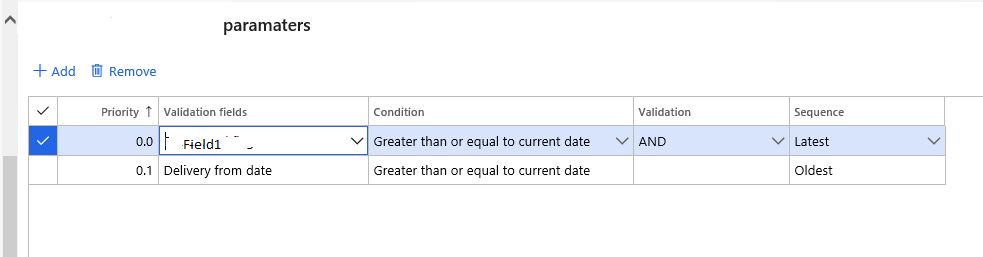
1. I have a parameter form , where user will define the validation fields and conditions with AND /OR and multiple lines 

2. I have to read the parameter records and looped it and create a where clause reading the fields validation from the parm table.

It will look like this .

Parameter Forms 
3487.png

Parm table has below condition 

condition = Mycustomtable.Field1 >= today &&  Mycustomtable.DeliveryFromDate >=today()

I have below code and  want to create the where clause reading the parm records and apply condition 

While Select MyCustomtable where condition *******(Here parm table condtion should apply automatically )

{

//Do something

}

Note :- Need help to apply condition on while loop and that condition should be created in the runtime and applied on the run time 

Any help would be appreciated !

.

I have the same question (0)
  • Suggested answer
    Sergei Minozhenko Profile Picture
    23,095 on at

    Hi Binay,

    If you need to generate select statements dynamically based, you need to use Query objects.

    docs.microsoft.com/.../query-object-model

  • BINAY KUMAR PANDEY Profile Picture
    135 on at

    Can you please help me with any sample code in the system where similar thing working.

  • Sergei Minozhenko Profile Picture
    23,095 on at

    Hi Binay,

    There are already some examples in the documentation. Basically you need

    1. Create query object

    2. Add data sources and ranges

    3. Create QueryRun object

    4. Iterate through records using queryRun.Next

    docs.microsoft.com/.../how-to-create-queries-by-using-x  - in the first section you can find how to create query from x++, the second section contains an example how to use while (qr.next() to iterate through select result)

    docs.microsoft.com/.../using-expressions-in-query-ranges - how to create complex ranges (like or conditions for different fields)

    I'm not sure if there is a similar code related to your task can be found in the system. But you can search in classes by text "QueryRun", there are a lot of different examples.

Under review

Thank you for your reply! To ensure a great experience for everyone, your content is awaiting approval by our Community Managers. Please check back later.

Helpful resources

Quick Links

Introducing the 2026 Season 1 community Super Users

Congratulations to our 2026 Super Stars!

Meet the Microsoft Dynamics 365 Contact Center Champions

We are thrilled to have these Champions in our Community!

Congratulations to the April Top 10 Community Leaders

These are the community rock stars!

Leaderboard > Finance | Project Operations, Human Resources, AX, GP, SL

#1
Giorgio Bonacorsi Profile Picture

Giorgio Bonacorsi 608

#2
André Arnaud de Calavon Profile Picture

André Arnaud de Cal... 591 Super User 2026 Season 1

#3
CP04-islander Profile Picture

CP04-islander 430

Last 30 days Overall leaderboard

Product updates

Dynamics 365 release plans
