web
You’re offline. This is a read only version of the page.
close
Skip to main content

Announcements

No record found.

News and Announcements icon
Community site session details

Community site session details

Session Id :
Microsoft Dynamics AX (Archived)

The query is making the items duplicate

(0) ShareShare
ReportReport
Posted on by 120

Hi, Friends

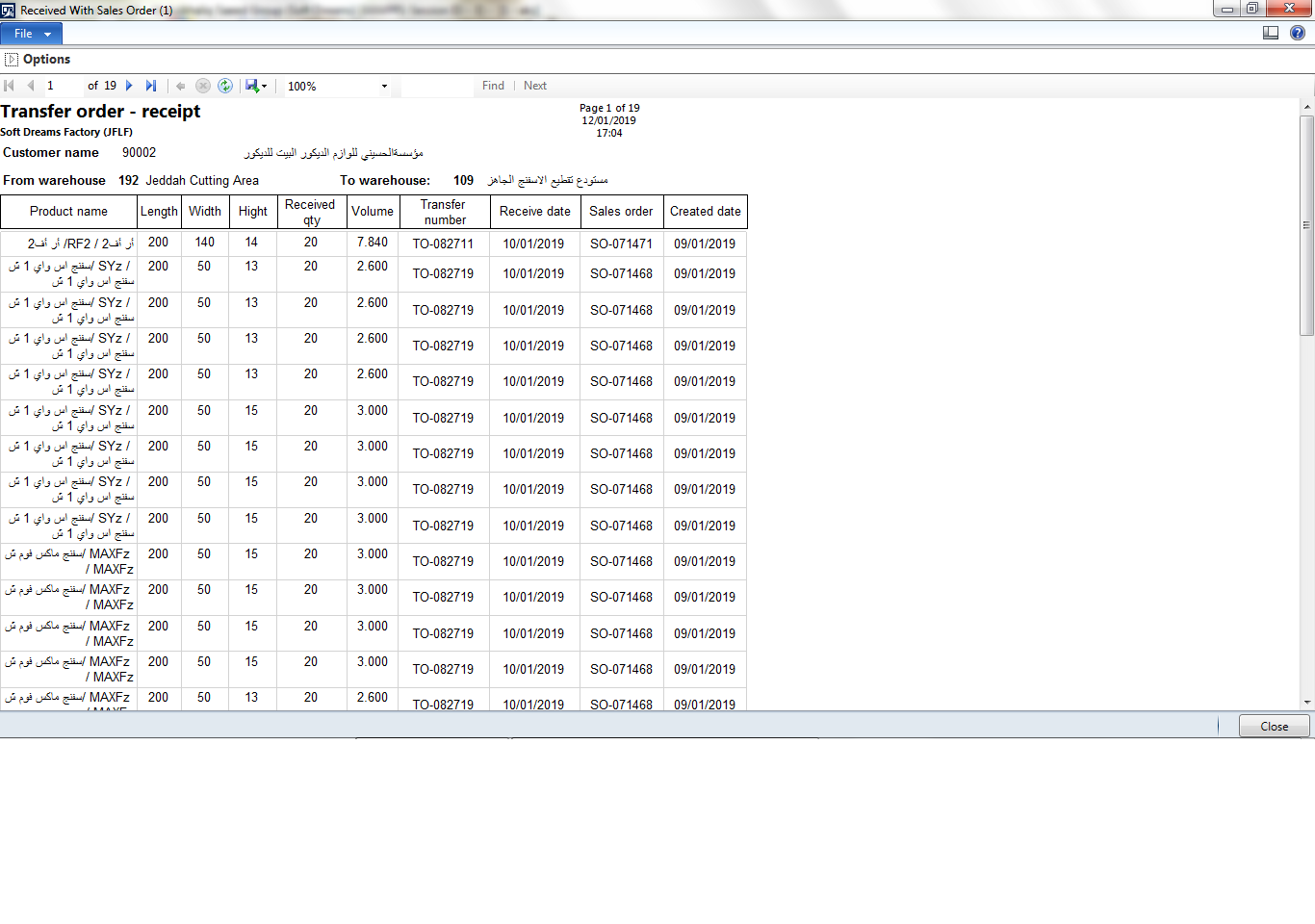
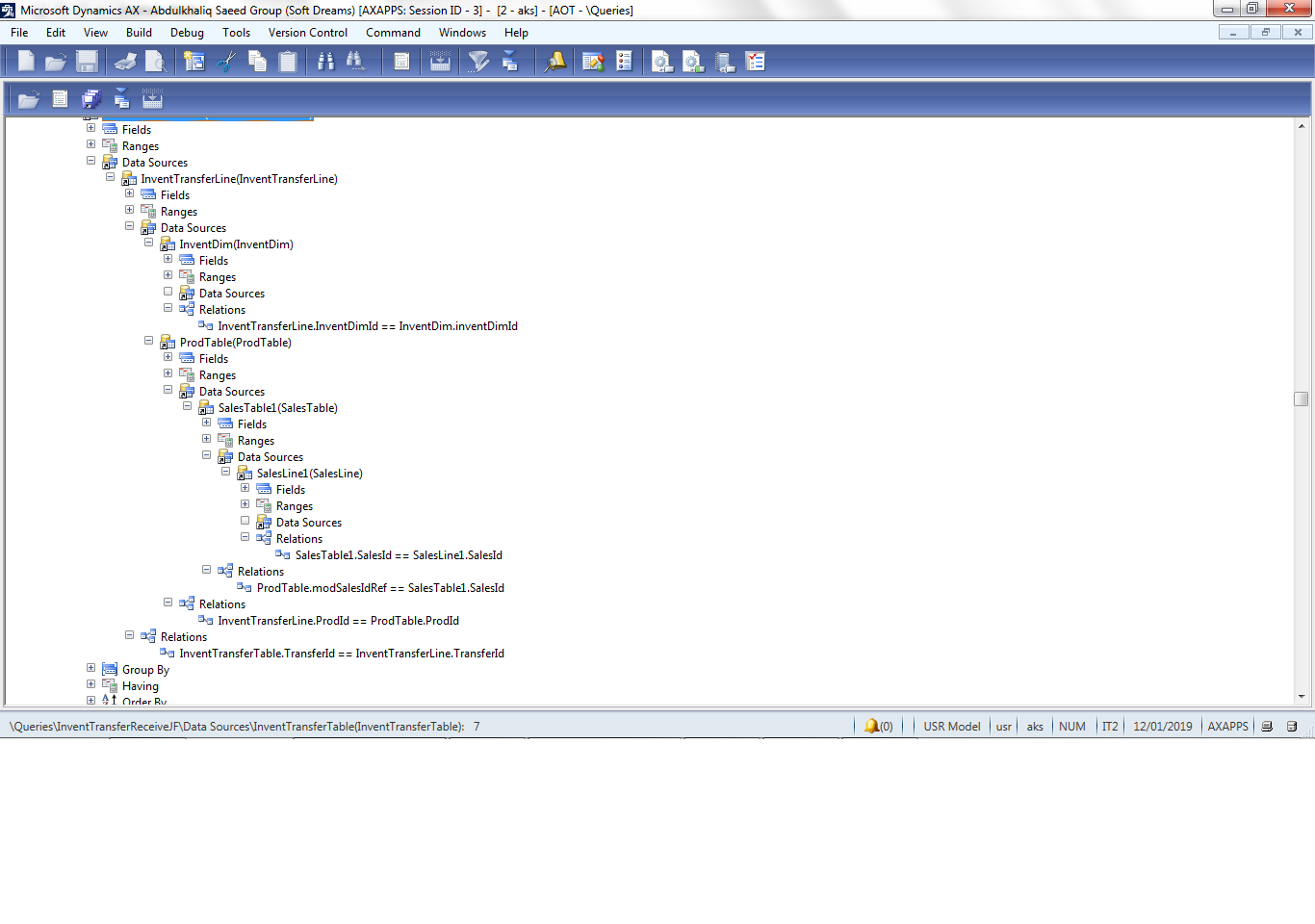
I have the following query as is shown in the following screen shot it is creating duplicate records in my transfer received reportDuplicate_5F00_Records.png
Screen Shot for the report

Duplicate_5F00_Rec.png

is the relation between salestable  and salesline is correct  as  this 

SalesTable1.salesId== SalesLine1.SalesId

can anyone tell my where my relation is wrong the query  in my query  

waiting for your valuable answer

Best regards

Jamil Alshaibani 

*This post is locked for comments

I have the same question (0)
  • Mea_ Profile Picture
    60,286 on at

    Relation is correct only if you want to see all lines of that order and that's probably the reason why you see duplicates, but we don't know what you want to see, so cannot say for sure. You need additional relation between ProdTable or transferLine, for example itemId  or inventTransId...

  • Suggested answer
    Hossein.K Profile Picture
    6,648 on at

    Hi Jamil Alshaibani,

    Your relation is correct but this query will make Cartesian multiplication.

    for solving this problem you should customize a method by group by or .....

    if you tell us more information, we can better help you .

  • On-Hand Inventory I want to Add to the Report ItemName Profile Picture
    120 on at

    Hi Hossein Karimi,

    Yes you are right the query is making Cartesian multiplication , my requirement is to get the details of all transferred production items from production area store to main store , and I am using the above query only I am not using any method and how can use a method by group by

    FOR EXAMPLE THIS SCREEN SHOTS  :

    DUPLICATE_5F00_TRANSFER.png

    The report output  fro the above transferred as the following 16 record an the above transferred only for   4 records

    DUPLICATE_5F00_TRANSFER.png 

    Waiting for your valuable answer .


    Best regards

    Jamil Alshaibani

  • Suggested answer
    Hossein.K Profile Picture
    6,648 on at

    Add group by in SalesId field in your query data source .

  • On-Hand Inventory I want to Add to the Report ItemName Profile Picture
    120 on at

    Hi Jamil Alshaibani,


    Thank you very much for your response , but still it gives the same result


    This the change I have and in the group by  

    TRANSFER_5F00_ORDERGroup.png

    and this report output after grouping is down as the following nothing changed

    TRANSFER_5F00_ORDERGroup.png

    Best Regards

    Jamil Alshaibani

  • On-Hand Inventory I want to Add to the Report ItemName Profile Picture
    120 on at

    Hi Ievgen Miroshnikov,

    The table which makes the duplicate is the SalesLine Table because the query was working fine before  adding SalesLine Table and the reports was not making any duplicate when my company tell me that they require Line status for each item wither they are delivered or not that Line Status present only in the SalesLine Table

    Would you please help me I do not know what to do for this duplicate records, Please help me with examples

    Waiting for your valuable answer

    Best Regards


    Jamil Alshaibani

  • Mea_ Profile Picture
    60,286 on at

     SalesTable1.salesId== SalesLine1.SalesId gives you all sales lines from this order, order may have hundreds of them, so you need add additional relation to identify item you are transferring.

  • Suggested answer
    nmaenpaa Profile Picture
    101,172 Moderator on at

    If you want to find the sales line that is related to the production order, your query is not correct. It will return all sales lines with the same sales id than the sales order that is related to the production order. Like Ievgen wrote, there could be 200 sales lines and only one of them is related to the production order.

    If you look at ProdTable in AOT, you will see that it has direct relation to SalesLine (relation name SlesOrderLine). So you should define similar relation in your query.

    It still depends on your system setup if it's even possible to use this relation. You might have one production order to fulfill requirements from 100 sales orders. 

  • Hossein.K Profile Picture
    6,648 on at

    Hi,

    Your problem is solved?Right?

Under review

Thank you for your reply! To ensure a great experience for everyone, your content is awaiting approval by our Community Managers. Please check back later.

Helpful resources

Quick Links

Introducing the 2026 Season 1 community Super Users

Congratulations to our 2026 Super Stars!

Meet the Microsoft Dynamics 365 Contact Center Champions

We are thrilled to have these Champions in our Community!

Congratulations to the April Top 10 Community Leaders

These are the community rock stars!

Leaderboard > 🔒一 Microsoft Dynamics AX (Archived)

#1
CP04-islander Profile Picture

CP04-islander 39

#2
Michel ROY Profile Picture

Michel ROY 14

#3
imran ul haq Profile Picture

imran ul haq 8

Last 30 days Overall leaderboard

Featured topics

Product updates

Dynamics 365 release plans