web
You’re offline. This is a read only version of the page.
close
Skip to main content

Announcements

No record found.

News and Announcements icon
Community site session details

Community site session details

Session Id :
Finance | Project Operations, Human Resources, ...
Suggested Answer

Cannot create a record in Ledger fiscal calendar year - Error when attempting to set up Ledger

(0) ShareShare
ReportReport
Posted on by 324

Hello All - 

I'm copying configurations from my client's UAT/Sandbox environment to the Stage/Golden Data environment but am experiencing errors after trying to set up the Ledger.

After clicking on 'Add' to bring in the balance sheet account structure I receive the message as seen below. I've checked my Chart of accounts and Account structures and all configurations are in place and correct.

Any ideas on what other areas I need to look at in order to get around this error?  
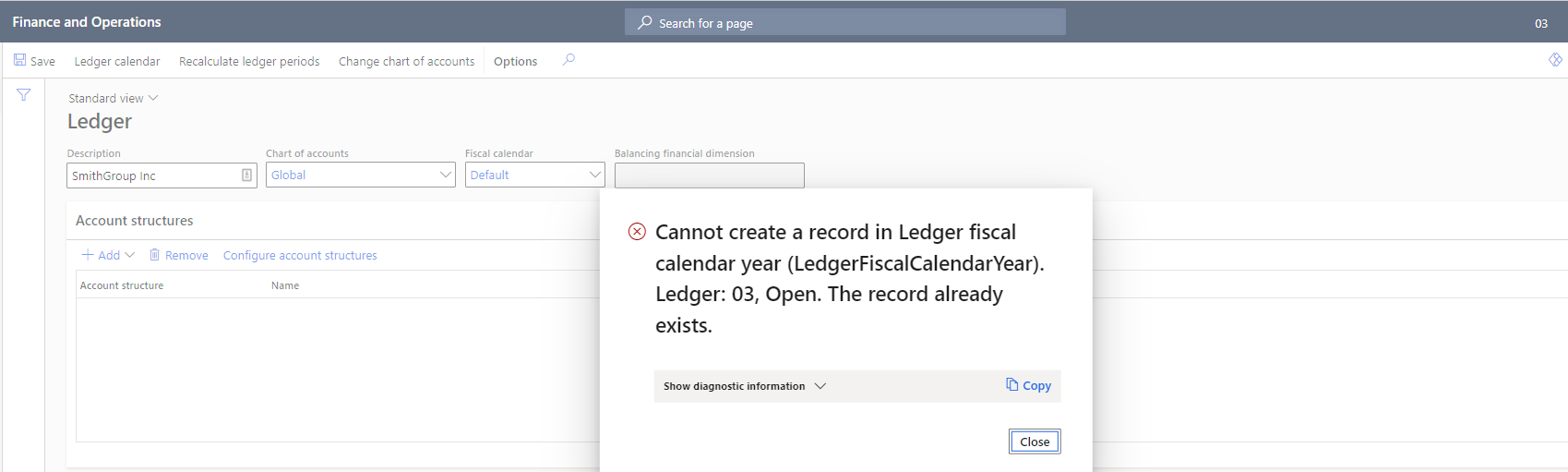
5125.Cannot-create-record-in-ledger-fiscal-calendar-year.png

Thanks in advance for any help.

I have the same question (0)
  • Suggested answer
    Ramit Paul Profile Picture
    22,803 Most Valuable Professional on at

    Hi,

    The error says fiscal calendar already exists? Can you remove the calender and select from drop down only?

    And save.

  • BarryR Profile Picture
    324 on at

    I can select a different calendar and save without any issues but when I change back to Default I get the error. I need to use the default calendar for this client.

    0407.Ledger-1.png_2D00_640x480.png

    6136.Ledger-2.png

  • BarryR Profile Picture
    324 on at

    Ramit, I can select a different calendar and save without any issues but when I change back to Default I get the error. I need to use the default calendar for this client.

  • CEGVBA Profile Picture
    6 on at

    Barry, did you solve this in the end, and how?

    We  have the same problem but are not able to solve it

    Arjan

  • BarryR Profile Picture
    324 on at

    This issue has not been resolved. I will submit a ticket to Microsoft.

  • JamesT Profile Picture
    341 on at

    Hi Barry,

    Did you use Data Management to import the Calendar information?  Asking as I remember another consultant had this a while back and they received errors after using Import function (as compared to Manually setting up).

    From what I remember they had to log with MS to fix.

    Regards

    James

  • BarryR Profile Picture
    324 on at

    Hello James, yes I did use Data Management to import but received errors. I was able to add the calendars manually a couple of months ago now am experiencing the same errors. Very frustrating.

Under review

Thank you for your reply! To ensure a great experience for everyone, your content is awaiting approval by our Community Managers. Please check back later.

Helpful resources

Quick Links

Introducing the 2026 Season 1 community Super Users

Congratulations to our 2026 Super Stars!

Meet the Microsoft Dynamics 365 Contact Center Champions

We are thrilled to have these Champions in our Community!

Congratulations to the March Top 10 Community Leaders

These are the community rock stars!

Leaderboard > Finance | Project Operations, Human Resources, AX, GP, SL

#1
Giorgio Bonacorsi Profile Picture

Giorgio Bonacorsi 658

#2
André Arnaud de Calavon Profile Picture

André Arnaud de Cal... 468 Super User 2026 Season 1

#3
Syed Haris Shah Profile Picture

Syed Haris Shah 333 Super User 2026 Season 1

Last 30 days Overall leaderboard

Product updates

Dynamics 365 release plans
