web
You’re offline. This is a read only version of the page.
close
Skip to main content

Announcements

No record found.

News and Announcements icon
Community site session details

Community site session details

Session Id :
Microsoft Dynamics AX (Archived)

Restrictions in Lookup Method

(0) ShareShare
ReportReport
Posted on by

Hi Community,

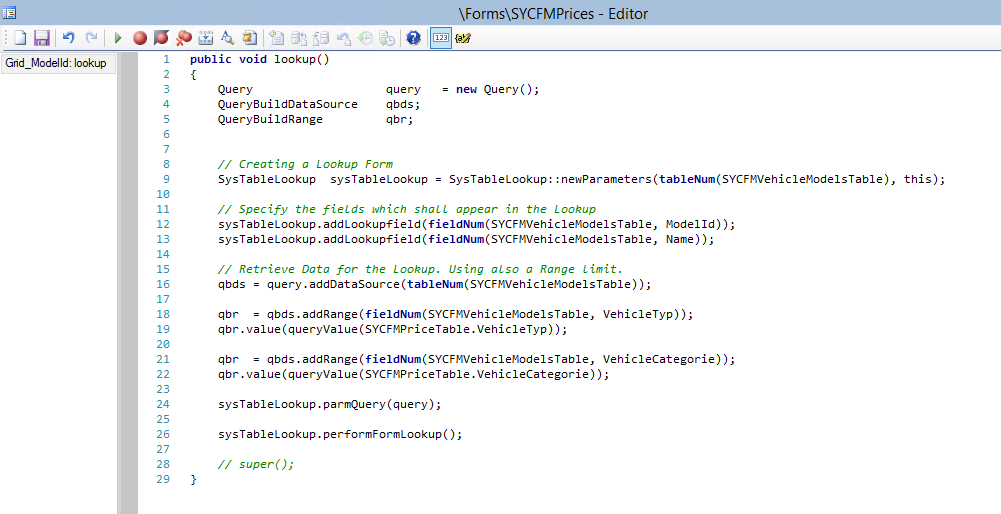
I wrote a lookup method.

The Code is shown in the Screenshot.
I want to make a restriction, that if for the VehicleCateogorie "not specified" (BaseEnum (1)) is choosen, that no models and names can be selected. Basically nothing.

Is there any Chance to do that in the lookup method I wrote and not in the table methods ?

And if so, do You have any other tips on how I can handle this Situation near to BP.

I welcome critic and recommendations.

Thanks in advance.
ForCommunity7.PNG

*This post is locked for comments

I have the same question (0)
  • Martin Dráb Profile Picture
    239,244 Most Valuable Professional on at

    Can you elaborate what you mean be "no models and names can be selected"? Does it mean that you want your lookup returning nothing? It will happen automatically if there are no records with VehicleCateogorie == "not specified". If "not specified" is a valid value, the requirement looks strange...

    I don't know what problem you have with a BP, but feel free to create a new thread and explain your problem in detail there. Note that we can't help you if you don't explain your problems properly; "how I can handle this Situation near to BP" didn't do a good job.

  • Community Member Profile Picture
    on at

    Ok, my bad.

    But it works. Is there a Chance to Change the highlighted text "This grid is empty" via Code in the lookup Method ?

    lookup1.PNG

  • Verified answer
    Martin Dráb Profile Picture
    239,244 Most Valuable Professional on at

    No, it's not. This is kernel functionality and even if it was possible, you should respect how all lookups in the whole system work. Doing it differently in a single lookup would be inconsistent.

Under review

Thank you for your reply! To ensure a great experience for everyone, your content is awaiting approval by our Community Managers. Please check back later.

Helpful resources

Quick Links

Introducing the 2026 Season 1 community Super Users

Congratulations to our 2026 Super Stars!

Meet the Microsoft Dynamics 365 Contact Center Champions

We are thrilled to have these Champions in our Community!

Congratulations to the March Top 10 Community Leaders

These are the community rock stars!

Leaderboard > 🔒一 Microsoft Dynamics AX (Archived)

#1
CP04-islander Profile Picture

CP04-islander 26

#2
imran ul haq Profile Picture

imran ul haq 8

#3
André Arnaud de Calavon Profile Picture

André Arnaud de Cal... 4 Super User 2026 Season 1

Last 30 days Overall leaderboard

Featured topics

Product updates

Dynamics 365 release plans
