web
You’re offline. This is a read only version of the page.
close
Skip to main content

Announcements

No record found.

News and Announcements icon
Community site session details

Community site session details

Session Id :
Finance | Project Operations, Human Resources, ...
Suggested Answer

Version mismatch error when applying SDP (Software Deployable Package) updates to UAT server

(0) ShareShare
ReportReport
Posted on by 4

Hi All,

I have deployed the azure development VM (Dev Server) with the version of 10.0.5 with Platform update 29. It's show the version  - 7.0.5372.35448.

Then, I have deployed the azure Sandbox build VM (UAT environment) with the version of 10.0.5 with Platform update 29. It's show the version  - 7.0.5372.35445.

we have selected the topology and Application version (10.0.5) & platform update 29. 

Created a Software deployable package from dev environment and uploaded in Asset library to apply it to UAT server. 

Getting the  below version mismatch error, When I try to apply updates to UAT server

How this versions will be changed in same PU29? How to resolve this?
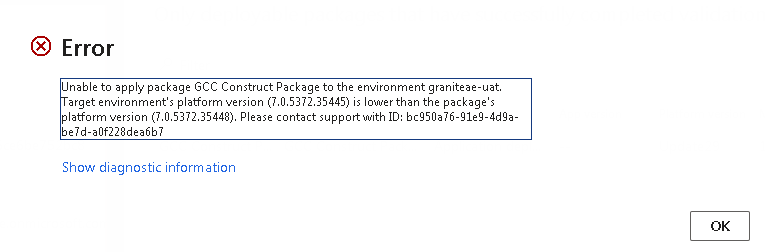
pastedimage1572853424114v1.png

Thanks,

I have the same question (0)
  • Suggested answer
    nmaenpaa Profile Picture
    101,172 Moderator on at

    First of all, you should not deploy a Build topology if you want to use the system for UAT.

    Second, you should use a build VM for creating deployable packages. Don't create them in your dev VM.

    Anyway if the target system has too low build number, you should install latest update to it.

  • Muthusamy Profile Picture
    4 on at

    Hi Nikolaos,

    I have MS tenant account. In that, created one build server and one UAT server.

    Sandbox 1(Develop and Test) - created as Build Server using "Develop" topology.

    Sandbox 2(Standard Acceptance Test) - created as UAT server using "Test" topology

    SDP is created from Sandbox 1 (Build server) and applied to Sandbox 2 (UAT server).

    For development purpose, I have deployed separate VM in azure hosted environment.

    This is new UAT server deployed by selecting the Version 10.0.5 & PU29. Then, how this version mismatch will come.

    Thanks,

  • Suggested answer
    nmaenpaa Profile Picture
    101,172 Moderator on at

    The build server should be deployed using "Build" topology.

    Anyway, your Sandbox 2 / UAT seems ok, I just got confused because in your first message you called it a build server ("I have deployed the azure Sandbox build VM (UAT environment)". That's definetely not a build server. Only Tier1 can be set up as a build machine.

    How this mismatch came is not so relevant. Relevant is to understand that build VM should not have higher build number than UAT/Prod. If you have higher build number in build VM you need to update your UAT/Prod.

  • Sukrut Parab Profile Picture
    71,741 Moderator on at

    Hi Muthusamy,

    You said, you are generating package through visual studio , then for what purpose you are using build machine ?  Whats the version of your build machine ? Make sure you have  build machine with lower /same version as your UAT /PROD environment.

  • Suggested answer
    Muthusamy Profile Picture
    4 on at

    Hi All,

    Previously, Package is created from build server manually and applied to UAT environment. Its 10.0.6 PU 30.

    I have  deleted both the environment (build server and UAT server) and deployed again the build server with build agent and also deployed the UAT environment. Then, generated the package through azure pipeline and applied the updates to UAT envionment. Now, its working fine and version is matched.

    Thanks all for the suggestions.

    Thanks,

Under review

Thank you for your reply! To ensure a great experience for everyone, your content is awaiting approval by our Community Managers. Please check back later.

Helpful resources

Quick Links

Introducing the 2026 Season 1 community Super Users

Congratulations to our 2026 Super Stars!

Meet the Microsoft Dynamics 365 Contact Center Champions

We are thrilled to have these Champions in our Community!

Congratulations to the April Top 10 Community Leaders

These are the community rock stars!

Leaderboard > Finance | Project Operations, Human Resources, AX, GP, SL

#1
Giorgio Bonacorsi Profile Picture

Giorgio Bonacorsi 694

#2
André Arnaud de Calavon Profile Picture

André Arnaud de Cal... 584 Super User 2026 Season 1

#3
Subra Profile Picture

Subra 518

Last 30 days Overall leaderboard

Product updates

Dynamics 365 release plans
