web
You’re offline. This is a read only version of the page.
close
Skip to main content

Notifications

Announcements

No record found.

Community site session details

Community site session details

Session Id :
Finance | Project Operations, Human Resources, ...
Answered

Duplicate vendor records created when running data import file

(0) ShareShare
ReportReport
Posted on by 31

Hi guys 

I have a record duplicate issue when importing vendor records from an excel sheet using data management in D365

These are the records:

pastedimage1591187951341v1.png

As you can see the vendor account field is blank because I'm using the auto generate to create sequence numbers  - which seems to work 

The issue is when I update one of the records and re-run the import, all 6 records are imported again, and the last record I created does not import into the vendor list page  
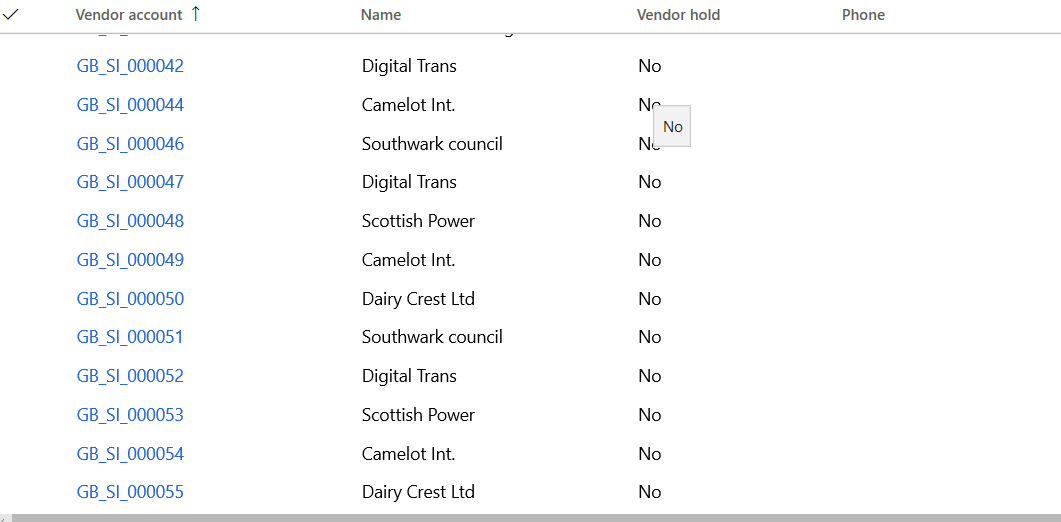
pastedimage1591188404869v2.png

Can you help please?

I have the same question (0)
  • Suggested answer
    nmaenpaa Profile Picture
    101,160 Moderator on at

    If you want to update vendors, you need to know the vendor account number. That's the unique identifier for vendors. You can only import without vendor account number when creating vendors.

    How else would the system know that you want to update a vendor? Many vendors can have the same in the system name so that can't be used in the determination.

  • James T Profile Picture
    31 on at

    Thanks Nikolaos  for your reply I tried with vendor accounts numbers but it failed

  • Verified answer
    nmaenpaa Profile Picture
    101,160 Moderator on at

    Ok, that's too bad to hear. Next you should look what the error message is, and if you need assistance with the error, share the message with us. Thanks!

    Anyway, when you provide account numbers you can't use the auto-generate feature.

  • James T Profile Picture
    31 on at

    Sure thanks  - but when you are running these imports what is the best practice regarding continuous and manual processes.

  • Verified answer
    nmaenpaa Profile Picture
    101,160 Moderator on at

    That's a broad question. Perhaps you can ask a more specific question?

    As already mentioned, if you want to import new vendors you can choose to provide vendor account numbers, or auto generate them.

    When you update vendors you must know the account number.

    In continuous process I would assume that the system that sends vendors to D365 will provide the vendor account number. Otherwise there would be no link between the vendor account in D365 and vendor account in the external system.

    But if you don't have any external system you can let D365 handle the vendor account number creation when you create vendors via Excel. Also when you create vendors in the user interface the number is usually generated automatically.

  • James T Profile Picture
    31 on at

    Thanks Nikolaos

  • André Arnaud de Calavon Profile Picture
    300,911 Super User 2025 Season 2 on at

    Hi James,

    Were you able to find the error details why the last import failed? Do you need any more assistance here?

  • James T Profile Picture
    31 on at

    HI André  - Many thanks for checking, Nikolaos answered my question and the file now imports

  • André Arnaud de Calavon Profile Picture
    300,911 Super User 2025 Season 2 on at

    Hi James,

    If the reply from Nikolaos helped you, would you mind to verify his answer instead of my reply? I'm not able to moderate this verified mark on my own posts.

Under review

Thank you for your reply! To ensure a great experience for everyone, your content is awaiting approval by our Community Managers. Please check back later.

Helpful resources

Quick Links

Responsible AI policies

As AI tools become more common, we’re introducing a Responsible AI Use…

Neeraj Kumar – Community Spotlight

We are honored to recognize Neeraj Kumar as our Community Spotlight honoree for…

Leaderboard > Finance | Project Operations, Human Resources, AX, GP, SL

#1
Martin Dráb Profile Picture

Martin Dráb 660 Most Valuable Professional

#2
André Arnaud de Calavon Profile Picture

André Arnaud de Cal... 549 Super User 2025 Season 2

#3
Sohaib Cheema Profile Picture

Sohaib Cheema 307 User Group Leader

Last 30 days Overall leaderboard

Product updates

Dynamics 365 release plans
